
How to Integrate AI Into an App: A Practical Guide
A controller we spoke with last quarter had three people spending the first week of every month doing the same thing. They opened PDF invoices, read the line items, then typed them into the accounting system. The data already existed. It just lived in the wrong format, in the wrong place, in a file nobody's software could read. That's the shape of most real AI projects. Not a chatbot. Not a reinvention. One stubborn gap where a human acts as a translator between two systems.
This article walks through how to integrate AI into an app you already run, step by step, in the order the work actually happens. By the end you'll know which use case to pick first, where the model should run, and how to stop the API bill from surprising you. You'll also know how to check the output before it reaches a customer, and how much coding knowledge your team needs to keep the thing alive after launch. On top of that, you'll know when the honest answer is that you don't need to build anything.
The thesis, up front: the hard part of AI integration is almost never the model. It's the connection to the system you already have, the validation of what comes back, and the cost controls you set before anyone else gets access.
Step 1: Name the one job you want AI to do
Start with a sentence that a person outside your team could repeat back. "Read supplier invoices and post them to the ledger as drafts." "Answer the twenty questions support gets about shipping, from our own help docs." "Flag reconciliation lines that don't match across our two entities."
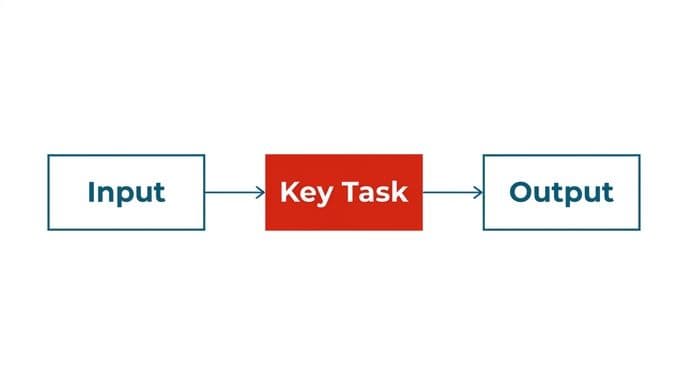
What goes wrong is adopting AI as a general capability rather than a specific fix. Projects that begin with "we should have AI in the product" produce a feature nobody asked for and nobody can measure. Projects that begin with a named job have a clear test: did the week of manual work shrink or not.
Pick the job using two filters. First, volume. It should happen often enough that automating it matters. Second, tolerance. There should be a sensible way to catch a wrong answer before it causes damage. A draft invoice a human approves is a good first job, while an automated payment release is not, at least not first.
The risk here is choosing the most visible use case instead of the most repetitive one.
Write the sentence down. Everything in the rest of this process gets judged against it.
Step 2: Write the plan before anyone writes code
Before the first API key is generated, put the requirements on paper. Note what goes in, what comes out, and what format it takes, then note what happens when the model returns something unusable, who sees the result, and where it gets stored. A page is enough, and two is plenty.
This step sounds obvious and gets skipped constantly, now that it's easy to start building with AI coding assistants and see something working in an afternoon. The afternoon demo is tempting.
The plan should also name the data path. If invoices contain bank details, you need to know that on day one, not during a security review two months later. Teams building in regulated spaces usually find the architecture decisions are driven by what the data is, not what the feature does. That's why we handle the security and compliance side of AI builds as its own workstream rather than a final checklist.
Treating the prototype as the plan is the trap to watch for. A working demo tells you the model can do the task in ideal conditions. It tells you little about how the system behaves on real inputs that are badly scanned, half-filled, or in a format your supplier changed last month.
Step 3: Decide where the model runs, on-device or in the cloud
This is the first real architecture decision and it sets most of what follows.
Cloud models are stronger, cheaper to start with, and need no infrastructure from you. You send text or an image to an endpoint and get a response. The tradeoff is that your data leaves your building, you pay per use forever, and latency depends on someone else's network.
On-device or self-hosted models keep the data where it is, and nothing crosses your boundary. Response times don't depend on an external service, and your cost is hardware rather than usage. The tradeoff is real: you get smaller models, more engineering, and you own the maintenance.
A practical middle path covers most cases. Run the routine, high-volume, low-sensitivity work in the cloud. Keep the sensitive subset local. The split is decided per data type, not per feature.
On the question we get asked most: check the enterprise terms of service for the specific provider you're using, since many offer enterprise endpoints with retention disabled and a contractual commitment not to train on that data. That's a contract term you can read and verify.
Defaulting to cloud because it's faster to start, then discovering during procurement that a customer contract forbids it, is a common misstep. Retrofitting a local deployment after launch costs far more than planning for one.
Step 4: Pick a model size that matches the task and the budget
The largest model is rarely the right answer. Most integration work is classification, extraction, summarizing, rewriting, or routing. Smaller and cheaper models handle those well, and they're faster, which matters more than people expect when the step sits inside a workflow a user is waiting on.
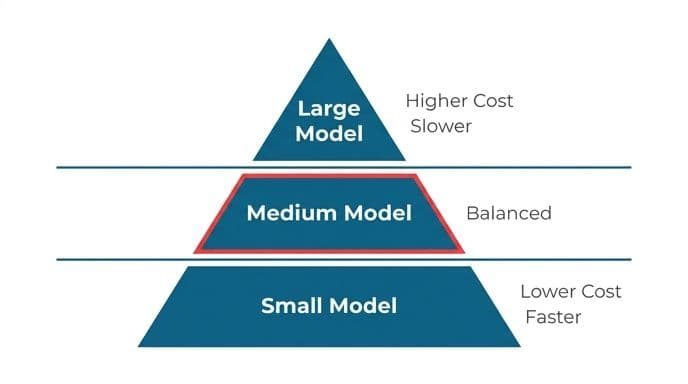
Here's a method that works. Build your test set first. That means thirty to fifty real examples with the answer you'd accept written next to each one. Run the cheapest model that could plausibly do the job. Measure. Only step up a tier when the cheap model actually fails, and when you do, note which cases forced the upgrade.
Often the answer is a split. Route the straightforward inputs to a small model and escalate only the ambiguous ones to a larger one. A support deflection system might answer the common questions with a small model reading your documentation, then hand anything unusual to a stronger model or a human. Your average cost per request drops without the quality drop showing up where customers notice it.
Choosing a model by benchmark score is a common error worth naming. Benchmarks measure general reasoning. You need performance on your invoices, your ticket types, your product catalog. A model that scores worse overall may score better on the narrow thing you're doing, and that's the only number that should change your decision.
Step 5: Wire it up with direct API calls, not built-in AI nodes
Most automation platforms now ship a drag-and-drop AI block.
Call the API directly instead. Build the HTTP request yourself. Set the headers, construct the JSON body, handle the response. It's maybe an hour of extra work the first time. What you get in return is knowledge that transfers. Understanding headers, request bodies, token counts, and error codes applies to every provider and every tool you use next.
Direct calls also give you control over the things that matter later. You set your own timeouts. You decide the retry behavior. You log the full request and response, which you will need the first time a user reports an answer that makes no sense. You can swap providers by changing a URL and a payload shape rather than rebuilding the workflow.
This is where custom AI API integration and wrapper work earns its keep. The wrapper is a thin layer of your own code that sits between your app and whichever model you're calling, holding the prompt, the validation, the logging, and the fallback in one place you control.
Scattering prompts across twelve places in your codebase causes real pain later. When you need to change how the model is instructed, and you will, you want one file to edit, not a search across the repository.
Step 6: How to integrate AI into an app that's older than your team
Legacy integration is where most of these projects struggle, and it's the part the demos never show. Your accounting system might have no modern API. Your CRM might be a vendor product you can't modify. Your core platform might be running on a stack whose original developers left years ago.
Work from the edges in. You usually don't need to touch the legacy system's internals at all. Three patterns cover most situations:
- Read-only extraction. Pull data out through whatever path exists, including a scheduled database read, a file export, or a report. Do the AI work outside. Push results back as a draft, a flag, or a notification rather than a direct write.
- A middleware layer. Put a small service between the old system and the new capability. It translates formats, holds the AI logic, and keeps the legacy system untouched. If the AI piece fails, the old system keeps running exactly as it did before.
- Queue-based handoff. The legacy system drops work in a queue. The AI service picks it up, processes it, and writes the result somewhere the legacy system can read on its next cycle. No synchronous dependency, no timeout risk.
The question arrives in different languages and the same form, asking what an llm integrado plataforma actually means in practice: a language model wired into the platform the business already depends on, not a separate product sitting beside it. We've done this across a lot of stacks over eighteen years, including an ABDM health platform connected to India's national health system, where the existing infrastructure set the rules and the new capability had to fit inside them.
Letting the AI write directly to the system of record on day one is the thing to avoid. Start with drafts and suggestions. Give it write access only after you've watched its output long enough to trust the failure modes.
Step 7: Validate the output before it goes near a customer
An AI response that looks right and is wrong is more dangerous than one that's obviously broken. Validation is not optional and it's not a phase. It's part of the code path.
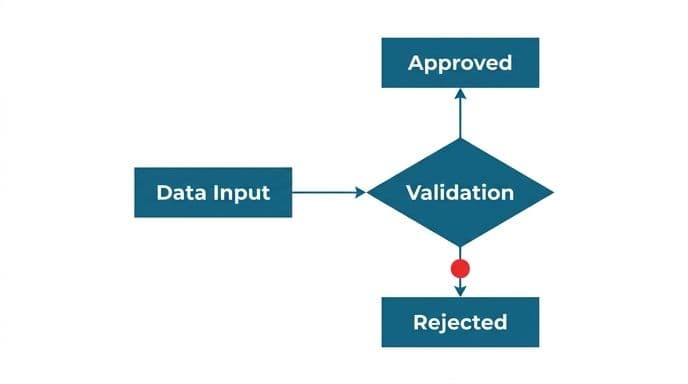
Three layers, in order:
Structural checks in code. If you asked for JSON with five fields, verify you got JSON with five fields. If you extracted an invoice total, check it's a number and that the line items sum to it. If you asked for a date, check it parses and falls in a sensible range. These catch a surprising share of failures and they cost nothing at runtime. When a check fails, retry once, then fall back to a human.
Cross-reference against known data. The supplier name the model extracted should match a supplier in your database. The product code should exist in your catalog. Anything that doesn't match gets flagged rather than posted. Grounding output in your own records is the whole idea behind retrieval augmented generation, and it applies to extraction as much as it does to support agents answering from your documentation.
A person on anything that matters. Anything touching money, a legal commitment, or a customer gets human approval before it takes effect. We build it that way as a rule. Healthcare content gets drafted by a model and checked word by word by a clinician. Ledger entries arrive as drafts. This isn't a lack of confidence in the technology. It's that no model is accurate enough to remove the check, and anyone telling you otherwise is selling something.
Validating only against the examples you built with will leave gaps. Hold back a set of real inputs the system has never seen, including the ugly ones, and test against those before launch.
Step 8: Set hard spending caps before you launch
Developers are genuinely afraid of API costs, and the fear is earned. The fix takes ten minutes and almost nobody does it before they need it.
- Set a hard spending cap in the provider dashboard. Not a soft alert. A limit that stops requests. Set it at a number you could absorb without a conversation.
- Add tiered alerts below the cap. You want to know at halfway, not at the ceiling.
- Cap per-user and per-session usage in your own code. The provider limit protects the company. Your own limit protects you from a single account consuming everything.
- Log every call with its token count. When the bill looks odd, you need to know which feature caused it within minutes rather than days.
- Use distinct keys for development and production. A runaway test script should never be able to spend production budget.
Costs do rise with usage, and that's the honest answer to the question everyone asks. What you control is the rate. Caching repeated requests, trimming prompt length, routing simple work to smaller models, and batching where latency allows all pull the curve down. The teams that get surprised are the ones who never looked at cost per request until the invoice arrived.
Planning to monitor this manually rarely survives contact with a busy week. You will forget. Automate the limit.
Step 9: Price the feature so heavy use pays for itself
AI features carry a variable cost per use, which makes them different from every other feature you've shipped. If you give unlimited access to free users, your costs scale with your least valuable segment.
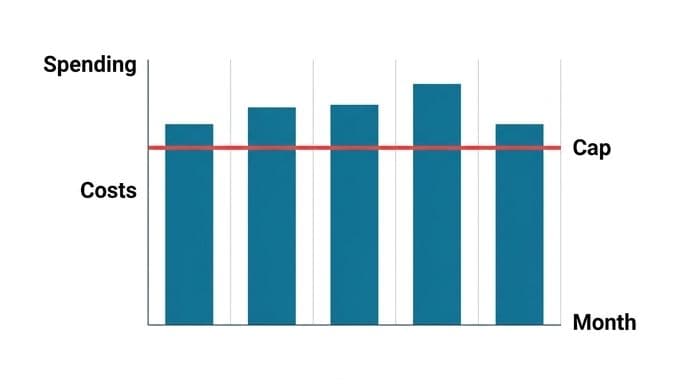
Structure it so usage and revenue move together. Route free-tier users to the cheapest model that still produces something worthwhile, with a usage limit. Put the expensive capability behind a paid tier, so heavy use then generates revenue instead of just consuming budget. This isn't about restricting the product. It's about making sure the people who use it most are the people paying for it.
On the marketing side, sell the outcome rather than the technology. "AI-powered" means nothing to a finance lead. "Invoice entry takes a morning instead of a week" means everything.
Watch for the free-tier case where someone builds a script against your endpoint and runs it continuously. Rate limits per account, not just per request, handle it.
Launching the feature to everyone at once to see what happens tends to backfire. Roll it out to a segment, watch the cost per active user, then open the gate.
Step 10: Ship small, then watch where it gets stuck
The first production week teaches you more than the previous month of testing. Ship to a small group and watch.
The failure modes to look for are specific. Models get stuck in loops, repeating a phrase or re-running a step without progressing, usually when the prompt is ambiguous or a tool call keeps returning the same unhelpful result. Add a step limit. Add a timeout. Add a condition that breaks the loop and hands off to a person rather than burning tokens.
You'll also see output drift, where answers that were fine in testing start degrading on real inputs that differ slightly from your samples. And you'll see silent failures, where the model returns something plausible for an input it should have refused. Your structural checks from step 7 catch most of these, but only if you're logging enough to notice the pattern.
Keep every request and response for the first few weeks, with whatever retention your policy allows. When someone reports a bad answer, you want to reconstruct exactly what happened rather than guess.
Shipping without a kill switch is a risk that tends to surface at the worst time. You need a way to disable the AI path and revert to the old process in one action, without a deployment. If the model provider has an outage, which happens, your app should degrade rather than stop.
How much coding knowledge you need to maintain it
This deserves a plain answer because the AI coding tools have blurred it.
You can get a working prototype with very little programming ability. What you cannot do without basic coding knowledge is fix it when it breaks. Without that, the app stays unpolished and held together loosely, and every small problem becomes a wall.
The practical minimum is someone on the team who can read and modify the integration code. That person should understand an HTTP request and a JSON response, use version control, and debug by reading logs. Not a full engineering department. One capable person.
Having even a part-time developer or a technical co-founder changes the outcome of these projects more than almost any other factor. If you don't have that person, hire the capability rather than hoping the tooling covers for it.
How to integrate AI in a website versus an app
The two paths share a foundation but differ in three ways worth knowing before you start.
Exposure is the first. A website endpoint is publicly reachable, so anyone can hit it. Never call a model API from browser-side code, because the key will be extracted. Route everything through your own backend, authenticate the request, and rate limit per session and per IP address.
Latency is the second concern. Web visitors leave. If a model call takes several seconds, stream the response so text appears as it generates, and show state while the user waits. The same delay inside an internal back-office tool is unremarkable, because the person is already waiting on a batch job.
Scope is the third. Website AI is usually narrow. Think of a support assistant reading your help content, a search layer over your catalog, or a form that understands plain language. An LLM integrated into the platform behind the site, with access to orders and accounts, is a different project with different access controls. The public-facing piece should read from a restricted index, not from your production database.
Teams in Spain and Latin America searching for an llm integrado plataforma are often asking about this second category, where the model sits inside the business system rather than on the marketing site. Both are legitimate, and they need different architecture. Conflating them is how a support widget ends up with more database access than it should have.
When you don't need to build anything
Sometimes the right call is not to build.
If your tool already has the feature as part of its roadmap and you can wait a quarter, wait. If the volume is genuinely low, a person doing it is cheaper than the integration, the monitoring, and the maintenance. If the data is so inconsistent that even a human struggles to interpret it, fix the data problem first, because the model will only automate the confusion.
And if what you need is a workflow rule rather than intelligence, write the rule. A fair number of "AI projects" we've been asked to scope turned out to be a conditional statement and a scheduled job. We say so when that's the case. Workflow automation without a model in it is cheaper to run, easier to test, and doesn't need validation layers.
The cases where building is clearly right: unstructured input that has to become structured, the same question answered repeatedly from documents you control, or matching across systems where the data is close but never identical.
Choosing between building in-house and hiring a team
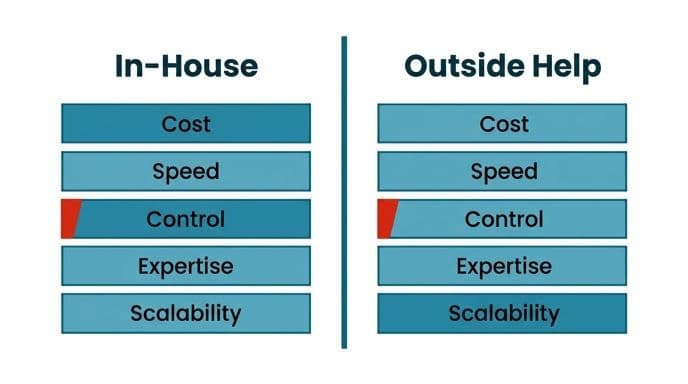
In-house makes sense when you have the engineering capacity, the use case sits close to your core product, and you expect to keep iterating. Outside help makes sense when you want working software quickly and don't want to hire for a skill set you'll need intensively for two months and occasionally after that.
If you go outside, the thing to check is depth. A fair number of firms advertising AI expertise are wrapping a model API around an existing system and calling it integration. We've written a longer breakdown of what to look for when you're comparing vendors in this space, including the questions that separate real integration work from a thin wrapper.
Our own position is straightforward. Fixed price named before work starts, and working software in month one, not a quarter from now. You own the code, the accounts and the keys. If we think you don't need to build, we'll tell you.
Start with one workflow
Knowing how to integrate AI into an app comes down to sequence more than technology. Name one job. Write the plan. Decide where the data lives. Pick the smallest model that works, call it directly, and validate what comes back. Cap the spend, keep a person on anything that matters, and ship to a few people before everyone.
Pick the single task your team complains about most and run it through these steps on paper this week. If the shape of the work becomes clear, you have your first project. If it doesn't, that's useful too, because it usually means the problem is somewhere other than where you thought.
If you'd rather have someone look at it with you, book a free automation audit and we'll go through your workflows and tell you which ones are worth automating. You can also see how we work before you commit to anything.
Frequently Asked Questions
How do I decide which AI use case to implement first in my app?
Start by naming one specific job you want AI to do in a single sentence that someone outside your team could repeat back, like "Read supplier invoices and post them to the ledger as drafts." Pick the job using two filters: it should happen often enough that automating it matters, and there should be a sensible way to catch wrong answers before they cause damage. Avoid choosing the most visible use case instead of the most repetitive one.
Should I run an AI model in the cloud or on-device?
Cloud models are stronger, cheaper to start with, and require no infrastructure from you, but your data leaves your building and you pay per use forever. On-device or self-hosted models keep data local and avoid ongoing costs, but you get smaller models, more engineering work, and must own the maintenance. A practical middle path covers most cases: run routine, high-volume, low-sensitivity work in the cloud and keep the sensitive subset local, with the split decided per data type.
How do I choose the right AI model size for my task?
Build a test set of thirty to fifty real examples first, then run the cheapest model that could plausibly do the job and measure its performance. Only step up to a larger model when the cheap model actually fails. Often the best answer is a split: route straightforward inputs to a small model and escalate only ambiguous cases to a larger one. Avoid choosing a model by benchmark score alone, since benchmarks measure general reasoning, not performance on your specific invoices, ticket types, or product catalog.
How should I integrate AI into a legacy system that has no modern API?
Work from the edges in using three patterns: read-only extraction where you pull data out through whatever path exists and push results back as drafts or notifications; a middleware layer that translates formats and keeps the legacy system untouched; or queue-based handoff where the legacy system drops work in a queue and the AI service processes it asynchronously. Start with drafts and suggestions rather than letting AI write directly to the system of record on day one.
What validation checks should I do on AI output before showing it to customers?
Use three layers of validation in order: structural checks in code to verify the response has the expected format; cross-reference against your known data like supplier names and product codes; and require a person to review anything touching money, legal commitments, or customers before it takes effect. When structural checks fail, retry once then fall back to a human.
Wondering what this would take against your own systems?
The audit costs nothing, and you keep the costed plan and the risks whether you go ahead or not.
Book a free automation auditCommon questions
How do I decide which AI use case to implement first in my app?
Start by naming one specific job you want AI to do in a single sentence that someone outside your team could repeat back, like "Read supplier invoices and post them to the ledger as drafts." Pick the job using two filters: it should happen often enough that automating it matters, and there should be a sensible way to catch wrong answers before they cause damage. Avoid choosing the most visible use case instead of the most repetitive one.
Should I run an AI model in the cloud or on-device?
Cloud models are stronger, cheaper to start with, and require no infrastructure from you, but your data leaves your building and you pay per use forever. On-device or self-hosted models keep data local and avoid ongoing costs, but you get smaller models, more engineering work, and must own the maintenance. A practical middle path covers most cases: run routine, high-volume, low-sensitivity work in the cloud and keep the sensitive subset local, with the split decided per data type.
How do I choose the right AI model size for my task?
Build a test set of thirty to fifty real examples first, then run the cheapest model that could plausibly do the job and measure its performance. Only step up to a larger model when the cheap model actually fails. Often the best answer is a split: route straightforward inputs to a small model and escalate only ambiguous cases to a larger one. Avoid choosing a model by benchmark score alone, since benchmarks measure general reasoning, not performance on your specific invoices, ticket types, or product catalog.
How should I integrate AI into a legacy system that has no modern API?
Work from the edges in using three patterns: read-only extraction where you pull data out through whatever path exists and push results back as drafts or notifications; a middleware layer that translates formats and keeps the legacy system untouched; or queue-based handoff where the legacy system drops work in a queue and the AI service processes it asynchronously. Start with drafts and suggestions rather than letting AI write directly to the system of record on day one.
What validation checks should I do on AI output before showing it to customers?
Use three layers of validation in order: structural checks in code to verify the response has the expected format; cross-reference against your known data like supplier names and product codes; and require a person to review anything touching money, legal commitments, or customers before it takes effect. When structural checks fail, retry once then fall back to a human.
Hitasoft
LinkedInHitasoft has built software since 2008, for companies that mostly do not have an IT department. These pieces are written by the people who do the integrations rather than by anybody in marketing.