
A finance lead we spoke with earlier this year had four people spending the first week of every month matching payments across three entities. They had already bought an AI assistant. It sat in a browser tab, unused, because nobody could work out how to point it at the reconciliation file without breaking the chain of approvals.
That gap is the real problem. The tools are cheap and plentiful. Knowing where they fit inside work you already do is the hard part, and it's where most budgets quietly disappear.
So here's the short answer on how to integrate AI into your business. Pick one repetitive workflow that costs you real hours, then test the task by hand before you automate it. Embed the result inside the software your team already opens every morning, and keep a person approving anything that touches money or a customer. Everything below expands on that, including the parts nobody enjoys, like deciding whether to build at all.
Start With One Workflow, Not a Tool Shortlist
The common move is to shortlist tools. Someone compiles a spreadsheet of vendors, schedules demos, and three months later the company owns five subscriptions and has changed nothing about how work gets done.
Map the process first. Sit with the people doing the work and write down every step of one task, including the steps that only exist because two systems don't talk. Work stops and waits somewhere in that chain, and someone retypes something a system already knows somewhere else. Those pauses are the bottlenecks, and they're where automation pays.
Then pick exactly one workflow and take it end to end. Not half of invoice processing. All of it, from the email arriving to the entry landing in the ledger with someone's approval on it. A single workflow finished properly gives you a number you can defend. Five workflows half-done give you a story nobody believes.
Good candidates share a shape: high volume, clear rules, same inputs every time, and a measurable cost when it goes wrong. Invoice capture, support triage and data entry between two systems that should have been connected years ago are typical examples. Those pay back fast. Strategy work and judgment calls don't, at least not yet.
Test the Prompts by Hand Before You Build Anything
This is the step almost everyone skips, and it saves the most money.
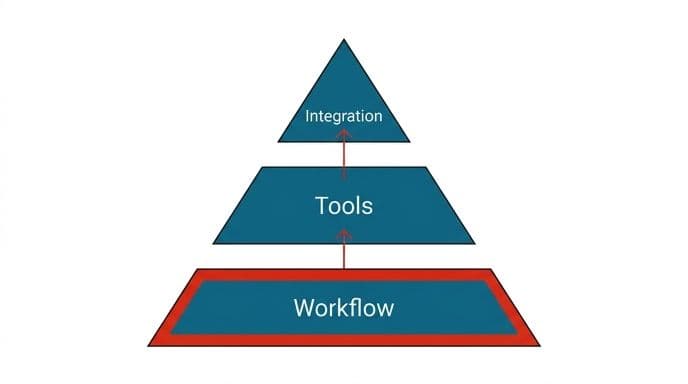
Before a line of code is written, take twenty real examples of the task from your own records. Paste them into whatever model you're considering, one by one, with the instruction you'd give a new hire. Read every output. Not skim. Read.
You learn three things fast: whether the model can actually do the task at all, where it fails (which is almost never where you expected), and what information it's missing, which usually turns out to be context sitting in a system you hadn't thought to connect.
If the manual test fails on twenty examples, it will fail on twenty thousand. Stop there, having spent an afternoon instead of a quarter. If it mostly works but gets confused on edge cases, you've just defined your human review rule, which is the thing that makes the automation safe to run.
We do this with clients before quoting. Sometimes the honest outcome is that the workflow needs fixing before any model touches it, and we say so.
Most AI Projects Die at the Chatbot Stage
Walk into most companies that say they've adopted AI and you'll find a chat window. Staff use it occasionally to rewrite emails, but nothing structural has changed.
Chat is a useful interface, but it's a poor strategy. A chatbot bolted to a website handles questions one at a time and leaves every downstream process exactly as it was. The invoices still get retyped. The reconciliation still eats the first week of the month. Customers get prompt replies to simple questions, which is fine, though transactional helpfulness rarely turns into loyalty on its own.
The work that changes a company's cost base sits behind the interface. Documents get parsed and posted into the system of record. Transactions get matched across entities and flagged when they don't agree. Support tickets get routed, drafted, and closed by rule, with a person reviewing the ones that matter. That's where AI workflow automation earns its keep, and it's a different build from a chat box.
Here's a practical test. If your AI disappeared overnight, would anyone's workload change? If the answer is no, you have a chatbot, not an automation.
Integrate AI Into Existing Software Rather Than Adding Another Platform
Every new platform costs adoption. Staff have to remember it exists, log into it, and change habits to use it. Most won't, and the tool shows up as a line item on a renewal invoice nobody can justify.
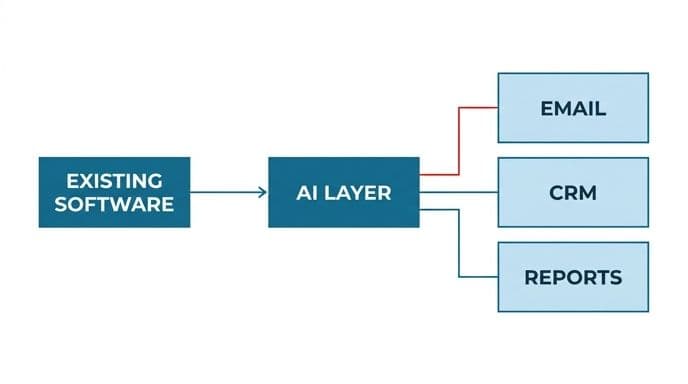
The pattern that holds up is the opposite one. Put the capability inside the tool people already have open. A retail team that lives in a messaging app should get AI answers in that messaging app, and a finance team that works in the accounting system should see suggested matches inside the accounting system. Support staff should get drafted replies in the helpdesk queue, not a separate tab.
Adding AI to your CRM follows the same logic. The value isn't a new interface on top of the CRM. It's the record getting enriched, the follow-up getting drafted, the duplicate getting caught, all inside the screen the rep already uses.
When you integrate AI into existing software this way, adoption stops being a change management project. Nothing visible changed except that some work got done for them. This is most of what we do. Our AI software integration work is usually a layer inside systems a client already runs, connected through custom API integration and AI wrappers, rather than a replacement for anything.
Build vs Buy AI Integration: How to Decide Honestly
Most readers want a quick verdict, and for most of them the honest answer is partly buy.
Buy when the problem is generic and the tool fits without contortion. Transcription, generic writing help and standard document OCR on common formats fall into this category. There's no advantage in building what already exists at a lower price than your engineering time.
Build when one of three things is true. Your workflow is genuinely unusual, so off-the-shelf tools nearly fit and the gap is where all your cost is. Your data can't leave your infrastructure, which rules out most vendors immediately and points toward private LLM fine-tuning on infrastructure you control. Or the capability is part of what makes your product worth buying, in which case renting it from a vendor every competitor also uses gives you no edge at all.
That last point matters more than it gets credit for. A generic implementation gives you parity. A defensible one comes from something only you have, built from your own transaction history, your own support archive, your own domain rules encoded into the system. The model is a commodity. Your data and your process aren't.
When you do evaluate outside help, look at who owns the output. You should own the code, the accounts and the keys at the end. We price work at a fixed figure named before anything starts, for the same reason.
If you want a wider view of the market before committing, our breakdown of how to assess firms that handle this kind of work covers what to ask. And sometimes the answer is build nothing. Plenty of inefficiency is a process problem wearing a technology costume, and we'll tell you when that's the case.
Eight Things to Settle Before Deployment
Call this an enterprise AI integration checklist, though it applies to a ten-person company just as well. Settle these before anyone writes code, because retrofitting them is expensive.
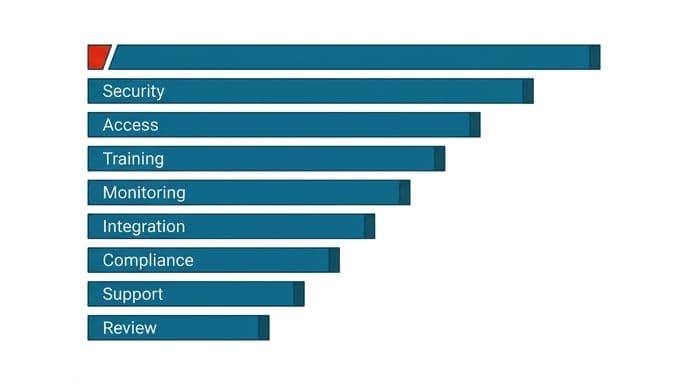
- Data access. Which systems does the model need to read, and does anyone actually have permission to connect them? This stalls more projects than any technical issue.
- Residency and retention. Where does your data go when a request leaves your network? On enterprise endpoints with retention disabled, vendor training on your inputs is off. Confirm it in writing for your specific contract rather than assuming the default.
- The human checkpoint. Decide now which outputs a person approves. Anything touching money, a customer, or a regulated record should have a named approver. Output gets validated in code or by a person, every time.
- Failure behavior. What happens when the model is unavailable or returns nonsense? The fallback must be defined, not discovered during an incident.
- Cost shape. Model spend scales with usage. Know your per-task cost at your real volume, set caps, and cache what repeats. Surprise bills come from nobody owning this number.
- Audit trail. Every automated action should be reconstructable later: what went in, what came out, who approved it. Compliance reviews ask for this first.
- Accuracy threshold. Define what "good enough" means for this task before launch, measured against your own examples. Without it, every review becomes an argument.
- Ownership after handover. Who maintains it, where does it run, and do you hold the credentials? For regulated work, secure architecture and compliance design belongs in the build, not bolted on later.
None of this guarantees a clean regulatory or app store review. Submissions and decisions stay with you. What the checklist does is remove the predictable objections before a reviewer finds them.
What the First 90 Days Should Actually Look Like
Plan for roughly 90 days to see results you can measure in operations, not 90 days to a finished platform. Ninety days to a workflow that runs, with numbers attached.
Weeks one to three. Map the process, run the manual prompt tests, settle the checklist above. Scope narrows during this period, and that's healthy. Most valuable projects get smaller before they get built.
Weeks four to eight. Build the narrow version and run it alongside the existing process. Humans still do the work. The system produces its answer in parallel and you compare. Disagreements are the most worthwhile output of this phase, because each one is either a bug or a rule nobody had written down.
Weeks nine to twelve. Switch the workflow over with review in place, measure against your baseline, then decide whether to extend to the next workflow.
Our own builds aim for working software inside the first month, because software you can look at settles arguments that specifications never do. Teams that treat this as a 90-day loop rather than a one-off launch tend to get a second and third automation out of the same groundwork. The connections, permissions and review patterns are already in place, so the second workflow costs a fraction of the first. That compounding is the real return, and it's why AI integration steps for SMBs should always start with the smallest viable piece.
How to Avoid Paying for AI That Nobody Uses
Unused subscriptions are the most common AI expense in a mid-sized company. The pattern is consistent: tools get bought on enthusiasm, assigned to no workflow, owned by no one, renewed by default.

Three rules prevent it. Every tool has a named owner and a named workflow before purchase. Every tool reports a usage number monthly, and a tool at near-zero usage after a quarter gets cancelled. Nothing gets bought at all until the manual test has shown the task is actually doable.
For support specifically, usage follows quality. A RAG agent, meaning one that retrieves your real documentation before answering rather than guessing from training data, gets used because the answers are right. Reranking results against the actual retrieved set rather than treating the model as one more step in a long chain makes a noticeable difference to answer quality. Our customer support AI and RAG agent work is built that way.
Most breakdowns in the AI integration process for business trace back to people, not platforms. It fails on ownership.
Where to Start This Week
Pick the task your team complains about most, then pull twenty real examples yourself. Test them by hand against a model before you talk to a single vendor. That afternoon tells you more than any demo, and it costs nothing.
If you'd rather have someone walk the processes with you, that's what our automation audit is. We look at what you run now, say which workflows are worth automating, and tell you plainly where you'd be better off fixing the process instead. We're a long-running team with a wide client base across many countries, and we still travel to clients rather than sending account managers.
Book a free automation audit, or read how we work first. Either way, start with one workflow.
Frequently Asked Questions
What is the first step to integrate AI into my business?
Pick one repetitive workflow that costs you real hours, then test the task by hand before you automate it. Map the process by sitting with the people doing the work and writing down every step, including bottlenecks where work stops and waits or someone retypes something a system already knows.
Why do most AI projects fail in companies?
Most AI projects die at the chatbot stage, where a chat window is bolted to a website but nothing structural changes in how work gets done. If the AI disappeared overnight and nobody's workload would change, you have a chatbot, not an automation that actually reduces costs.
Should I build AI tools custom or buy existing solutions?
Buy when the problem is generic and existing tools fit without modification, like transcription or standard document OCR. Build when your workflow is genuinely unusual, your data can't leave your infrastructure, or the capability is part of what makes your product worth buying and gives you competitive advantage.
How should I integrate AI into my company's workflow?
Integrate AI into existing software your team already uses every day rather than adding another platform. Put the capability inside the tool people have open, like AI answers in a messaging app, suggested matches in the accounting system, or drafted replies in the helpdesk queue.
What should I test before building an AI automation?
Before writing any code, take twenty real examples of the task from your records, paste them into the model with the instruction you'd give a new hire, and read every output carefully. This reveals whether the model can do the task, where it fails, and what information it's missing, potentially saving you an entire quarter of wasted development.
Wondering what this would take against your own systems?
The audit costs nothing, and you keep the costed plan and the risks whether you go ahead or not.
Book a free automation auditCommon questions
What is the first step to integrate AI into my business?
Pick one repetitive workflow that costs you real hours, then test the task by hand before you automate it. Map the process by sitting with the people doing the work and writing down every step, including bottlenecks where work stops and waits or someone retypes something a system already knows.
Why do most AI projects fail in companies?
Most AI projects die at the chatbot stage, where a chat window is bolted to a website but nothing structural changes in how work gets done. If the AI disappeared overnight and nobody's workload would change, you have a chatbot, not an automation that actually reduces costs.
Should I build AI tools custom or buy existing solutions?
Buy when the problem is generic and existing tools fit without modification, like transcription or standard document OCR. Build when your workflow is genuinely unusual, your data can't leave your infrastructure, or the capability is part of what makes your product worth buying and gives you competitive advantage.
How should I integrate AI into my company's workflow?
Integrate AI into existing software your team already uses every day rather than adding another platform. Put the capability inside the tool people have open, like AI answers in a messaging app, suggested matches in the accounting system, or drafted replies in the helpdesk queue.
What should I test before building an AI automation?
Before writing any code, take twenty real examples of the task from your records, paste them into the model with the instruction you'd give a new hire, and read every output carefully. This reveals whether the model can do the task, where it fails, and what information it's missing, potentially saving you an entire quarter of wasted development.
Hitasoft
LinkedInHitasoft has built software since 2008, for companies that mostly do not have an IT department. These pieces are written by the people who do the integrations rather than by anybody in marketing.