
A finance lead opens the same three tabs every morning. The accounting system, the bank portal, and a spreadsheet that exists because neither of the other two will talk to the other. She copies numbers across and flags the ones that don't match. Then she emails a colleague about the rest, and that takes until lunch. The software she already pays for knows every one of those numbers.
That gap is where this conversation starts. So, what is AI integration? It's the work of connecting a model, or several, into software you already run, so the system handles a specific task that used to need a person reading, typing, or deciding. Not a separate AI tool sitting beside your CRM. It sits inside it, triggered by your data, writing back to your records. The thesis of this guide is that integration succeeds or fails on which task you picked, not on which model you picked.
What AI Integration Actually Means in Practice
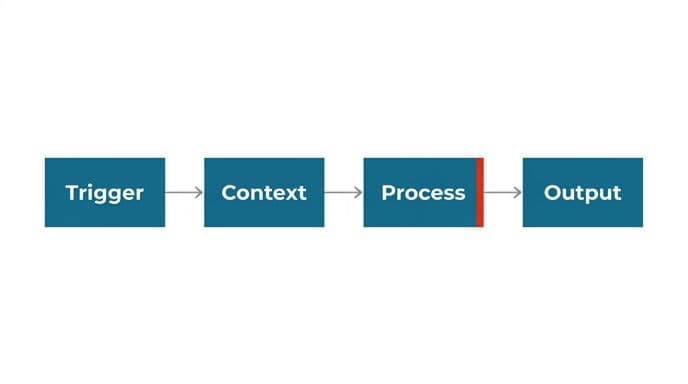
Strip away the vendor language and you're looking at four moving parts. Something triggers the process, like a new invoice landing in a shared inbox. The system pulls the relevant context: your chart of accounts, past vendor history, and the purchase order it should match. A model does one narrow job with that context, such as extracting line items or drafting a reply. Then the result goes somewhere a person or a rule can check it before it becomes real.
That last part matters more than the model. A document processing step that reads a PDF and posts straight to the ledger is a liability. The same step that reads the PDF, fills the fields, and waits for a two-second human confirmation is useful on day one. Every build we do that touches money or a customer keeps a person in that approval seat.
Mobile platforms have made this pattern visible to anyone with a phone. Apple now ships a set of core apps instrumented with Siri-driven actions, and developers expose their own by defining intents with typed parameters and expected results. The system compiles those into a sandboxed extension. Handling stays on-device unless the developer opts into cloud processing. That's AI integration in miniature: declare the actions, define the inputs, decide where the data goes.
How to Tell Whether a Process Is Worth Automating
Most teams start with the wrong question, asking where they can use AI rather than which task is costing them. Start from the second one instead. Write down the processes that repeat, then put three things next to each: how multiple times a week it happens, how long one pass takes, and what happens when it goes wrong.
The high-count, low-stakes tasks are where you begin. Support tickets that need categorizing, fields that need pulling off a supplier invoice, a first-pass reply to one of the twenty questions your support team answers forever, these are the kinds of jobs that qualify. These have clear inputs, a correct answer you can check, and enough volume that saving minutes compounds.
Return on investment comes from the count, not the task. A job that takes an hour but runs twice a month is rarely worth building for. One that takes four minutes and runs two hundred times a week is. Measure the baseline before anything is built. Time per pass, error rate, rework hours all count. If you can't state those numbers now, you won't be able to prove the result later, and you'll be arguing about a feeling.
Some processes should stay manual. Judgment calls with thin data belong here, and so does anything where a wrong output costs more than the whole saving. One-off work that never looks the same twice fits too. We've told clients to skip the build and fix a form field instead, and that conversation is cheaper for everyone than a project nobody needed.
Why Most AI Integration Programs Fail
The failures we see rarely involve a model that couldn't do the job. They involve an AI integration program launched as a general initiative, with a budget and a mandate to find uses, rather than a defined bottleneck and a measurable before-state. Work that starts from a specific business need tends to land. Work that starts from the technology tends to drift.
The second failure pattern is quieter and shows up months later. Someone in operations builds a valuable tool with AI assistance. It works, and it spreads. Then the question nobody asked at the start arrives: who reviews this, who maintains it, who owns it when its creator leaves? These tools typically have no version control, no security review, and no documentation. That's the same situation that spreadsheets and ad-hoc scripts created in finance departments for decades.
The fix isn't banning the practice. Teams that handle it well set a low bar for crossing into production: a short written spec of what the tool is meant to do, a handful of test cases, and sign-off from the person who originally asked for it. Anything that passes gets a named owner and goes into the same repository as everything else.
Third, performance. Teams assume a slow process needs a faster model or a different stack. In complex data work, bottlenecks usually trace to algorithmic complexity, operations that scale badly as records grow. That pattern shows up clearly in engineering software, where a redesign of the approach beats a change of language. Before you spend on inference, check whether the query underneath is the problem.
Mapping Your Workflows Before You Pick a Tool
Sit with the people doing the work and record each step as it actually happens, including the shortcuts nobody documented. Watch for where work sits waiting, where someone retypes what another system already stores, and where the same decision gets made over and over with the same inputs.
File-based handoffs deserve close attention. Plenty of teams move work between tools by exporting a file, mailing it, and importing it somewhere else. That separates the artifact from the system of record and often forces an expensive add-on subscription to close the loop. The same fragility shows up in design and engineering workflows, where sharing work in a standard interchange format is treated as a feature rather than a baseline.
If a process depends on a file crossing a gap by hand, that gap is a candidate. Then narrow hard, and pick one workflow for the first build. One gives you a real measurement, a short feedback loop, and a reversible decision.
Core-Built or Plug-In: Choosing Your Integration Architecture
Two routes, and the trade-off is honest in both directions.
Plug-in approach. You connect a hosted model through an API, keep your existing system intact, and ship fast. The cost is lower up front, the model is easy to replace later, and it suits well-bounded tasks like classification or drafting. The trade-off is ongoing per-use spend and a dependency on someone else's roadmap. Our custom AI API integration and AI wrappers work takes this route, and it fits most first projects.
Core-built approach. The capability lives inside your application, often with a model you host and tune yourself.
Higher cost to start and a longer build, but you get predictable spend at volume, no data leaving your environment, and behavior tuned to your records. For compliance-bound teams this is sometimes the only route, which is where private LLM fine-tuning and secure hosting applies.
On the data question, here's the honest answer. On enterprise endpoints with retention switched off, the major providers do not train on your inputs. Check the contract terms yourself rather than taking any vendor's word, including ours. If your records can't leave your infrastructure at all, hosting is the decision that settles it.
On cost: usage-based spend does grow with volume. Price the per-transaction cost at the start. Decide what you'll do if volume triples, and build the switch to a cheaper or self-hosted model into the design.
Getting the Team to Use It
A tool that handles half a job annoys people. One that handles a whole job, with a straightforward point where a person confirms the result, gets adopted quietly. Pick the task the team already complains about.

Name an owner before launch, someone who sees the outputs and can turn the thing off. Keep the manual path available for the first few weeks, and tell people plainly what the system does and where it stops. The worry underneath is usually about being blamed for an output nobody can explain.
Prevent fragmentation early. When distinct departments each buy a different tool, you end up with four bills and four security postures, with no shared record of what's automated. A short internal register of every automated process, who owns it, and what it touches is enough to stop that.
Your Next Step
Take one process, count how often it runs, and time one pass. Then ask whether a person would still need to check the output. That answer tells you more than any vendor call.
When you're ready to compare suppliers, our breakdown of how to evaluate firms that build AI into existing systems covers what to ask. If you want the full picture of adding AI to the software you already run, start there.
We've been doing this a long time, with a team sized to handle it and work delivered across a wide range of countries. Fixed price named before work starts, and you own the code, accounts, and keys.
Book a free automation audit and we'll tell you if there's nothing worth building.
Frequently Asked Questions
What is AI integration?
AI integration is the work of connecting a model or several models into software you already run, so the system handles a specific task that used to need a person reading, typing, or deciding. It sits inside your existing system, triggered by your data, and writes back to your records rather than being a separate tool sitting beside your CRM.
Which tasks are worth automating with AI?
High-count, low-stakes tasks are where you should begin, such as support tickets that need categorizing, fields that need pulling off a supplier invoice, or first-pass replies to common questions. Focus on jobs that take minutes but run many times a week rather than tasks that take an hour but run only twice a month, since return on investment comes from volume and frequency.
Why do most AI integration programs fail?
Most failures happen because programs are launched as general initiatives with a budget to find uses, rather than starting from a defined bottleneck and measurable before-state. A second common failure is that tools built by individuals spread without version control, security review, documentation, or a clear owner, creating the same problems that ad-hoc spreadsheets created in finance departments.
Should AI integration be built into my existing system or use a plug-in approach?
The plug-in approach connects a hosted model through an API, keeps your existing system intact, and ships fast with lower upfront cost, but costs more over time per use and creates dependency on someone else's roadmap. The core-built approach has higher startup costs and longer builds but gives predictable spend at volume, keeps data in your environment, and lets you tune behavior to your records.
How do you get a team to actually use an AI integration tool?
Pick a task the team already complains about and build a tool that handles the whole job with a straightforward point where a person confirms the result before it becomes real. Name an owner before launch, keep the manual path available for the first few weeks, and tell people plainly what the system does and where it stops.
Wondering what this would take against your own systems?
The audit costs nothing, and you keep the costed plan and the risks whether you go ahead or not.
Book a free automation auditCommon questions
What is AI integration?
AI integration is the work of connecting a model or several models into software you already run, so the system handles a specific task that used to need a person reading, typing, or deciding. It sits inside your existing system, triggered by your data, and writes back to your records rather than being a separate tool sitting beside your CRM.
Which tasks are worth automating with AI?
High-count, low-stakes tasks are where you should begin, such as support tickets that need categorizing, fields that need pulling off a supplier invoice, or first-pass replies to common questions. Focus on jobs that take minutes but run many times a week rather than tasks that take an hour but run only twice a month, since return on investment comes from volume and frequency.
Why do most AI integration programs fail?
Most failures happen because programs are launched as general initiatives with a budget to find uses, rather than starting from a defined bottleneck and measurable before-state. A second common failure is that tools built by individuals spread without version control, security review, documentation, or a clear owner, creating the same problems that ad-hoc spreadsheets created in finance departments.
Should AI integration be built into my existing system or use a plug-in approach?
The plug-in approach connects a hosted model through an API, keeps your existing system intact, and ships fast with lower upfront cost, but costs more over time per use and creates dependency on someone else's roadmap. The core-built approach has higher startup costs and longer builds but gives predictable spend at volume, keeps data in your environment, and lets you tune behavior to your records.
How do you get a team to actually use an AI integration tool?
Pick a task the team already complains about and build a tool that handles the whole job with a straightforward point where a person confirms the result before it becomes real. Name an owner before launch, keep the manual path available for the first few weeks, and tell people plainly what the system does and where it stops.
Hitasoft
LinkedInHitasoft has built software since 2008, for companies that mostly do not have an IT department. These pieces are written by the people who do the integrations rather than by anybody in marketing.