
CRM integration is the work of connecting your CRM to the other systems your team uses every day, so customer information moves between them without anyone retyping it. Done properly, an email thread, a signed quote, a support ticket and a payment all land against the right customer record on their own. The people who need that context can see it without opening four tabs.
That's the short answer. The longer answer matters more, because most teams who ask what is CRM integration have already been told their CRM "integrates with everything." They've discovered that the connection logs a name and an email address and stops there. The gap between a vendor's integration list and an integration that actually removes work from your week is where this article lives.
What a CRM integration actually moves between systems
Picture a mid-sized services business. A customer emails about a renewal, and the account manager replies from Gmail. A quote gets built in a separate tool. The signed PDF lands in a shared drive. The invoice is raised in accounting software, and the job gets scheduled in a work order system. Somewhere in the middle, a text message goes out confirming the visit.
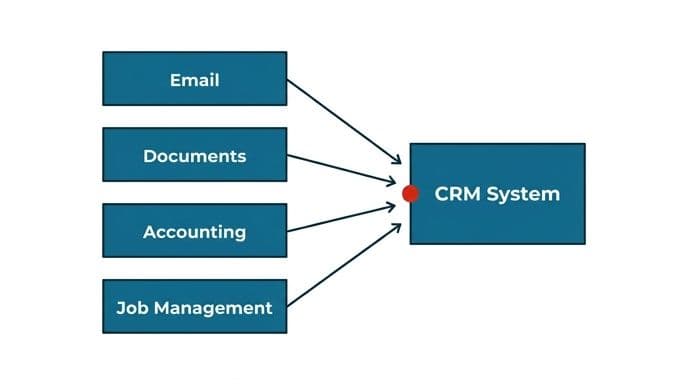
Six systems, one customer. With no integration, someone has to copy fragments of that story into the CRM by hand. Teams burn real hours each week hopping between disconnected tools to piece together where a customer stands, and the hopping gets worse as the business adds tools rather than better.
A CRM integration moves three kinds of things between systems:
- Records. Contacts, companies, deals, tickets. The thing both systems agree they're talking about.
- Activity. Emails sent and received, calls placed, meetings held, messages exchanged, documents signed. The history that explains why the record looks the way it does.
- Triggers. Something happens in one system and causes something in another. An invoice is paid, so the deal closes. A trial expires, so a task appears.
Most integrations you'll encounter handle the first and some of the second. Very few handle the third without extra build. When someone asks what is a CRM integration and gets shown a contact sync, they're being shown the floor, not the ceiling.
Start with email and calendar, because nothing else gets adopted without them
If you do one integration, do email and calendar. Not because it's glamorous, but because it decides whether your team uses the CRM at all.
Salespeople don't log activity. They mean to. They don't follow through. Ask any sales manager who's run a "update your pipeline by Friday" campaign. The fix isn't discipline, it's removing the step. When email and calendar sync automatically, every message and meeting attaches itself to the right record while the rep does nothing differently.
The effect on data quality is bigger than people expect. Teams who turn on proper bidirectional email and calendar sync typically see CRM records fill out substantially more than before. The manual logging that used to eat the end of every day largely disappears. Those are observations from how these rollouts tend to go, not promises, but the direction is consistent.
Bidirectional matters. One-way sync pushes CRM data into the mail client, or pulls mail into the CRM, but not both. The symptom is a meeting booked in the CRM that never appears on the rep's phone. A calendar invite rescheduled in Outlook leaves the CRM showing last Tuesday. Two-way sync means whichever system the person touched is the one that wins, and the other catches up within moments. Ask any vendor directly which direction their sync runs and how quickly changes propagate. The answers vary more than the marketing pages suggest.
Filtering email without creating a new manual job
The obvious objection to email sync is privacy and noise. Nobody wants their lunch plans or their personal banking alerts logged against a company record, and nobody wants to tick a box on every message deciding whether it syncs.
So filtering has to be automatic, and it has to be rules you set once.
Domain matching is the backbone. If the sender or recipient domain matches a company in the CRM, sync it. If it doesn't, leave it alone. That single rule handles the bulk of the problem and keeps personal mail out by default rather than by effort.
Layer a few more on top:
- Exclusion lists for internal domains, newsletters, billing alerts and recruitment traffic, so the record shows customer conversation rather than system noise.
- Folder or label scoping, where only mail the user has filed into a client folder syncs. More control, more effort, better for teams handling sensitive matters.
- Direction rules, so you log sent mail always and received mail only from known contacts, which cuts inbound spam from the timeline.
- Per-user opt-in, because a legal or HR inbox should probably never sync, and the integration should let you say so without disabling it for everyone.
The test of a good filtering setup is whether anyone thinks about it after week two. If your team is still making case-by-case decisions a month in, the rules are wrong, and the integration will quietly get switched off.
What is a CRM integration worth once behavioral data joins it
Contact and activity sync tells you who you spoke to. Product usage data tells you whether they're actually getting value. That's the information that changes what a salesperson or account manager does next.
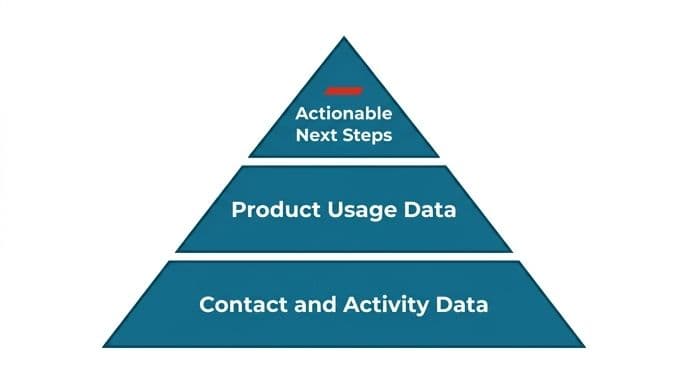
Think about what your product or service already records: logins, features opened, reports run, seats activated out of seats purchased, support tickets raised. For a fintech product, transaction volume. None of this lives in the CRM by default, and all of it predicts renewal and expansion better than the last call note does.
Pipe a handful of those signals onto the account record and the conversation changes shape. An account manager looking at a record can see that the customer bought forty seats and activated nine, which is a different call from the one they'd have made looking at a clean pipeline stage. A support lead can see a customer has filed the same category of ticket three times this quarter before they reply with the standard answer.
Keep it narrow. The failure mode here is dumping every event into the CRM until the activity timeline is unreadable and nobody scrolls it. Pick the few signals that would genuinely change a decision, write them to fields rather than to the activity feed, and leave the raw event data where it already lives. If you want the full event history queryable later, that belongs in a warehouse with the CRM holding a summary, not the other way around.
Multi-channel consolidation and the customer memory layer
Here's the part most CRM conversations haven't caught up with. Your customer context isn't only in email anymore. It's in Slack threads, in recorded call transcripts, in meeting notes someone keeps in Notion, in the support queue. The CRM sees a slice of it and calls that the record.
Pulling those channels into one place, a customer memory layer, is where CRM integration starts to do something new rather than just saving typing. Once email, chat, meeting recordings and internal notes sit in a single searchable store tied to the account, an AI layer can read across all of it and produce things a person wouldn't have time to assemble: a pre-call brief that summarizes every touchpoint since the last meeting, including the thing a colleague mentioned in Slack three weeks ago, or a morning list of which accounts need attention today and why, based on signals from several systems rather than a single "last contacted" date.
This is the difference between an AI feature bolted onto a CRM and AI reading your actual operating history. A CRM-native assistant summarizes CRM data, which is usually thin. A properly integrated memory layer summarizes what your company knows.
Two honest caveats apply here. First, output from this kind of system is a draft. A brief that misreads a thread and tells a rep the customer agreed to something they didn't is worse than no brief, so anything that drives a customer-facing action or touches money needs a person approving it. We build it that way on purpose. Second, consolidating communications raises genuine data questions, and if your records can't leave your infrastructure, the memory layer has to be deployed where you control it rather than handed to a third-party service. That's a solvable problem, but it's a decision to make at the start, not after rollout.
How to tell a deep integration from a marketing checkbox
Software companies compete on integration count. A long logo grid on a pricing page is cheap to produce and tells you almost nothing about whether the connection will hold up under your workflow. Multiple of those listings are shallow by design, built to be announced rather than used.
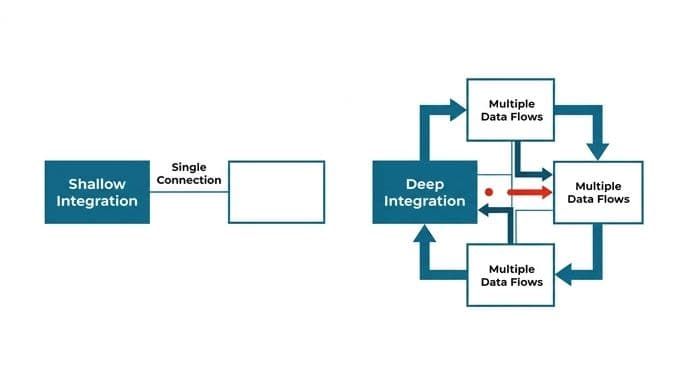
Here's how to find out before you commit.
Ask what syncs, field by field. Not "it integrates with QuickBooks." Which objects, which fields, in which direction. A vendor who can answer this quickly has built something real. A vendor who routes you to a partner has a logo, not an integration.
Ask about direction and frequency. Real-time, or a batch every few hours, or on-demand when someone clicks refresh. One-way or two-way. These are plain questions with plain answers, and vagueness is the answer.
Ask what happens when it breaks. Does a failed sync surface anywhere a human will see it, or does it fail silently and leave you with records that quietly diverge for a month? Is there a retry? Is there a log you can read without a support ticket?
Ask who maintains it. Some integrations need a dedicated administrator keeping mappings alive as both products ship changes. If your team doesn't have that person, a connection that requires one isn't going to survive.
Test with your own messy data. Trial accounts are seeded with clean records. Your data has duplicates, missing fields, companies with three spellings of the same name. Run a sample through before signing.
The most common complaint about CRM integrations isn't that they don't exist. It's that they exist in a thin form, handling the happy path, needing manual workarounds the moment reality shows up. Finding that out during a trial is cheap, but finding out in month four is not.
The order to build in
Sequence matters more than people assume, because each layer makes the next one worth having.
First, email and calendar. Adoption and data completeness. Nothing downstream works if the CRM is empty.
Second, analytics and behavioral data. Product usage, site activity, engagement signals. This is what turns a record into a reason to act.
Third, marketing automation. Campaign membership, lead scoring, form fills. Helpful, but only once the contact data underneath it is reliable.
Fourth, finance and operations. Invoicing, payments, work orders, fulfilment. Higher value, more complexity, and it benefits from the data hygiene the first three forced on you.
Fifth, custom workflow and AI. Automated triggers, agents, drafted responses, the memory layer. Build this last because it depends on everything above it being trustworthy.
Use native connectors wherever they genuinely do the job. A supported connector is maintained by someone else and survives product updates. Reach for a custom API build when the native option is shallow, when the systems involved are specific to your industry, or when the logic you need is yours rather than generic. That mixed approach is most of what our work connecting AI to the systems businesses already run involves: native where native is fine, custom where it isn't, and nothing built that didn't need building.
Custom objects and fields across different platforms
Every CRM lets you add custom objects and fields. Almost no integration handles them well out of the box, and this is where most projects run into trouble on day eleven.
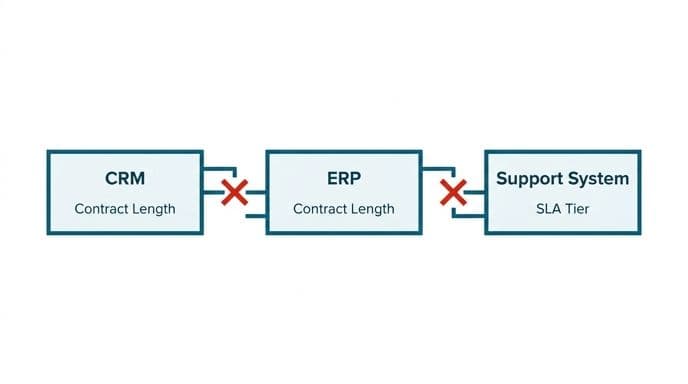
The problem is that the systems don't agree on shape. Your CRM has a custom object for "Site" because your customers have numerous locations, while your work order system calls it a "Service Address" with different fields. Your accounting software has no concept of it at all and just has a billing address. Nothing is wrong, exactly, but nothing lines up either.
A few things make this manageable:
- Decide the system of record per field. One system owns each piece of data. Everything else reads it. Without this rule you get two systems overwriting each other and a support ticket you can't reproduce.
- Map picklists explicitly. Status values are where silent corruption happens. "Pending" in one system becoming "Open" in another is fine if you wrote the mapping down, and a mess if the integration guessed.
- Handle the fields that don't exist on the other side. Either create them, or drop them deliberately, or stash them in a notes field. Choose. Don't let the connector choose.
- Plan for schema changes. Someone will add a required field next quarter. Integrations that don't fail loudly when that happens are the ones that produce the nastiest surprises.
Platform differences compound this problem. Objects, relationships and API limits differ enough between the major CRMs that an integration pattern which works cleanly on one needs rethinking on another. Budget design time for this rather than assuming a connector will absorb it.
When you don't need a CRM integration at all
Sometimes the honest answer is that integration isn't your problem.
If three people use the CRM and the manual logging takes twenty minutes a day, an integration project won't pay for itself. If your CRM is about to be replaced, don't build connections into a system you're leaving.
If the real issue is that nobody has agreed what a qualified lead is, no amount of data flow will fix a process that doesn't exist. If a native connector covers ninety percent of what you need, use it and live with the gap rather than commissioning a custom build for the remainder.
We say this to prospective clients regularly, and it costs us work. It's still the right call. An automation audit that ends with "your current setup is fine, change this one process instead" is a successful audit. Figuring out how much CRM integration is actually going to save you, in hours and in errors, before anyone writes code, is the step that separates projects that land from projects that quietly get abandoned.
The build case is usually clear when it exists: many entities to reconcile, document-heavy intake where the same information gets typed three times, a support team answering the same questions forever. Those are problems worth engineering around.
What to do next
Map where your customer information actually lives first. List every system that holds a piece of it, mark which ones your team opens in a normal day, and note where the same fact gets entered twice. That list is your integration plan in rough form, and it usually surprises people with how long it is.
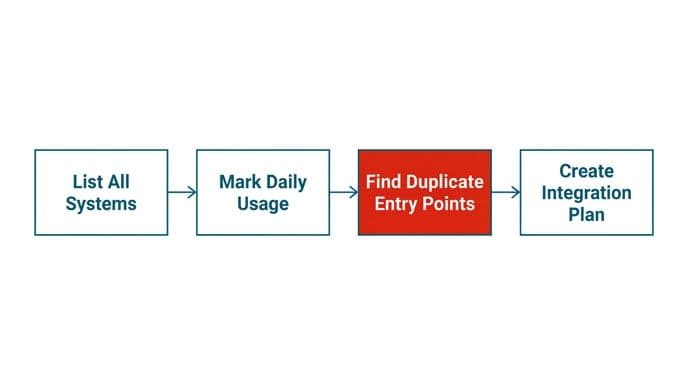
Then pick the single worst duplication and fix that one first, email and calendar sync, most likely. Prove the pattern works before extending it.
If you want a second opinion on what's worth connecting and what isn't, we'll give you one. Eighteen years, a team of 150 in Madurai, and more than a thousand clients across 50-plus countries have taught us which integrations repay the effort and which ones look good in a diagram and die in production. If you're also weighing up who should do the work, our rundown of how to compare firms that build AI into existing systems covers what to ask and what the answers tell you.
Book a free automation audit and we'll look at your stack, tell you what's worth integrating, and name a fixed price before any work starts. If we think you don't need to build, we'll say so.
Frequently Asked Questions
What is CRM integration and how does it work?
CRM integration is the work of connecting your CRM to the other systems your team uses every day, so customer information moves between them without anyone retyping it. When done properly, emails, quotes, support tickets, and payments all land against the right customer record automatically, and the people who need that context can see it without opening multiple tabs.
What three types of data does a CRM integration move between systems?
A CRM integration moves records (contacts, companies, deals, tickets), activity (emails, calls, meetings, messages, signed documents), and triggers (something happening in one system that causes something in another, like an invoice being paid closing a deal). Most integrations handle the first and some of the second, while very few handle the third without extra build.
Why should you start with email and calendar integration?
Email and calendar integration should be your first priority because it decides whether your team actually uses the CRM. When email and calendar sync automatically, every message and meeting attaches itself to the right record without the salesperson doing anything differently, which dramatically improves data quality and eliminates the manual logging work that typically eats up time at the end of each day.
What is behavioral data integration in CRM and why does it matter?
Behavioral data integration brings product usage information—like logins, features opened, seats activated, and support tickets raised—into the CRM to show whether customers are actually getting value. This information predicts renewal and expansion better than call notes alone and changes what a salesperson or account manager does next by giving them real signals about customer engagement.
How can you tell if a CRM integration is real or just marketing?
Ask the vendor what syncs field by field, what direction the sync runs (one-way or two-way), how often it syncs (real-time or batch), what happens when it breaks, and who maintains it. Test with your own messy data before signing on, because trial accounts use clean records while real data has duplicates and inconsistencies that may not sync properly.
Wondering what this would take against your own systems?
The audit costs nothing, and you keep the costed plan and the risks whether you go ahead or not.
Book a free automation auditHitasoft
LinkedInHitasoft has built software since 2008, for companies that mostly do not have an IT department. These pieces are written by the people who do the integrations rather than by anybody in marketing.