
A form lands in an inbox. Someone opens it, retypes six fields into the CRM, renames the attachment, drops it in the right folder, and sends a confirmation. That's roughly ten minutes a submission. Do forty a day and you have paid a salary to move data between systems that already hold it.
That's the work both options are competing for. Most teams weighing workflow automation vs AI agent are really asking which one to spend on first. Here's our answer before the detail: build the deterministic spine out of rules, and bring an agent in only for the steps where the input varies too much for a rule to hold. Teams that start the other way round usually spend twice, once on the agent and once on the rules they needed underneath it.
The short verdict on workflow automation vs AI agent
Rule-based automation follows a path you drew. Trigger, condition, action. Cost per run is close to nothing. Behavior is identical on Monday and Friday, and when it fails it fails at a named step you can open and read. RPA belongs to this family too, software clicking through screens a person used to click. The honest version of AI vs RPA is that RPA is cheaper and more predictable until a vendor moves a button. At that point it breaks quietly and keeps reporting success.
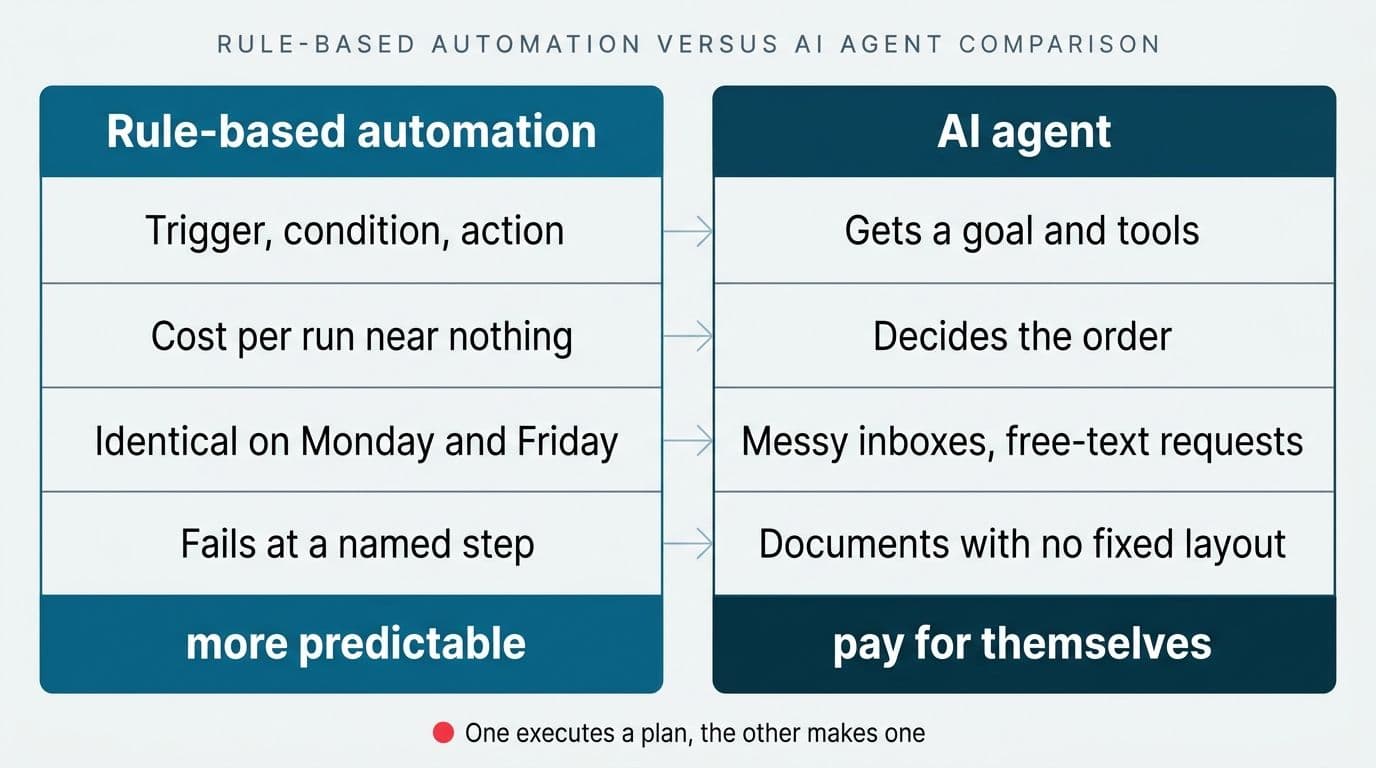
An agent gets a goal, a set of tools, and permission to decide the order. That's the real difference in the AI agent vs automation workflow question. One executes a plan, the other makes one. Agents handle messy inboxes, free-text requests, and documents with no fixed layout. They also handle the gray cases a rule would have to list out one by one.
Who each suits is less about company size than about input shape. Stable formats, high volume, and clear decision rules favor rules. Legal or financial steps that must be reproducible favor rules too, and the comparison of AI automation vs workflow isn't close. Varied wording and unstructured text tip the other way, and exceptions that outnumber the standard path are where AI agents for workflow automation pay for themselves.
Price works the same way. Rules cost you build time and almost nothing per execution, while an agent costs per token, per retry, and per evaluation you run against it. One of the quieter traps in AI agent workflow automation is scoring quality with model-based checks like correctness or helpfulness on every single run. Those checks are themselves model calls, and they add money and seconds to work that was supposed to be instant. Gate them to samples and to changed logic rather than firing them on all traffic.
Where production breaks: latency, error handling, and the steps nobody tests
Most failures we see are not model failures. They're plumbing.
Start with triggers. Teams often wire a workflow to a spreadsheet change because it's the quickest thing to click. A webhook trigger is the better default. It works with almost any form builder, and it lets you replay a sample payload while you build. It also doesn't quietly stall when a sheet is renamed. Right after the trigger, normalize your field names in a single mapping step. Six months later, when someone else edits the workflow, readable field names are the difference between a ten-minute fix and a rebuild.
Then there's the behavior you only discover after launch. Adding an output-setting node at the end of a chat-facing workflow can break the chat interface, because the interface reads whatever node executed last. The workaround is a branch into a no-op node that runs after it, so the interface still finds the response it expects. Nothing in the documentation warns you. You find it when a customer sees a blank reply.
Multi-step agent tasks need error handling at every hop, not one try-catch around the whole thing. An agent that calls four tools has four chances to receive a timeout, a malformed response, or a confident wrong answer that passes schema validation. Write the retry and the fallback per tool, and decide in advance what happens when a step fails for the third time. That path should end with a human, not with silence.
Testing deserves the same discipline. Teams routinely want several evaluation triggers inside one workflow instead of splitting every test scenario into its own sub-workflow, and that instinct is right. Keeping the test cases next to the logic they cover is what keeps them maintained. For monitoring, log the input, the chosen tool path, the output, and the cost of each run. Without that trail you cannot answer why last Tuesday's batch cost three times the usual, and you also cannot prove to a reviewer what the system did. On our builds, anything touching money or a customer waits for a person to approve it. That step also gives you a natural place to catch drift early.
Picking tools and use cases, including how to automate ticket categorization with AI agents
Platform choice follows the work, not the brochure. Open-source automation platforms have changed what smaller teams can run themselves, mainly because you can host them, read the execution logs, and avoid per-task pricing that punishes success. These platforms are also genuinely useful for low-tech companies modernizing operations, since a lot of the build is configuration rather than code.
If you're drawing up a shortlist, our breakdown of the platforms worth testing before you commit goes through where each one holds up.
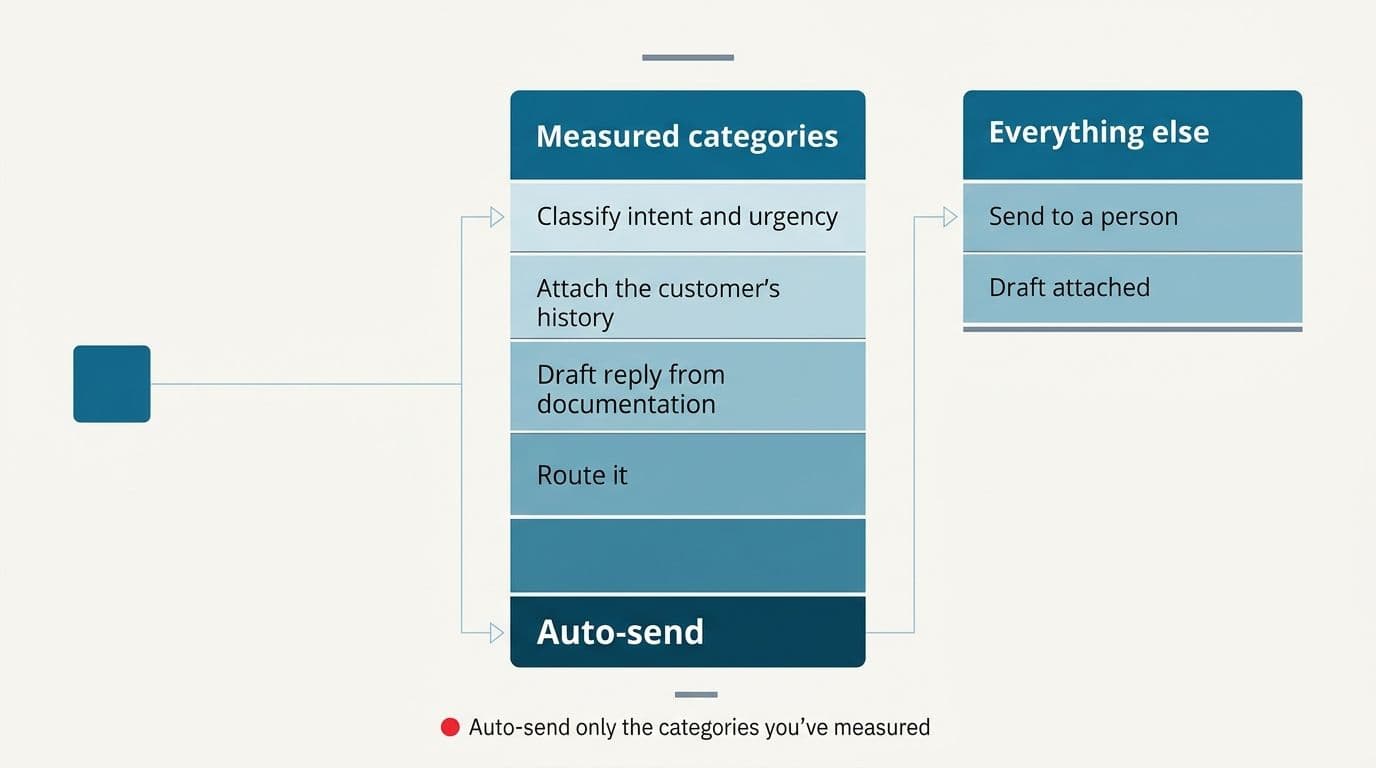
Support is where AI agents in workflow automation earn trust fastest. To automate ticket categorization with AI agents, the shape that works is narrow: classify intent and urgency, attach the customer's history, and suggest a reply drafted from your own documentation using retrieval augmented generation, then route it. Auto-send only the categories you've measured, and send everything else to a person with the draft attached. That design holds up in less technical organizations because the agent never acts alone, and because the team can see exactly what it was asked to do. Our work on support automation that answers from your own documentation follows that pattern.
Document-heavy work splits the same way. Extraction from various invoices or health records needs a model. Posting the result into a ledger does not, and should not.
The migration path from rules to agents, one step at a time
You don't rip out working automation. Map the process you already run and mark each step as deterministic or judgment-based. Automate the deterministic steps first with rules, because they're cheap and they stabilize everything downstream. Leave the judgment steps manual for now, and log them. That log becomes your test set.
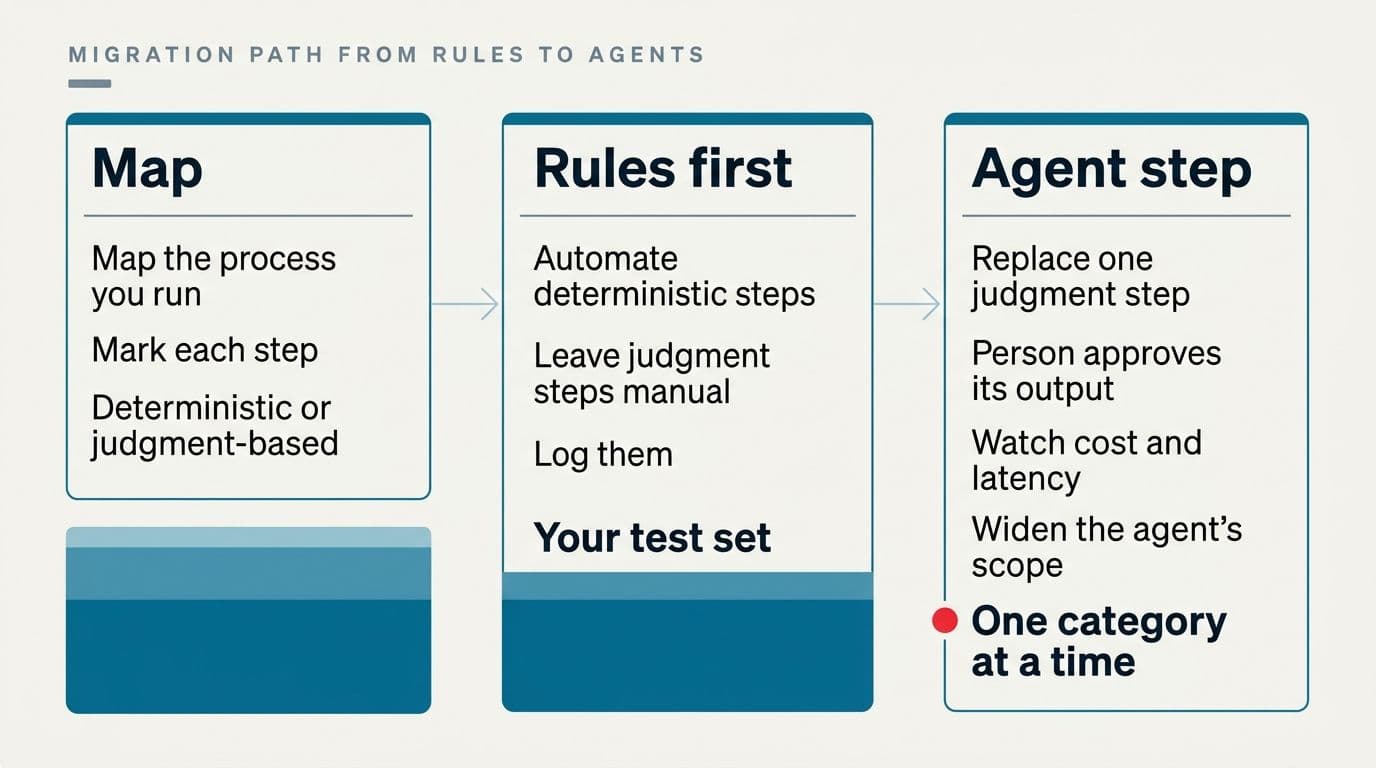
Next, replace one judgment step with an agent and keep a person approving its output. Watch cost, latency, and the error cases for a few weeks, then widen the agent's scope or relax approval, one category at a time.
Sometimes the honest conclusion is that you don't need an agent at all, and we'll say so. A fintech client with fixed statement formats needed better rules and a reconciliation report, not a model. We cover this sequencing in more depth on our page about putting automation into the systems you already run.
If you want a second opinion on which of your steps are rules and which are judgment, book a free automation audit. We'll name a fixed price before any work starts, and you'll own the code, accounts and keys at the end. Get in touch, or see how we work first.
Frequently Asked Questions
When should you use workflow automation instead of an AI agent?
Use workflow automation for stable formats, high volume, and clear decision rules. It's also the better choice for legal or financial steps that must be reproducible, since rule-based automation has identical behavior every time and fails at a named step you can inspect.
What is the main difference between AI agents and workflow automation?
Workflow automation executes a plan you drew with triggers, conditions, and actions, while an AI agent gets a goal and tools, then decides the order to use them. Agents handle messy inboxes, free-text requests, and documents with no fixed layout, while automation follows predefined rules.
How do you automate ticket categorization with AI agents?
Classify intent and urgency, attach the customer's history, and suggest a reply drafted from your documentation using retrieval augmented generation, then route it. Only auto-send the categories you've measured, and send everything else to a person with the draft attached so the agent never acts alone.
What are the most common reasons workflow automation fails in production?
Most failures are plumbing problems, not model failures. Common issues include using unreliable triggers like spreadsheet changes, missing output-setting nodes that break chat interfaces, insufficient error handling at each tool step, and lack of logging to track what happened during each run.
What is the best way to migrate from rules to AI agents?
Map your existing process and mark each step as deterministic or judgment-based, then automate the deterministic steps first with rules. Next, replace one judgment step with an agent while keeping a person approving its output, then watch cost and errors for a few weeks before widening the agent's scope.
Wondering what this would take against your own systems?
The audit costs nothing, and you keep the costed plan and the risks whether you go ahead or not.
Book a free automation auditHitasoft
LinkedInHitasoft has built software since 2008, for companies that mostly do not have an IT department. These pieces are written by the people who do the integrations rather than by anybody in marketing.