
A customer renews for three years, then doesn't. You go back through the CRM looking for the warning. The last four notes say "good call," "sent pricing," "following up," and "going well." Nothing in the record is wrong. It's just thin. The signal that mattered sat inside a forty minute call nobody wrote down properly, and in a support thread that lived in a different tool.
The point of ai crm customer retention isn't a churn score glowing red on a dashboard. It's getting the substance of what customers actually said into a place where it can be read, searched, and acted on while the account is still savable. Most retention failures we see aren't prediction failures. They're record failures, and AI is better at fixing those than at predicting anything.
Most of what gets sold as AI in this space is just workflow rules with a new sticker, and knowing the difference before you spend money matters more than the feature list.
What AI inside your CRM actually changes about churn
Traditional CRM automation works on fields. Someone enters a renewal date, a stage, and a last contact timestamp, and the system fires reminders off that. It works well when the data is clean. It does nothing when a rep closes a call and moves straight to the next one without logging anything, which is most of the time.
AI changes which inputs count. It reads unstructured material: call recordings, email threads, chat logs, and meeting notes typed half finished. That's where the honest version of the customer relationship lives. A rep will skip a required dropdown. They won't skip the conversation.
So integrating AI into CRM systems for enhanced customer retention is less about new predictions and more about new inputs. Once a call transcript is searchable and summarized against the right account, you can ask questions the old setup couldn't answer. Which accounts mentioned a competitor by name last quarter. Which ones raised the same integration complaint twice. Which renewals had no substantive conversation at all, only scheduling emails.
The retention work that follows is ordinary. Someone calls the account, and someone fixes the complaint. What AI did was make the list of who to call accurate instead of guessed.
We're straight with clients about this at putting AI into the systems you already run. If your CRM records are rich, current, and well filled already, a scoring model is a small gain. If they're sparse, the gain is large, because the problem was never the model.
Telling real AI apart from if-then rules wearing the label
A lot of CRM products now market branching logic as AI. If deal stage equals negotiation and last activity is older than fourteen days, flag the account. That's a useful rule. It's also exactly what the same software did before anyone used the word AI in the release notes, and teams are right to be suspicious when they can't tell the difference in practice.
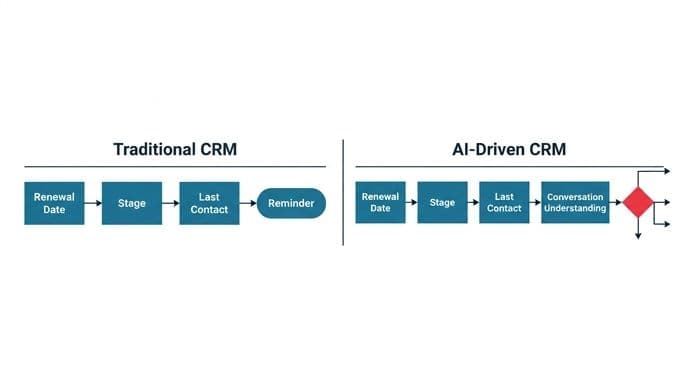
Three questions separate them quickly.
- What does it read? If the feature only looks at structured fields you typed in, it's automation. If it reads transcripts, email bodies, or ticket text and produces something you didn't enter, there's a model involved.
- Can it handle input it has never seen? Rules break on anything outside their conditions. A model will still produce an answer on a new phrasing, which is both the advantage and the risk.
- Does its output change as data accumulates? A rule threshold stays where you set it. A trained scoring model shifts as your customer base shifts, and you should be able to see when it last changed.
None of this means the rules version is worthless. For a small team with a short pipeline, clear rules plus a weekly review beat a model you can't interrogate.
We've told clients exactly that and walked away from the build. The reason to know which one you're buying is simple: you shouldn't pay model prices for conditional logic, and you shouldn't trust conditional logic to catch what a model catches.
Propose and confirm, not auto-commit
The most common failure in retention automation is a system that acts on its own reading of a conversation. It hears "we'll probably revisit this in Q4 if security signs off," writes a task called "revisit in Q4," sets a follow-up, and nudges the forecast. Conditional language flattens into commitment. Three of those in a quarter and your pipeline picture is fiction.
The cleanup costs more than the typing ever did. A manager now reviews, vetoes, and corrects machine-generated tasks, which is a slower job than reading a short note a rep wrote themselves. We've watched auto-commit features become the bottleneck they were bought to remove.
The fix is a design rule, not a better model: the system proposes, and a person confirms. Draft tasks sit in a review queue with the exact sentence they came from attached. One click accepts, one click discards, and nothing reaches the pipeline, the customer, or a billing record without a human saying yes. That rule holds across everything we build. Anything touching money or a customer gets approved by a person.
This is also how you keep the queue cheap. Batch the confirmations, show the source line, and the review takes a couple of minutes after a call instead of a distinct admin block. When we design automated workflows around existing systems, the approval step is specified before the model is chosen, because retrofitting it later means rebuilding the flow.
What happens when AI acts on messy, half-filled records
Your CRM has duplicate accounts. It has contacts who left two years ago. It has one company spelled four ways and an owner field pointing at someone who no longer works there. Every team has this. The question is what AI does with it.
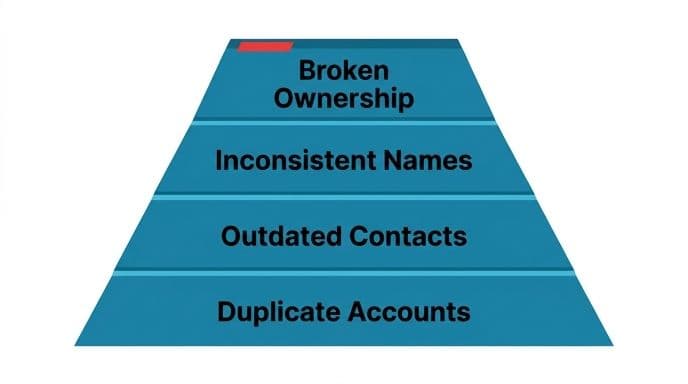
Badly handled, it amplifies the mess. A model summarizing calls against the wrong duplicate account splits one customer's history into two incomplete stories, and both look healthier than the truth. Churn scores computed on stale contacts rate dead accounts as active because no one marked them closed.
What works is scoping the AI to the records it can actually trust, and making it say so when it can't. Three practical moves:
- Match before you write. Resolve the account and contact first, with a confidence check. If the match is ambiguous, the summary goes to a holding queue rather than onto a guess.
- Mark the thin records. An account with no substantive conversation in the period shouldn't get a confident health score. It should get a flag that says there's nothing here to judge, which is itself the most valuable retention signal you'll find.
- Fix the worst duplicates by hand first. Deduplication by model is possible. For most mid sized lists it's faster and safer to clean the top accounts manually before anything automated runs on them.
Data cleanup isn't glamorous and nobody budgets for it. Skipping it is why many CRM AI rollouts produce outputs the team quietly stops opening.
Call transcripts and auto-summaries: the highest-return place to start
If you do one thing, do this. Transcribe calls, summarize them against the account, and draft the follow-up tasks for confirmation. It removes the reason data goes stale instead of trying to predict around stale data.
The effect compounds in ways that aren't obvious on day one. Your renewal conversation next March can be informed by an objection raised in a discovery call last October, because the objection is now text attached to the account rather than a memory in someone's head. New reps inherit real context instead of a stage field. A manager preparing for an escalation reads the actual words the customer used.
Support benefits just as fast. When past conversations and resolutions are searchable, a retrieval augmented generation setup can answer repeat questions from your own material rather than from a generic model's guesswork. Teams running AI customer support automation this way often see it take most routine tickets off the queue, in the cases that go well. That frees the people who are good at difficult customers to spend their day on difficult customers.
Two honest limits apply here. Transcription quality drops on bad audio, accents the model handles poorly, and crowded rooms, so budget for correction. And recording calls brings consent obligations that vary by country and state. Decide that policy before you switch anything on, not after.
Structuring notes so facts, inferences and confidence stay individual
A summary that reads like a single paragraph of prose is where most of the trouble starts, because the reader can't tell which parts the customer said and which parts the model concluded. "The customer is likely to churn" and "the customer said their budget was cut" belong in different buckets.
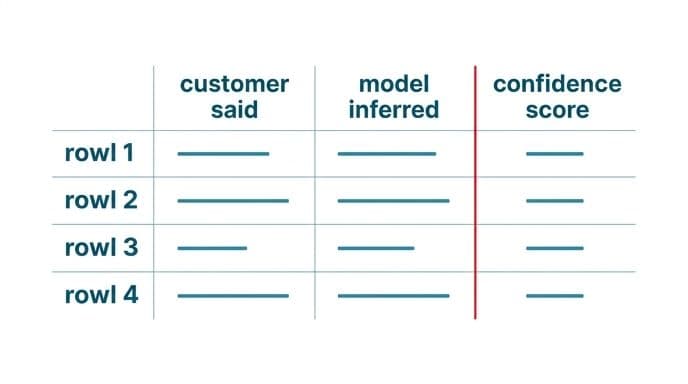
Structure the output into fields. What was said, quoted or near quoted, with a timestamp. What was agreed, meaning explicit commitments with the exact sentence attached. What the model infers, labeled as inference. What it's unsure about, listed as open questions for the rep to resolve.
Add a confidence marker on the inference block and keep it plain. High confidence means the customer stated it directly. Medium means it was implied across more than one exchange. Low means the model is reading tone or filling a gap, and nobody should forecast on it. When conditional language appears, the condition travels with the statement. "Maybe in Q4 if security approves" stays attached to "if security approves," and the open question becomes who owns the security review.
This sounds fussy. It's the difference between a tool your team trusts after six weeks and one they stop reading. The structure also makes errors findable. When a forecast turns out wrong, you can check whether the model misheard, over-inferred, or whether the customer genuinely changed their mind, and only one of those is something you fix in software.
Can you trace a recommendation back to its source?
Any retention output that can't be traced back to a source line is an opinion with a confidence score on it. For a team deciding whether to discount a renewal or escalate to an executive, that's not enough.
Traceability is a build requirement, not a feature you hope the vendor added. Every flag, score, and summary line should carry a link to the material it came from: the transcript segment, the email, or the ticket itself. A rep should be able to click from "declining engagement" to the three unanswered emails that produced it. A manager reviewing a churn list should be able to check whether a red flag rests on a real conversation or on the absence of one.
This matters for a reason beyond trust. Models drift, prompts get edited, and someone eventually asks why the scores shifted in a month when nothing else changed. If outputs are traceable, you can audit. If they aren't, you're arguing about vibes.
It also settles a question customers of ours ask early. Will the vendor use our data to train their model? On enterprise endpoints with retention switched off, no. That's a configuration you can verify in the account settings, and if the answer isn't verifiable in writing, treat it as a no-go. For records that can't leave your infrastructure at all, private deployment with fine-tuned models hosted on your own infrastructure keeps the material inside your walls, and you hold the keys.
Churn scoring and lead scoring when your customer list is small
Scoring models need examples of the outcome they're predicting. If you lost eleven customers last year, a churn model has eleven positive examples to learn from, and whatever it produces will mostly describe those eleven rather than the next one.
Below a certain volume, and most mid sized companies sit below it, you get more from rules you wrote yourself plus good summaries than from a model. Usage dropped and the champion went quiet. Two support escalations unresolved past a week. A renewal inside ninety days with no substantive conversation logged. Those are legible, arguable, and adjustable, and a new ops hire can understand them on their first morning.
Where AI earns its place at small scale is feeding those rules. "The champion went quiet" requires knowing who the champion is, which comes from reading conversations, not from a contact-role dropdown somebody filled in during onboarding. "No substantive conversation" requires distinguishing a scheduling email from a real discussion, which is a reading task.
Teams at growth stage keep asking for retention tooling built for their size rather than enterprise platforms scaled down. The reason is this mismatch: the enterprise product assumes thousands of churn events to train on, while you have dozens. Build for the data you have.
One customer view across email, chat, phone and support tickets
Retention signals rarely appear in one channel. The complaint goes to support. The budget comment comes up on a call. The hesitation shows in a WhatsApp thread with the account manager. Each system holds a fragment, and nobody holds the account.
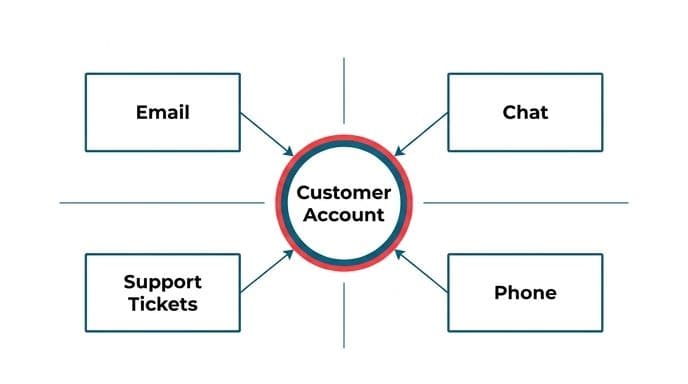
Pulling those into one timeline is mostly integration work, and it's unglamorous. It means APIs, identity matching across systems that disagree about what a customer is, deduplication, and handling channels with no clean export. The AI layer only becomes worthwhile once that pipe exists, which is why we spend more of a typical project on plumbing than on models.
Set the order deliberately. Start with the two channels carrying the most signal, usually calls and support tickets, and get those landing against the right account reliably. Add the rest once the matching is solid. A unified view built on bad identity matching is worse than four discrete tools, because it looks authoritative while being wrong.
There's a budget argument worth making here too. Loyalty and retention programs now absorb a meaningful share of marketing spend in many organizations. Much of that goes to incentives aimed at segments defined by purchase history alone. A unified conversation record lets you target the accounts actually at risk rather than discounting customers who were going to stay anyway, which usually pays for the integration before the model does.
Integration of AI into CRM for effective US healthcare and pharmaceutical marketing
Healthcare and pharma teams carry constraints most CRM advice ignores. Patient-identifiable information falls under HIPAA. Any communication touching a prescriber or a treatment claim has review obligations. The result is a system shaped more by what it's forbidden to do than by what it can.
The practical consequences follow a straightforward pattern. Transcription and summarization of calls involving patient information need to run inside infrastructure you control, under a business associate agreement, with retention and logging configured before the first recording.
Generic public endpoints are usually the wrong answer here. Any AI-drafted copy aimed at clinicians or patients is a draft, and a clinician or a qualified reviewer checks every word before it leaves the building. We don't build systems that give clinical advice, and we won't promise a regulatory or app-store review will clear, because that decision belongs to the reviewer and the client.
What does work is the unglamorous part. HCP engagement history scattered across field notes, email, and portal activity gets resolved into one record with sources attached. Consent and preference state gets tracked properly so outreach stops when someone opts out. Audit trails sit on every automated action. Our team has handled this kind of work before, including an ABDM health platform integrated with India's national system, where the compliance architecture had to be settled before anything else got built. The same sequencing applies to secure architecture for regulated data in US healthcare. Constraints come first, then capability.
Build, buy, or do nothing: what to check first
Before anyone writes code, run a short audit of where retention information actually goes missing. Pick ten accounts you lost in the past year. Read everything the CRM holds on each one. Ask what a good system would have needed to catch it, and whether that information existed anywhere at the time. Sometimes the answer is that nothing would have helped, and the honest conclusion is to leave the CRM alone and fix the product instead.
If the gaps are real, the buy option is worth checking first. Your CRM vendor may already ship transcription and summarization that covers most of it. Native features are cheaper than custom work and need no maintenance from you. The reasons to build are specific. Data that can't leave your infrastructure, a channel the vendor doesn't support, approval steps the native tool won't enforce, or a billing model where usage costs climb without limit as volume grows. Check that last one carefully, because per-seat pricing and per-call pricing behave very differently at scale.
If you do go outside, judge suppliers on terms rather than decks. Fixed price named before work starts. Working software in weeks rather than quarters. You own the code, the accounts, and the keys at the end. Builders who talk to you directly instead of an account manager relaying messages. We've set out what to ask in our rundown of choosing between firms that do this kind of integration work, including the questions that get vague answers from the wrong vendor.
Where to start with AI CRM customer retention
Pick one thing. Transcribe and summarize customer calls, route the drafts into a confirmation queue, and attach every summary to the right account with its source. Run it on one team for a month, then read the lost-account post-mortems again and see whether the record would have told you in time.
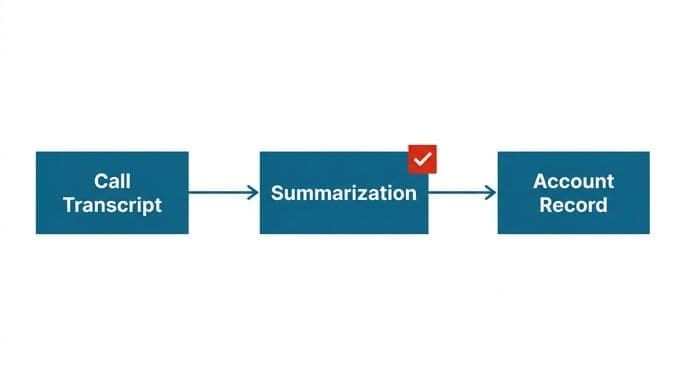
That single step does most of the work. The scoring models, the health dashboards, and the automated plays all sit on top of it and are worth very little without it. Our own content team of 150 writers cut a monthly cycle to a week using the same approach, initial with the step that removed retyping rather than the one that sounded most advanced.
If you want a second opinion on whether integrating AI into CRM systems for enhanced customer retention is worth it in your case, we'll look at your current setup and say so plainly, including when the answer is that you don't need to build anything. Eighteen years, 150 people, work in more than 50 countries, and a habit of telling clients when the sensible move is to do nothing.
Book a free automation audit, or read how we work before you get in touch.
Wondering what this would take against your own systems?
The audit costs nothing, and you keep the costed plan and the risks whether you go ahead or not.
Book a free automation auditHitasoft
LinkedInHitasoft has built software since 2008, for companies that mostly do not have an IT department. These pieces are written by the people who do the integrations rather than by anybody in marketing.