
A finance lead came to us earlier this year with a quote for an invoice extraction build and no idea what it would cost to keep alive. The build figure was on the page. The monthly figure wasn't anywhere. Her board asked the obvious follow-up, and nobody in the room could answer it.
That gap is normal. Software vendors publish a per-seat price and keep the rest of the cost structure out of sight. Build shops publish a project fee and go quiet about month two onward. So here is the AI integration monthly cost written out in full. Fixed infrastructure, variable model usage, the maintenance line most proposals skip, and what changes once you tune the thing. The figures below come from systems we run for invoice processing, support automation and document extraction. Each has a different shape. The math behind them is the same, which means you can decide between building and buying with something better than a hunch.
Run Cost Is Not Build Cost: The AI Integration Pricing Breakdown
Every running system has two layers. One barely moves. The other moves with the work you push through it.
The fixed layer for a small production deployment, say 50 people using it daily, lands around $100 to $140 a month:
- App server: about $24
- Background worker for asynchronous OCR and model calls: about $24
- Managed PostgreSQL: $30 to $60 depending on storage and connection limits
- Object storage for source files: around $5
- Backups and monitoring: $10 to $20
You could run a demo of this for six dollars. You can't run a finance workflow on it. The worker exists so a 40-page PDF doesn't block the request queue. The managed database exists so someone else handles point-in-time recovery at 2am. Those two decisions are most of the difference between a prototype and monthly LLM hosting costs you can defend to a board.
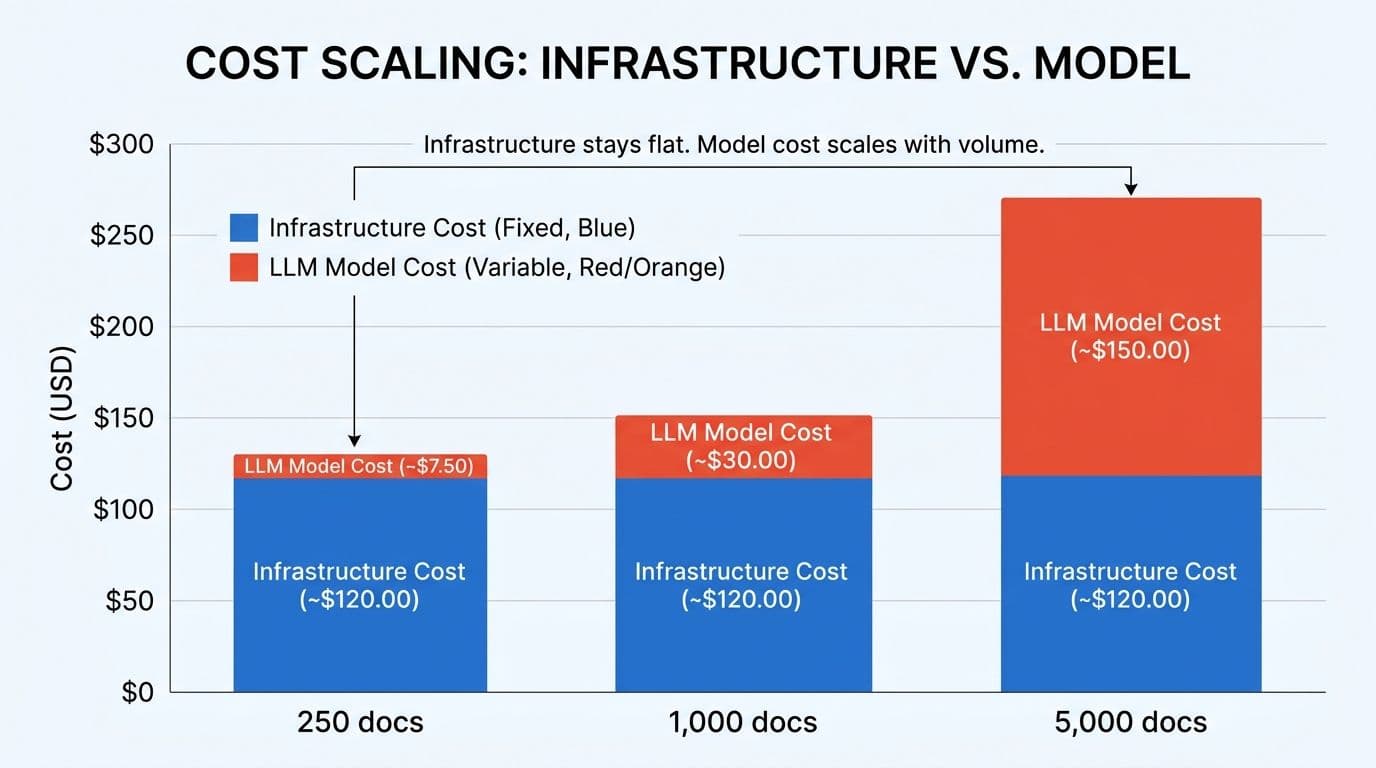
The variable layer is the model itself. A typical invoice or claim form sends roughly 2,000 to 3,000 input tokens and gets back around 500. At current AI API pricing per month across the major providers, that works out to somewhere between two and five cents per document before any tuning.
| Monthly volume | Model usage | Fixed infrastructure | Total |
|---|---|---|---|
| 250 documents | ~$7.50 | ~$120 | ~$128 |
| 1,000 documents | ~$30 | ~$120 | ~$150 |
| 5,000 documents | ~$150 | ~$120 | ~$270 |
Read that table sideways. Volume went up 20 times and the bill roughly doubled. Run cost tracks work done, not headcount licensed. That single property is why the build case exists at all.
Build Versus Buy: Per-Document Against Per-Seat
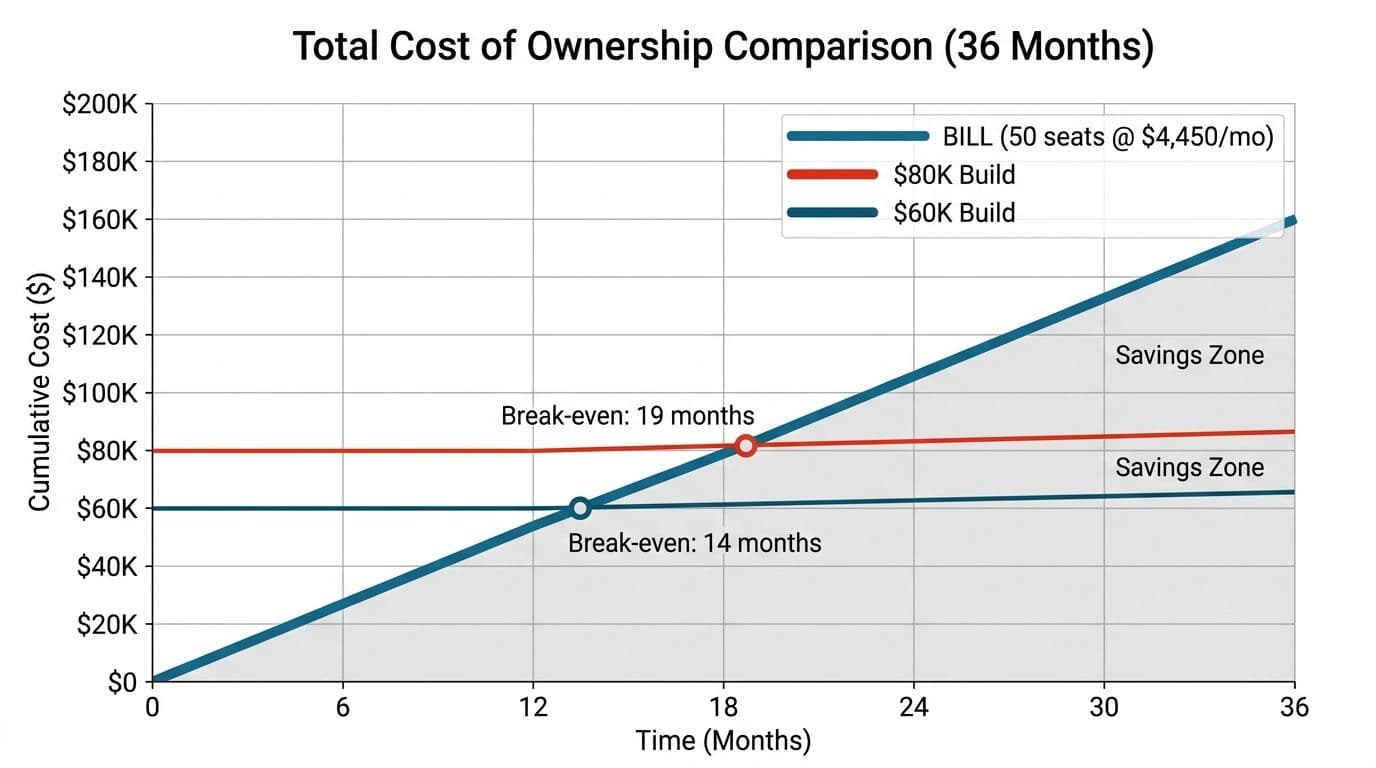
Published list pricing for accounts payable platforms is hard to compare against usage pricing, since the two are measured in different units. At the time of writing, BILL's corporate tier runs about $89 per user per month, so 50 seats is roughly $4,450 a month whether you process 100 invoices or 10,000. Ramp Plus sits near $15 per user, so 50 users is somewhere around $750 to $1,000, plus a platform fee that isn't always visible up front. Tipalti and ApprovalMax are quote-only, along with several other platforms in the category, which means you cannot budget against them until you've sat through a sales cycle.
A custom build of a document or reconciliation pipeline typically runs $40,000 to $100,000 one time, including integration into your existing systems and the optimization work described further down. Monthly run cost after that is the $150 to $300 range above.
Break-even, read across each row:
| Build cost | vs 50 seats at $4,450/mo | vs 12 seats at $1,068/mo | vs 50 users at $750/mo |
|---|---|---|---|
| $40,000 | 9 months | 44 months | 67 months |
| $60,000 | 14 months | 65 months | 100 months |
| $80,000 | 19 months | 87 months | Realistically never |
| $100,000 | 23 months | 109 months | Realistically never |
Over 36 months, an $80,000 build set against a 50-seat corporate subscription nets out roughly $74,000 ahead. The subscription line climbs in a straight line forever, while the build line flattens once you've paid for it.
Now the honest half. Against a $750 per month product, building almost never pencils out, and we will say so in the first conversation rather than the fourth. If you have twelve people and modest volume, the subscription wins on arithmetic alone. The build case gets strong when seats multiply, when volume is high, or when the tool nearly fits and the gap is costing you manual work anyway.
The Ongoing AI Maintenance Costs Nobody Quotes
A run-cost table is honest about servers and tokens and silent about everything else. Three things belong on the page.
Maintenance. Dependencies drift, security patches land, operating systems reach end of life, and model providers deprecate endpoints. A retainer for this runs $200 to $2,000 a month depending on scope and response time. You can absorb it internally instead, but you cannot skip it. Any budgeting for AI automation that omits this line is understating the number by a meaningful margin.
Key-person risk. One engineer understands the extraction pipeline and then takes another job. This is the quiet failure mode of custom software, and it has gotten worse in the last two years. We keep seeing codebases assembled quickly from generated code that nobody on the team can fully explain, where the original author never had to understand it either. Senior engineers then spend more hours reviewing that work than writing it from scratch would have taken, and the bugs that accumulate are the kind you rewrite rather than repair. Generated scaffolding is fine when a person tests and reviews it. Whole applications produced from prompts are how you end up with something maintainable only by the person who prompted it, and sometimes not even them.
The fix is unglamorous. Document the system, keep ownership in more than one head, and hold a support arrangement with whoever built it.
Availability. Redundancy, failover and deeper monitoring cost more and reduce downtime. If the pipeline stops during month-end close, you'll wish you'd paid. If it's a back-office nicety, you won't.
Add $200 to $2,000 a month to the run figures above, or accept the burden internally with eyes open. Those are the choices, and ongoing AI maintenance costs behave the same way in either.
How to Cut AI Model Usage Costs in the First Month
The first invoice from a model provider is usually the highest one you'll ever get. Untuned spend is not the real cost of running AI in production. It's the cost of running the first version.
Week One: Visibility and Hard Stops
Set spend caps at the provider before anything reaches real traffic, so day 32 holds no surprises. Then instrument the thing: track cost per document type, cost per workflow, and cost per user action. A dashboard showing live token spend takes an afternoon to wire up and pays for itself the first time a support query turns out to cost six times what an invoice extraction does. You cannot tune what you cannot see, and most teams reach month three without ever splitting their bill by workflow.
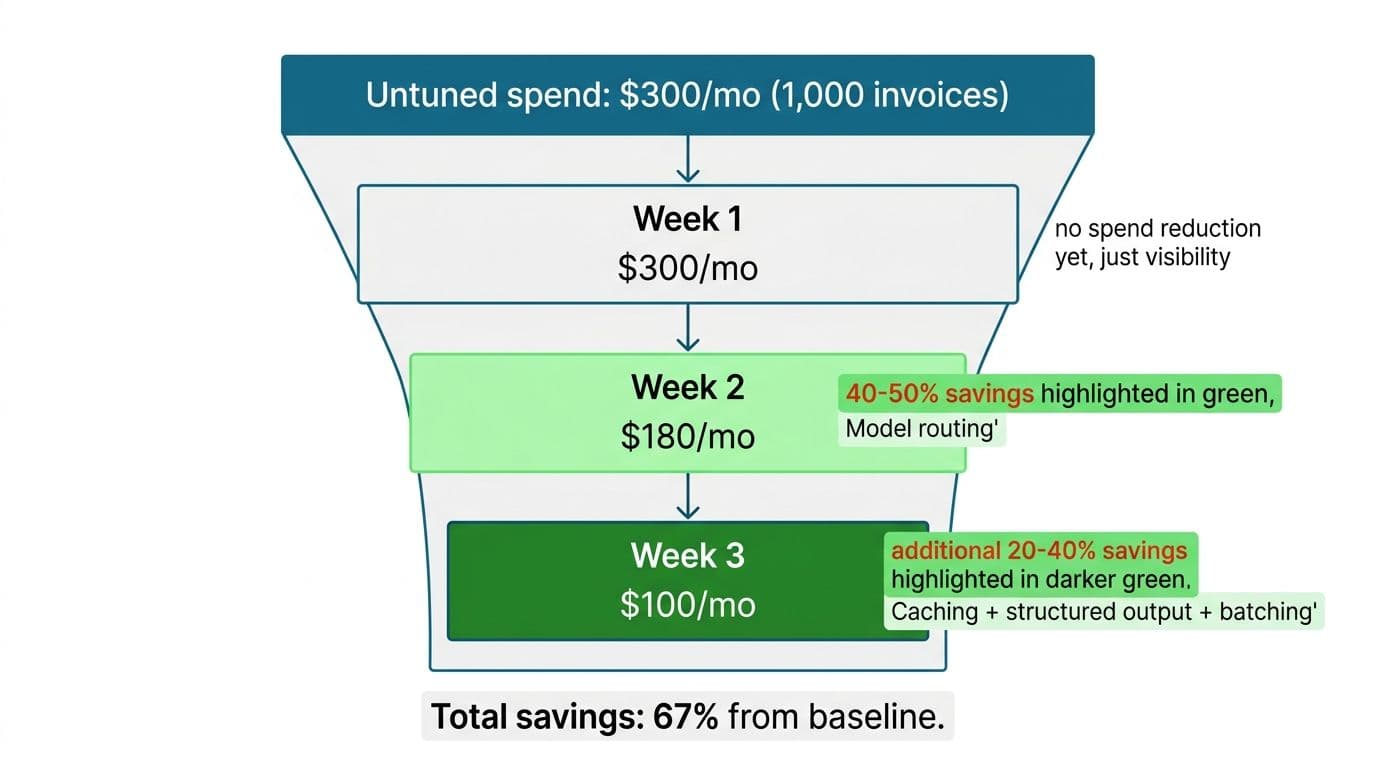
Week Two: Model Routing
This is where the largest reduction comes from, usually 40 to 50 percent. Not every task needs the expensive model. Simple classification and field extraction from a clean form: small models handle these for a cent or two per call. Judgment calls and messy multi-page documents: route those to the larger model at ten to fifteen cents.
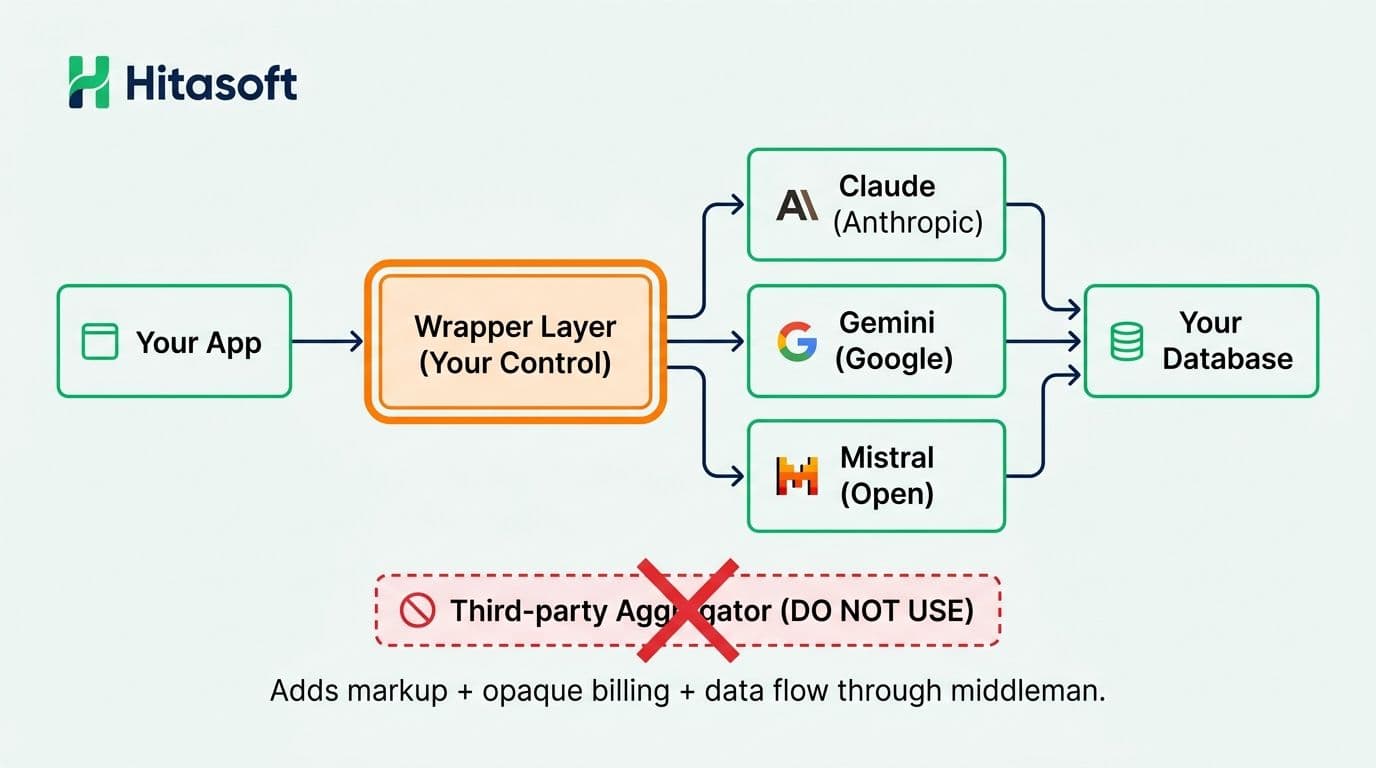
If 70 percent of your documents are routine and 30 percent need the strong model, your bill drops to roughly 60 percent of baseline for the same output quality. Model choice should live in configuration, not in your code. Done properly through a thin, provider-agnostic API layer, swapping a model is an afternoon's work, not a rewrite.
Week Three: Caching, Structured Output and Batching
Another 20 to 40 percent tends to be sitting here.
- Prompt caching. Vendor master data, customer profiles and compliance rules get re-sent on every call. Cache them and you stop paying for the same input tokens hundreds of times a day.
- Structured output. Tell the model to return a defined JSON shape. It stops writing prose around the answer, which cuts output tokens by 30 to 50 percent and makes validation in code straightforward.
- Batching. Group a hundred documents into one processing run instead of a hundred separate calls.
- RAG tuning. Retrieval augmented generation only helps if you retrieve the right three passages. Sending the whole knowledge base as context is the most common way to overpay.
Weeks two and three together commonly take spend 50 to 70 percent below the untuned baseline.
Attribution, Providers and What Happens When Volume Doubles
Route across Claude, Gemini and other providers if you like, but own the routing logic and keep the keys in your own provider accounts. Third-party aggregators add a markup and a layer between you and the invoice. With direct accounts, each provider's dashboard shows exactly what you spent on what, which keeps model choice auditable.
Split spend by workflow so finance carries invoice automation and support carries its own agent. That tells you which revenue stream is actually profitable and flags a runaway process the week it triples instead of the quarter it triples.
The scaling question matters most. With routing, caching and batching in place, spend does not double when volume doubles. At 10,000 documents a month you're closer to $400 or $500 than the $1,500 a naive projection suggests. The other breakpoint is worth knowing too: at some volume, somewhere around 15,000 to 30,000 documents a month depending on your wage base, a person genuinely costs less per document than the pipeline. Rare, but real.
Three Worked Examples of the Cost of Running AI in Production
These are illustrative composites at typical volumes, not client invoices.
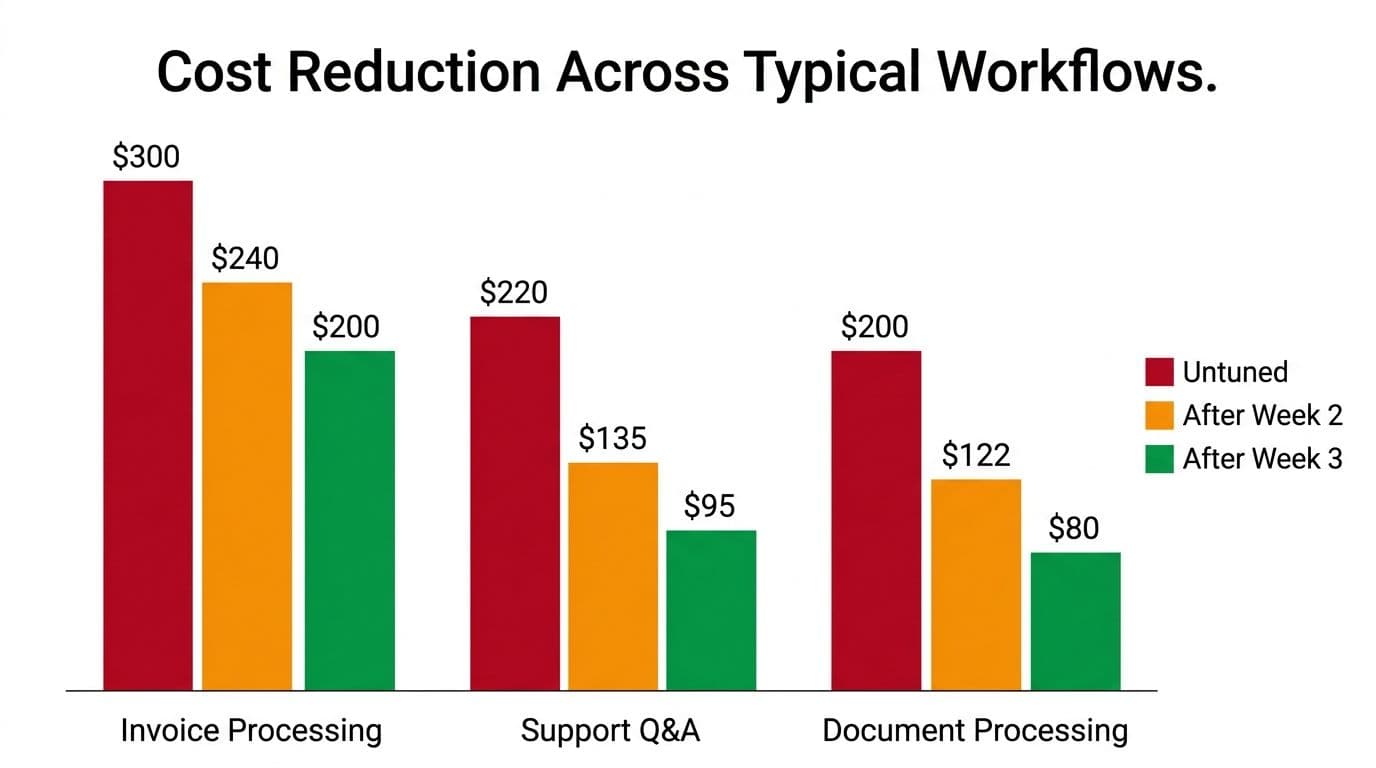
Invoice processing for a fintech team. A thousand invoices a month, untuned: about $180 in model usage plus $120 infrastructure, so $300. After routing, model spend falls near $120, and after caching vendor rules and enforcing structured output, about $80. Total around $200, with cleaner extraction than the untuned version produced, because JSON schemas catch what free-form text hides. More on the surrounding architecture in our write-up on building a finance automation platform that survives audit.
Customer support question answering. Five hundred queries a month, untuned: roughly $100 in model usage plus $120 infrastructure. Send FAQ matching to a small model and escalate only exceptions, and usage drops to about $50. Cache the FAQ embeddings and it settles near $35. The staffing effect is larger than the money: most repeat questions resolve in seconds, and the team handles what's left.
Mixed document processing with a compliance requirement. Two thousand documents a month, untuned: about $60 in usage plus $140 infrastructure, the database being larger. Route uncomplicated extraction to a small model and usage falls to $45.
Structured output and cached rules take it to $30, and every extraction stays logged and reviewable, which is the part auditors ask about. Where records cannot leave your infrastructure, private hosting changes the monthly LLM hosting costs upward, and that trade is worth pricing separately.
None of these run unattended on anything touching money or a customer. A person approves those. We don't claim model output is accurate without review, and no configuration of the above changes that.
When Building Isn't the Right Call
Three reasons to walk away, and we'd rather say them now than bill you to find out.
Your volume is genuinely low. Under 250 documents a month, or fewer than a hundred support queries, a subscription probably wins. Run your own numbers against the break-even table. If it says 67 months, believe it.
You need one vendor's specific feature. If what you actually want is a payments rail plus an approval flow that already exists in a product you can buy, rebuilding it is waste. Buy the tool. We'll tell you that in the audit.
Nobody on your side can own it. Custom software needs a home. A retainer covers patches and monitoring, but someone at your company has to care when a workflow changes or a vendor format shifts. We've watched teams inherit a pipeline they never had time to understand, under pressure to ship faster, carrying bugs they can't diagnose. That ends badly regardless of who wrote the code. If there's no engineering capacity and no appetite to hold the keys, buy instead.
How We Keep the AI Integration Monthly Cost Down From Week One
Our price is fixed and named before work starts, and optimization sits inside it rather than arriving as a change request after the first provider bill lands.
Week one is the audit: your real volume, your document mix, the fixed infrastructure you need and the AI API pricing per month that follows from it. Week two builds the routing logic, cheap models on regular work and strong models on exceptions. Week three tunes against actual traffic, adds caching and batching, and tightens retrieval. You're live in month one with cost already shaped, not bolted on later.
Our support retainer covers monitoring and drift detection, so a sudden spike gets flagged rather than discovered on a statement. You own the code, the cloud accounts, the provider keys and the model choice. Eighteen years and 150 people sit behind that, across 1,000-plus clients in 50-plus countries, and if the audit says buy, we say buy. More detail on the sequence lives in our process page and the reference material we keep for integration work.
See Your Own Numbers
We can't quote your AI integration monthly cost without knowing your volume, your document mix and what your current tooling charges you. What we can do is put three figures side by side: fixed infrastructure, variable model usage at your throughput, and the break-even month against whatever you're paying now. That's the whole of budgeting for AI automation, and it fits on one page.
Bring an invoice count, a ticket count, or a stack of forms nobody wants to retype. Book a free automation audit and we'll work through it with you, or read how we approach putting AI into systems you already run first.
Wondering what this would take against your own systems?
The audit costs nothing, and you keep the costed plan and the risks whether you go ahead or not.
Book a free automation audit
Arun Andiselvam
LinkedInI am a startup veteran who has built five brands. I sold the first, an SEO tool, for a six figure exit, and now build AI automation products for businesses. I bootstrapped every one of them from day one.