
Extraction is the easy half. Any competent pipeline can pull a quantity off a screenshot. The hard half is knowing what a discrepancy means once you have found it. You also need to point at the clause it was judged against. That is the difference between a diff tool and something a pharmacy will actually run against live claims.
This post walks through what prescription verification software has to do, field by field. It also covers what a flag has to prove before anyone acts on it.
The job, as it is currently staffed
Right now, in a lot of pharmacies and billing operations, a person does this work.
The job posting is specific. A remote medical virtual assistant or pharmacy technician gets hired for medical terminology, familiarity with prescription workflow, and the ability to read a SOAP note without needing it explained. They work inside the client's EHR or pharmacy system, using the client's credentials, and turn work around inside twenty-four hours. The core skill, stated plainly in the listing, is spotting missing or inconsistent information by eye.
That is the baseline. One person, two records open, reading across. They check the prescriber's original against what was keyed into the system, and they notice when something does not line up. This is the kind of verification work still done by hand inside the EHR in most pharmacy operations.
Underneath that sits the pharmacy's own verification sequence, which is older and more structured than the audit layer bolted on top. Data entry with insurance billing, a pharmacist review for accuracy, filling, then a final verification before the medication leaves the counter. A physically written prescription gets a second pharmacist's eyes on it. At each step somebody is confirming the right patient, the right dose, the right form, and the right route. They ask whether the dosage is safe for this person, whether it interacts with anything else on file, and whether it fits their age and diagnosis. When something fails, a stock shortage, an insurance rejection, a DUR flag, the pharmacist goes back to the prescriber and asks for an alternative.
None of that is going away, and none of it is what we are talking about automating. The audit layer is narrower. It asks whether the record in the system matches the prescription that authorized it, and if not, whether the difference creates a recovery risk. That is the manual process any pharmacy prescription verification system has to replace. The twenty-four hour turnaround is the standard it has to beat.
Verification means two sources, not one document
Almost every article about document AI assumes the same shape. One document goes in, structured data comes out, and accuracy means how often the extracted field matches what a human would have typed.
This is a different shape, and the difference is not cosmetic.
There are two records. What the prescriber sent, and what the pharmacy keyed in. Neither one is authoritative on its own. The prescriber's version can be ambiguous, and the pharmacy's version can be a correct clarification of it, or a transcription error, or both on different fields of the same script. The output of the system is not extracted data. The output is a comparison, and a judgment about what the comparison means.
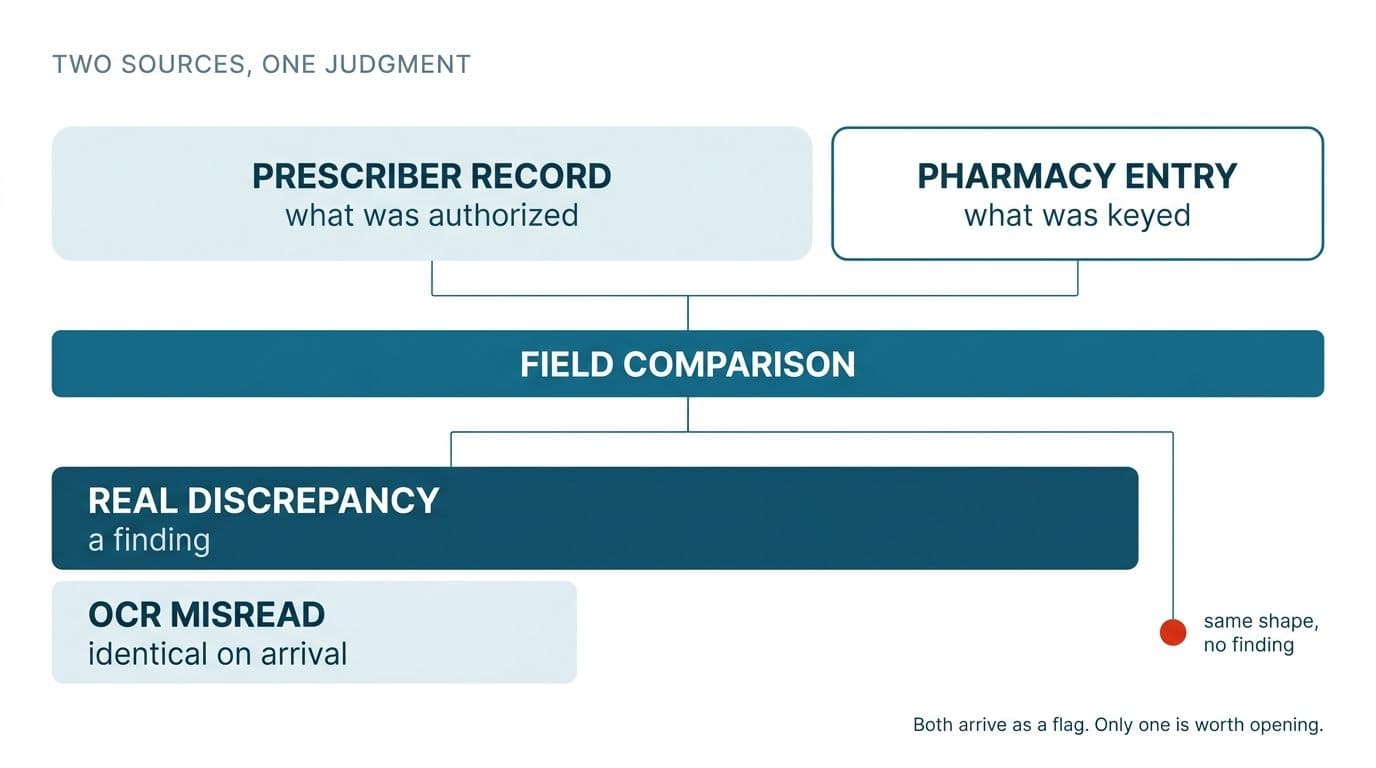
Here is the consequence that gets missed. Suppose your extraction is 95% accurate per field. That sounds strong. Now run it twice, once on each source, and compare the results. The probability that both reads are correct on a given field is roughly 90%. The remaining 10% splits into cases where the reads disagree because the records genuinely disagree, and cases where they disagree because the OCR misread one side.
Those two look identical in the output. Both arrive as a flag. One is a finding and the other is noise, and the second kind is what gets an audit tool switched off within a month. A pharmacist who opens fifteen flags and finds twelve of them are the software misreading a 5 as an S stops opening flags. The tool is then technically deployed and functionally dead.
So per-field extraction accuracy is the wrong headline metric for prescription verification software. The metric that matters is agreement accuracy. Given two reads of the same underlying field, how often does the system correctly decide whether they match. That is a harder number to hit and a more honest one to publish.
The nine fields, and why they cannot be checked the same way
Nine fields carry almost all the audit risk. Listing them is the simple part. The useful part is that each one needs a genuinely different comparison method, and a system that runs the same string diff across all nine will be wrong in nine different ways.
| Field | How it has to be checked |
|---|---|
| Quantity, Refills | Exact numeric match |
| Patient name & Date of birth | Fuzzy on the name, format normalization then exact on the date |
| Prescription date | Format normalization first, then exact |
| Prescriber information | Fuzzy, plus identifier lookup where one is available |
| Medication name, strength, dosage form | Controlled vocabulary match, not string match |
| Directions (sig) | Semantic comparison |
| Days' supply | Recalculated, not compared |
| DAW / substitution | Coded field, and both sides can agree and still be wrong |
The field list comes from what buyers are actually asking for. The handling logic below is our engineering reading of what each field requires. Reasonable people could group them differently, but the distinctions are real.
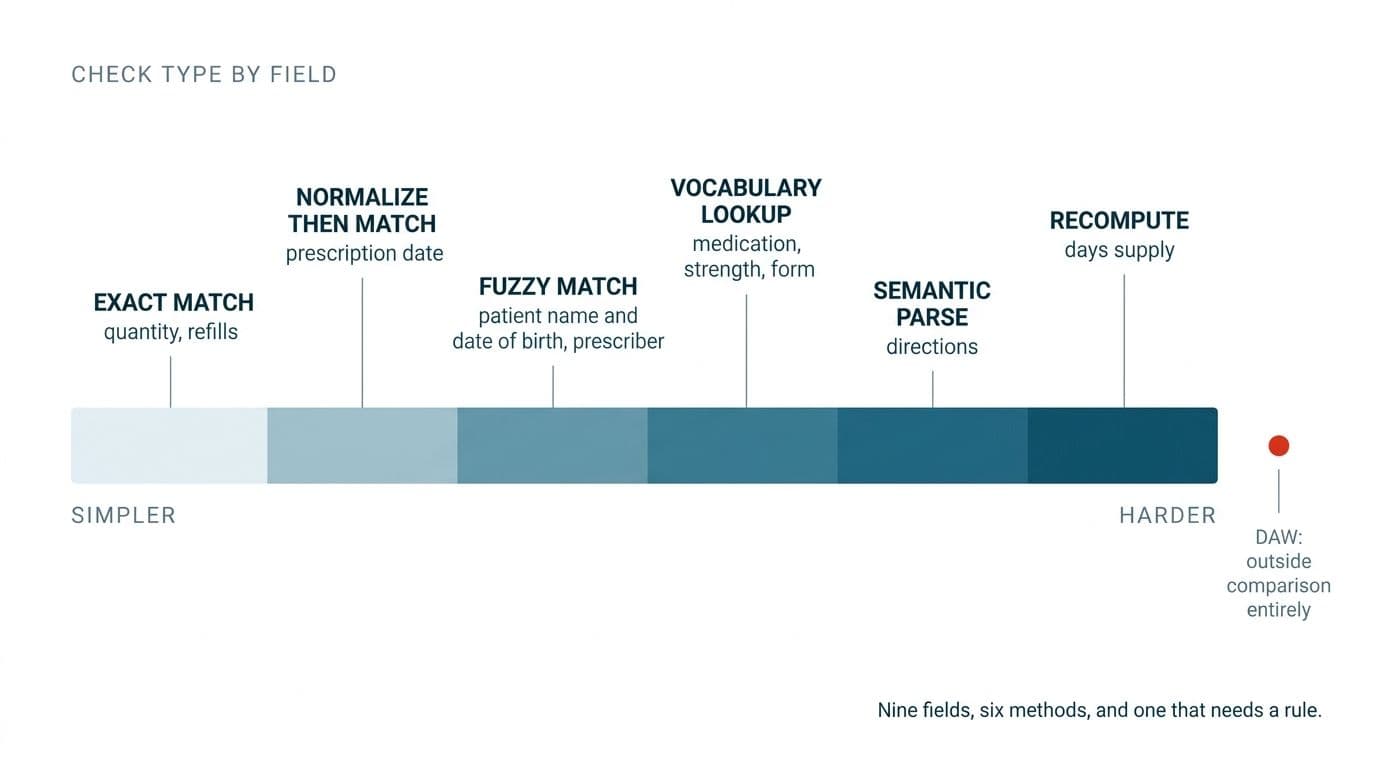
Quantity and refills are the only two that behave the way people expect. Numbers, exact match, no tolerance. If one says 30 and the other says 90, that is a finding, full stop.
Patient names need tolerance. Last-name-first versus first-name-last, a middle initial present on one side and absent on the other, a hyphenated surname entered without the hyphen. Flagging every one of those produces a report nobody reads. Dates need normalization before comparison, because 03/04/2024 is two different days depending on which system wrote it. A comparison engine that does not know the source system's date convention will invent discrepancies out of formatting.
Medication name, strength, and dosage form look like string fields and are not. They are vocabulary lookups. "Lisinopril 10mg tab" and "Lisinopril 10 MG oral tablet" are the same product, and a string comparison says they differ by a wide margin. Resolve both sides to a controlled vocabulary, RxNorm or NDC or whatever the client's systems already speak, then compare the resolved codes. Now the match is unambiguous. The failure to resolve becomes its own signal too: if one side will not map to any known product, that is worth a human look regardless of what the other side says.
Three fields break the naive approach badly enough to deserve their own treatment.
Directions
"1 tab PO BID" and "take one tablet by mouth twice daily" are the same instruction. They share almost no characters. Any string comparison, fuzzy or otherwise, will call them a mismatch, and it will do so on a very large fraction of scripts, because prescribers write in abbreviations and pharmacy systems expand them.
The sig has to be parsed, not diffed. Break both sides into structured components, dose amount, dose unit, route, frequency, duration, PRN condition, maximum daily, then compare component to component. That gives you two things. First, real semantic matching, so "q12h" and "twice daily" resolve to compatible frequencies. Second, granularity in the flag: instead of "directions differ", the system says "route differs: oral versus topical", which is a finding a pharmacist can act on in four seconds.
Parsing sig text is the single largest piece of engineering in this build, and it also determines whether the rest of the system is worth anything, since the next field depends on it entirely.
Days' supply
Days' supply is not a field to compare. It is a field to recompute.
It is derived from quantity and directions. Thirty tablets, one twice daily, is fifteen days. If the record says thirty days, the record is internally inconsistent, and that inconsistency exists on one side independent of what the other side says. So the correct operation is not left-versus-right. Recalculate days' supply from each side's own quantity and directions, then check each side against itself, then check the two against each other.
This is also where sig parsing quality shows up as a business problem. When a recalculated days' supply disagrees with the stated one, the cause is usually that the directions were misread, not that someone mistyped the number. A system that reports "days' supply mismatch" without exposing the parsed sig it used to derive that number is handing the pharmacist a puzzle rather than a finding.
DAW and substitution
The DAW code is not a data point. It is a claim about why a substitution did or did not happen: prescriber demanded brand, patient demanded brand, generic not in stock, and so on.
Both records can carry the same DAW code and the code can still be unsupported by everything else on the prescription. A DAW 1 asserting prescriber-mandated brand, on a script with no dispense-as-written notation anywhere in the original, is a recovery risk. A comparison tool will pass it cleanly because both sides agree.
This is the exact point where a diff stops being valuable and a rules engine starts. The check is not "does the left match the right". It is "does the evidence in either record support the claim this code is making". Which brings us to where the rules come from.
The input is a screenshot, and that changes everything
One spec we looked at specified screenshots. Not PDFs, not HL7 messages, not API responses. Screenshots taken from two different pharmacy systems by staff working at speed.
Almost no OCR writeup addresses this case, and it is where accuracy actually breaks.
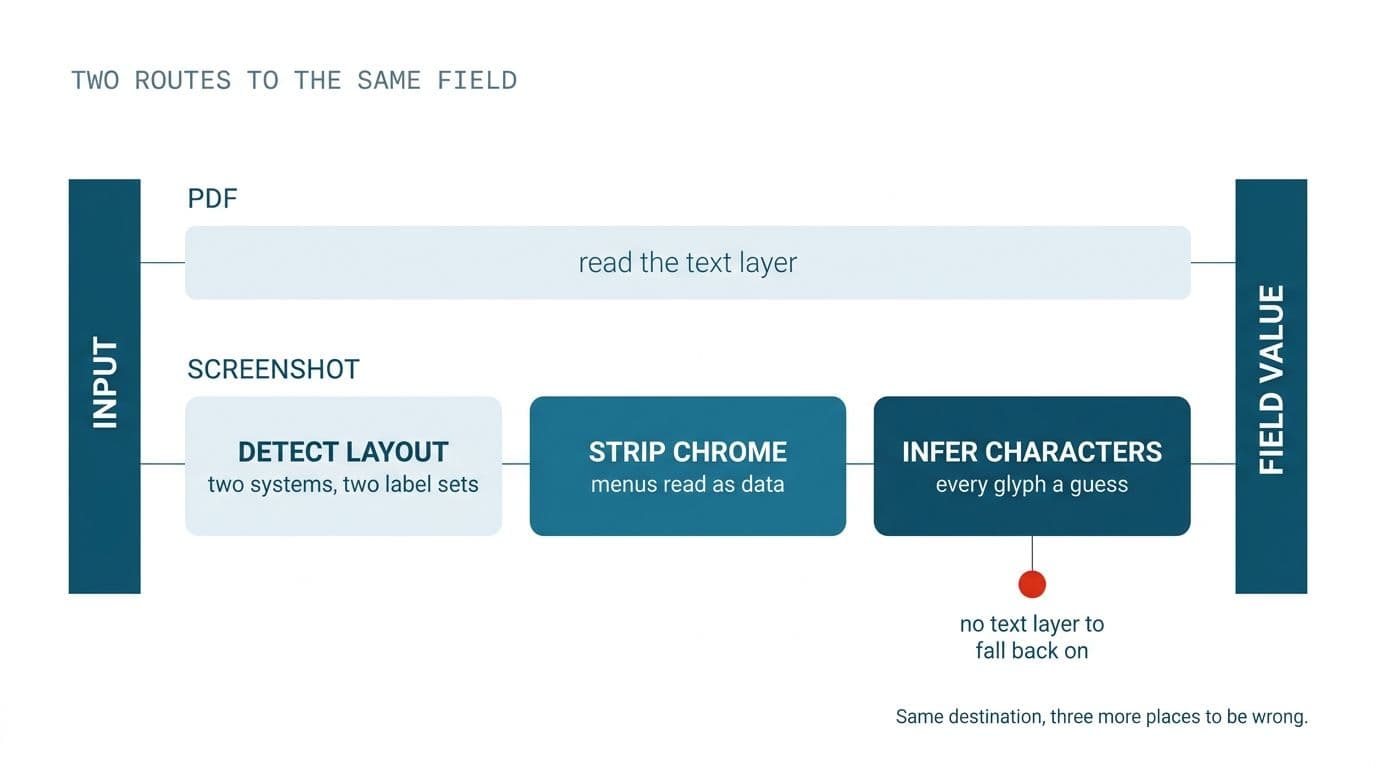
A PDF usually carries a text layer. You can extract characters directly and use OCR only as a fallback. A screenshot has no text layer at all. Everything is pixels, every character is an inference, and there is no ground truth to reconcile against.
The layouts are not stable either. Two pharmacy systems mean two sets of field labels, two arrangements on screen, two conventions for where the sig lives relative to the quantity. The capture includes interface chrome, menu bars, tab strips, sidebars, notification badges, all of which is text that OCR will happily read and hand to your parser as if it were prescription data. Crops are inconsistent because humans crop inconsistently. Scaling varies with monitor resolution. The artifacts are screen artifacts, not scan artifacts: subpixel antialiasing, compression banding from a resized PNG, a tooltip sitting over the field you needed.
The build consequences follow directly. You cannot use a document template, because there is no document. You need layout detection per source system, or field location by label proximity, finding the label "Qty" and taking the value in the region adjacent to it, which survives layout drift better than fixed coordinates. You also need a confidence score per field rather than per document, because a capture can be pin-sharp on the patient name and unreadable on the strength, and a single document-level confidence number averages that distinction away. Reading fields off a screen capture is a different problem from parsing a clean PDF, and it needs a different pipeline.
We have written separately about where automatic document recognition accuracy actually comes from, which covers the measurement side in more detail. For pharmacy prescription verification specifically, the short version is this: confidence below threshold on any of the nine fields should route to a human before it ever reaches the comparison stage. A flag generated from a low-confidence read is worse than no flag.
Every flag has to name its clause
Here is the requirement that separates pharmacy claim audit software from a comparison utility.
The audit risk rules do not come from the developer. They come from PBM provider manuals and audit manuals, uploaded into the system by the client. Each flag the system raises has to do two things: explain what the problem is, and identify the manual or policy section the judgment rests on.
Two architectural decisions follow from that, and one of them is the most consequential choice in the entire build.
Rules are data, not code. Payer manuals change when the payer changes them, on the payer's schedule, with no notice to you. If those rules are compiled into the application, every manual revision is a code change, a test cycle, and a release. If the rules are loaded, parsed, and versioned as documents, a manual revision is an upload. The second approach costs more to build and settles the question of whether the system is still worthwhile in year three. Version the rule set, stamp every flag with the rule version that produced it, and you can answer the question an auditor will eventually ask: what were you checking against on the date this claim went out.
The citation is the deliverable. In an audit conversation, an unexplained flag is worth nothing. Nobody can defend or dismiss it. The value is not "these two records differ". The value is "these two records differ on days' supply, and the manual's days-supply provision makes that a recovery risk on this drug class". That is a sentence a pharmacist can act on and a sentence that survives being forwarded to a payer. Retrieval augmented generation over the uploaded manuals is a reasonable way to get there, provided the retrieved clause is shown verbatim alongside the flag rather than paraphrased into something that sounds plausible and cites nothing.
Three output states, not two. Match confirmed. Difference flagged. Information missing.
That third state is not a courtesy. A blank field is neither a match nor a mismatch, and systems that force it into one bucket fail in both directions. Treat it as a match and you silently pass incomplete records. Treat it as a mismatch and you drown the reviewer in flags for fields that simply were not captured in the screenshot. Missing has its own handling and its own queue. It usually has its own resolution path too, which is frequently "recapture the screen" rather than "call the prescriber".
Because this data is protected health information, the deployment shape matters as much as the logic. Our secure AI and compliance architecture work exists for exactly this case: records that cannot leave the client's infrastructure, model endpoints with retention off, and an audit trail of who saw what.
How you test it before trusting it
Specs like this one often close by asking vendors to describe how they would build and test the system. That request is the tell. It means the buyer does not yet have a way to evaluate the answers they get back, and whoever gives them one has been genuinely useful whether or not they win the work.
So here is how to evaluate any prescription verification software, including anything we would build for you.
Measure accuracy per field, not per document. A document-level accuracy figure is an average across nine fields with wildly different difficulty. Quantity and refills will be near perfect and will drag the mean up over a sig parser that is struggling. Demand the breakdown. The number that matters is the worst field, not the average.
Report the two failure modes separately. A missed discrepancy and a false flag cost completely different things. A miss means a claim goes out with an exposure nobody caught. A false flag means a pharmacist wastes four minutes and trusts the tool slightly less. A single accuracy percentage conflates them and lets a vendor tune toward whichever is easier to hit. Ask for recall on true discrepancies and precision on raised flags, as two numbers, always.
Hold back a labeled set the rules were never written against. If the same prescriptions that shaped the rule set are also the ones used to validate it, the score is meaningless. Keep a set sealed until the build is finished.
Test derived fields with deliberately broken inputs. Construct prescriptions where quantity and directions cannot both be right. Feed in a DAW 1 with no supporting notation. Put a sig in that parses two ways. The system should either flag these or say it is not confident, and anything that confidently passes them is not ready.
The same request, in a different industry
An unrelated buyer, in eyewear, asked for the same architecture in different clothes. They wanted a validation engine that implements published professional standards, with the tolerance rules documented so it is always clear exactly why a given measurement was accepted or rejected.
Different vertical, identical shape. When the rules live in a document somebody else maintains and revises, the engine that reads those rules, applies them, and shows its working is the product. The extraction is plumbing. We will take the optical case apart properly in a later post.
What to settle before scoping this
Five decisions separate a six-week build from a six-month one. Settle them before anyone writes a proposal.
- Which payers' manuals are in scope at launch, and who owns keeping them current afterward. One manual is a different project from eleven.
- Whether the input is screenshots, API access to the pharmacy system, or both. API access removes most of the hard problems in section four. If it is available, use it.
- Whether directions are parsed or compared. Parsed is the right answer and the expensive one. Decide deliberately.
- What false-flag rate you will tolerate, agreed before the build rather than discovered in week three of the pilot.
- Who signs off a flag, and whether the tool blocks the claim or annotates it. Blocking is a much heavier compliance conversation.
Bring those five answers and we can scope pharmacy claim audit software with a fixed price named before work starts. Bring three of them and we will tell you which two are missing. If the honest answer turns out to be that API access makes most of this unnecessary, we will tell you that too. Book a free automation audit, or see how we work first.
Wondering what this would take against your own systems?
The audit costs nothing, and you keep the costed plan and the risks whether you go ahead or not.
Book a free automation audit
Arun Andiselvam
LinkedInI am a startup veteran who has built five brands. I sold the first, an SEO tool, for a six figure exit, and now build AI automation products for businesses. I bootstrapped every one of them from day one.