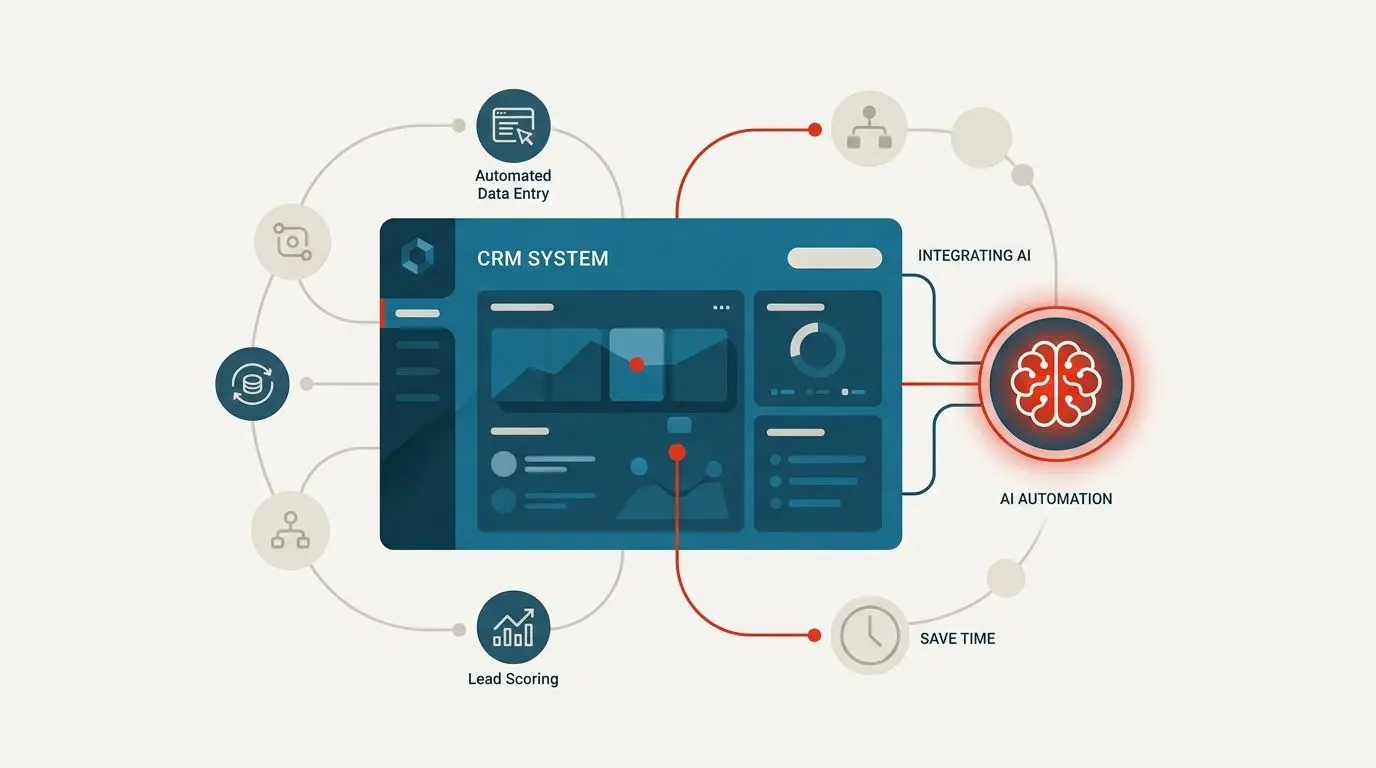
A controller at a 40-person company told us her month-end close runs six working days. Four of those go to work nobody would call accounting. Pulling statements, matching payment processor payouts against invoices, retyping supplier bills into the ledger, hunting the one line that sits $12.40 out across two entities. The judgment work, the part she trained for, takes a day and a half.
That gap widens as the business grows. When it gets wide enough, finance teams usually pick one of three options. Hire another person and absorb the cost permanently, pull an engineer off the product roadmap to write reconciliation scripts nobody maintains, or automate the repetitive half and keep the people for work that needs a human brain.
This guide is about the third option. An AI accounting automation system doesn't replace your ledger or your team. It sits alongside what you already run, reads the unstructured mess coming in from banks and suppliers, and writes clean entries through your existing software's API. A person still approves anything that touches money.
What follows covers what these systems actually do, where AI belongs and where it doesn't. We'll walk through a realistic timeline, how the cost behaves, and a decision tree for whether you should build at all. We'll also be candid about the cases where you shouldn't.
Why Off-the-Shelf Accounting Software Doesn't Fix Manual Entry
Most finance leads looking at this problem start by shopping for a new platform. That's the wrong first move, and it's worth understanding why before you sit through six vendor demos.
Your accounting software isn't the problem. Xero, QuickBooks, NetSuite, Zoho Books and the rest all hold a ledger perfectly well. The problem lives in the space before the ledger. The PDF invoice in an inbox, the bank feed with 400 lines of ambiguous merchant strings, the spreadsheet where someone tracks which entity owes which. Nothing in that space is structured, so your software can't do anything with it until a person turns it into rows.
Switching platforms moves the manual work. It doesn't remove it. You'll spend four months on migration, retrain the team, and still have someone retyping supplier bills in January.
Accounting automation done properly works the other way around. The automation layer sits beside your current ledger and pushes verified entries through its API. Your chart of accounts stays where it is, and your auditors see the same system they saw last year. If you later decide the underlying platform genuinely needs replacing, that's a separate project with its own business case, and it's rarely the one worth doing first.
There's also the lock-in question. Generic financial automation software is built for the average customer, which means your unusual cases get handled by workarounds. One bent-out-of-shape workflow in a packaged tool is survivable. Four of them, each with a note in a shared doc explaining the hack, means nobody except the person who set it up can explain the close to an auditor.
Adding intelligence to systems you already run is a smaller project than replacing them, and it's reversible. That matters when you're spending money on something your finance team has to trust by the second month.
What an AI Accounting Automation System Actually Does
Strip away the category language and there are three workflows that carry nearly all the value. Most finance teams need two of them.
Ledger and transaction categorization
A model reads each incoming transaction from your bank feed, payment processor or aggregator and decides which account it belongs to. Not by keyword matching, which breaks the first time a supplier changes its merchant descriptor. It reads the full context instead: amount, counterparty, timing, history of similar entries, any linked document.
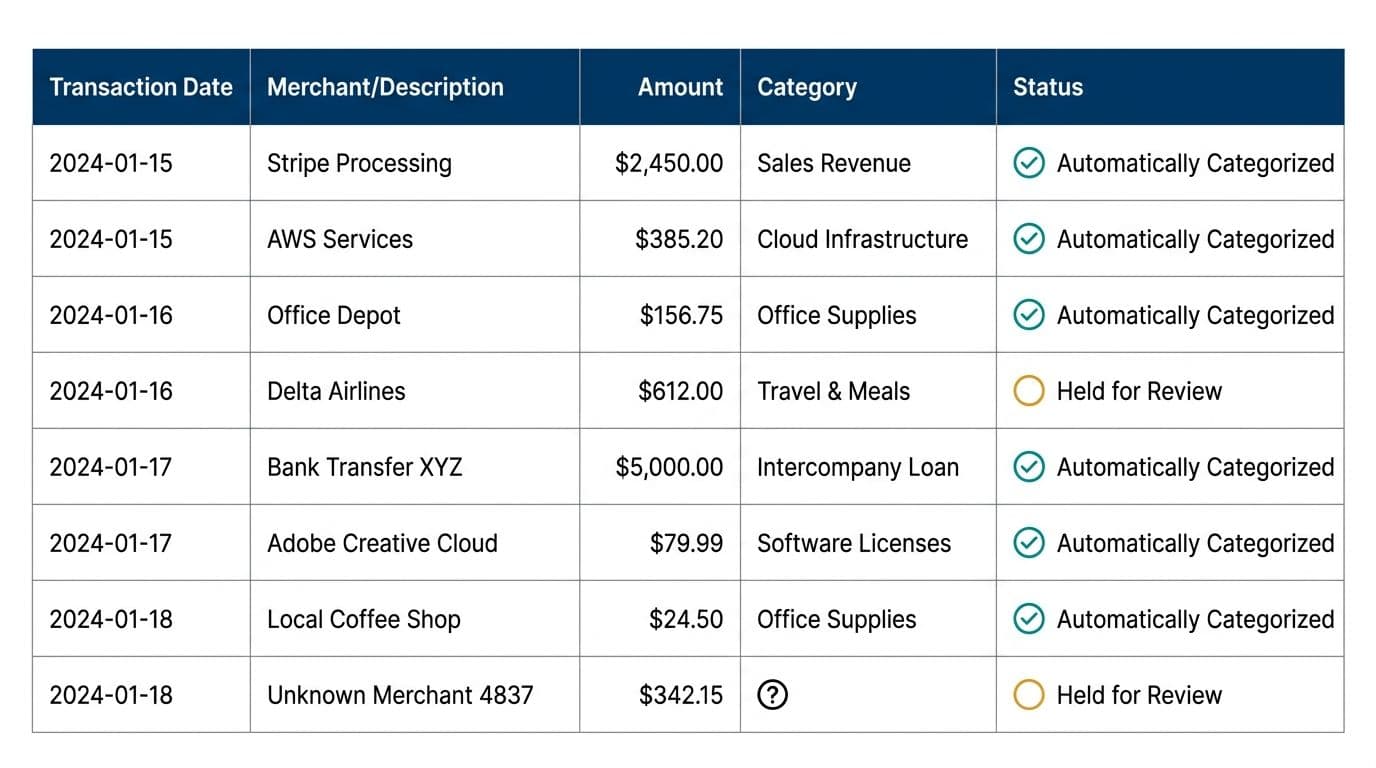
Then the important part. The model assigns the category. Ordinary code calculates every total, split and running balance. For multi-entity structures or shared balances, the recalculation fires on each entry and the numbers come from tested code, not from a language model's output.
Anything the model isn't confident about stops and waits for a person. In the ledger automation work we've built, a typical pattern is seven of eight transactions clearing without human involvement and the eighth landing in a review queue. That ratio is illustrative, not a promise, since it depends entirely on how clean your source data is and how clearly your rules are written down.
Invoice and receipt processing
Supplier bills arrive as PDFs, email attachments and phone photographs of crumpled receipts. A vision-capable model reads them and writes structured rows into your database. Vendor, date, line items, tax, total, purchase order reference where one exists.
Invoice automation is usually the easiest win to measure because you already know the volume. Count the documents your team keyed in last month, multiply by the minutes each one took, and you have the number. Reviewers only see what the model flagged as uncertain, which in practice is a fraction of the pile. Our document processing and OCR work covers the extraction layer, including handwritten and poor-quality scans where confidence thresholds matter most.
The same pipeline handles employee expenses. Expense automation AI reads the receipt, matches it against the card transaction, applies your policy rules in code, and routes anything over the threshold or outside policy to an approver.
Account and balance questions
Teams that serve customers or internal staff spend real hours answering the same twenty questions about balances, invoice status and payment dates. An AI assistant reading from your actual database takes most of those. The balance it quotes is queried from your ledger, not generated by the model, and anything that isn't in the database goes to a person rather than being guessed at. That's the design rule in our AI customer support automation builds, and in finance it isn't optional.
The Model Reads, The Code Calculates
This is the single design decision that separates accounting automation you can trust from a demo that embarrasses you in an audit.
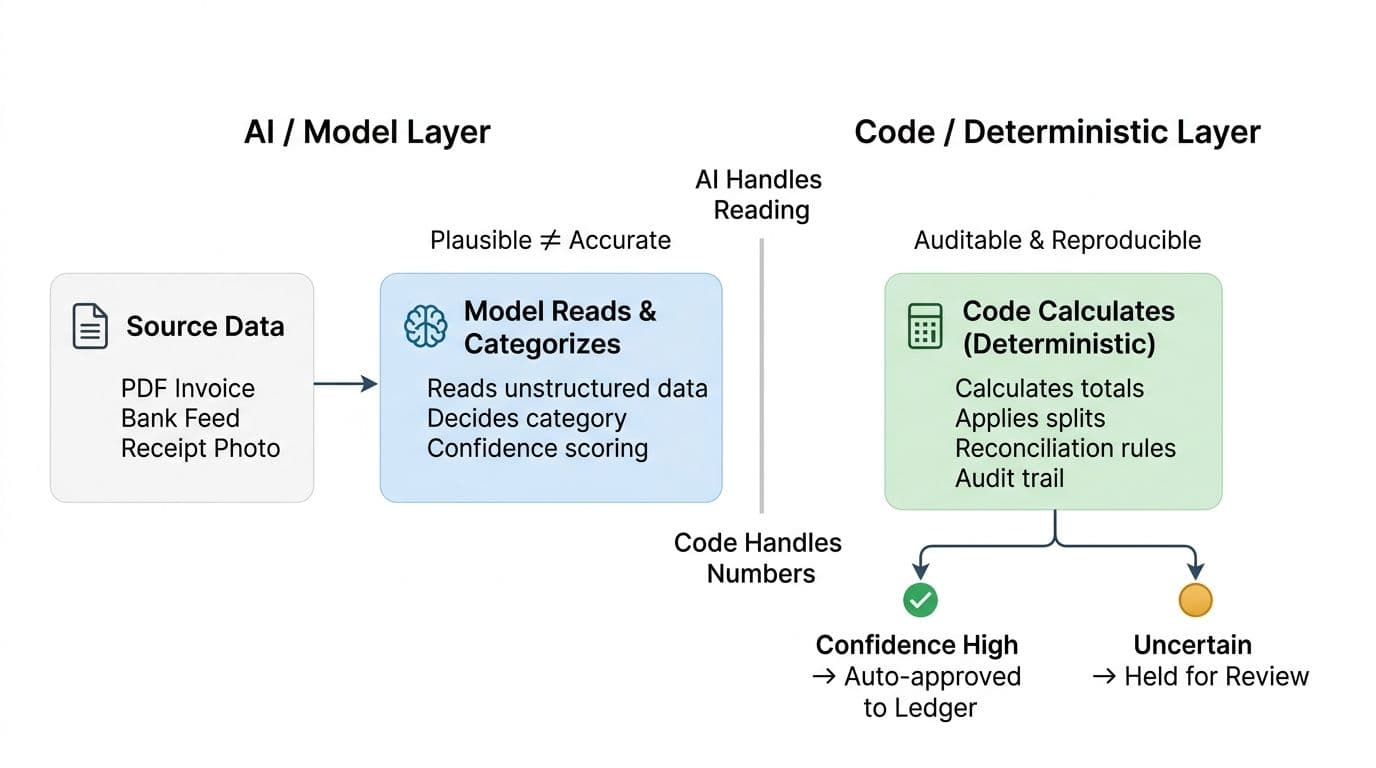
Ask a language model for a total and it will produce something plausible. Plausible is fine for a draft email. It is not what a ledger needs. Models are probabilistic by construction, which means arithmetic is the one job you should never hand them.
So the split is clean. AI handles reading and sorting: pulling fields out of a PDF, interpreting a bank feed string, deciding which cost center a charge belongs to, spotting that two entries are probably the same transaction. Every number after that point comes from ordinary code, written in Python or TypeScript, unit tested, version controlled, reviewable by anyone on your team or ours.
Reconciliation automation lives entirely on the code side. Matching rules, tolerance thresholds, FX conversion, rounding treatment, the order in which partial payments get applied. All of that is logic you can read, test and change. If an auditor asks why two entries matched in March, the answer is a rule with a version number, not a model's reasoning.
Every decision carries an audit trail: which source document, which rule or model call, what confidence score, who approved it, when. Data retention stays off on the enterprise endpoints we use, so your financial records aren't used to train anyone's model. We'll say plainly what we can't say. No deployment is breach-proof, and no model is accurate without review. The protection is architectural, which is to say a person signs off anything that touches money or a customer.
For shared ledgers and inter-entity debt, the split matters more again. We wrote about the mechanics of automating loans between group entities if you run that structure. The arithmetic there compounds, and a model is simply the wrong tool for compounding arithmetic.
A Realistic Timeline: Three Weeks Per Workflow
Most proposals you'll read for accounting workflow automation quote quarters. Ours quote weeks, and the sequence is the same every time.
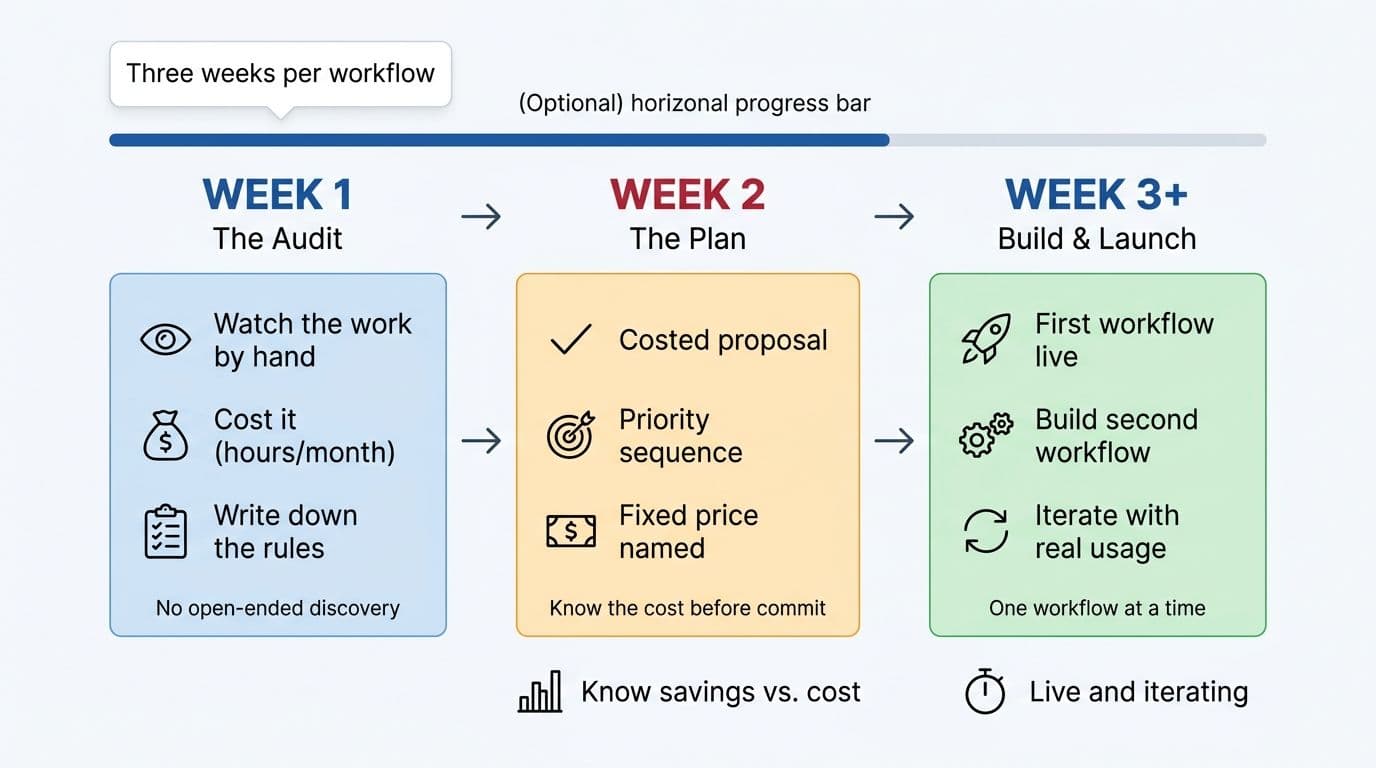
- Week one is the audit. We watch your team do the work by hand. Not a workshop, not a requirements document. Someone from our side sits with the person who does reconciliation on a Tuesday and records what actually happens, including the parts that aren't in any process doc. We cost the work: hours per month, loaded salary, and the delay cost when a close slips. We then write down your reconciliation rules, because a model cannot infer a policy nobody has stated. Half the value of the audit week is discovering that three people apply three different tolerance rules and nobody noticed. That's a finding worth having whether or not you build anything.
- Week two is the plan. You get a costed proposal with a fixed price named before any build starts. It says which workflow to automate first and why, what the monthly time saving looks like, what the build sequence is, and which integrations carry risk. There's no open-ended discovery phase and no hourly meter running while scope expands. If the audit shows your volumes are too low to justify a build, we tell you that and you've spent nothing further. We'd rather say no than sell you a system you'll resent paying for.
- Week three onward is build and launch. The first workflow goes live and your team uses it while the second one is being built. Real usage surfaces things no specification catches: the supplier who sends two invoices in one PDF, the bank feed that posts weekend transactions on Monday. Those get fixed against real data.
Running one workflow at a time keeps the review queue honest. Launch invoice automation and ledger automation together and nobody can tell you which one is producing the exceptions. More on the sequencing in how we run projects.
What Accounting Automation Costs and What Moves the Number
The audit exists to put a number on both sides before you commit to either. You should know your current monthly cost of manual work and your build cost in the same week.
You're paying for middleware and API work, not a platform license. There's no per-seat fee and no annual renewal that climbs 18 percent because your transaction volume grew. You own the code, the cloud accounts and the API keys at the end of it.
Three things move the build cost:
- Rule complexity. A single-entity business with one bank account and clear approval thresholds is a small build. Four entities, intercompany eliminations and custom split logic is a bigger one.
- Number of integrations. Each system you connect to carries its own cost: the accounting API, the payment processor, banking connections, a CRM, a payroll provider. Banking integrations are usually the slowest because of authentication and sandbox access.
- Exception handling. Deciding what happens when the model is unsure, who sees it, how it gets resolved and how that resolution feeds back. This is where thin implementations cut corners and where the finance team feels it six weeks later.
On return, three workflows reliably carry the most weight. Transaction categorization wins on volume, invoice automation wins on minutes per document, and multi-entity reconciliation automation wins because it's where errors cost the most to find later.
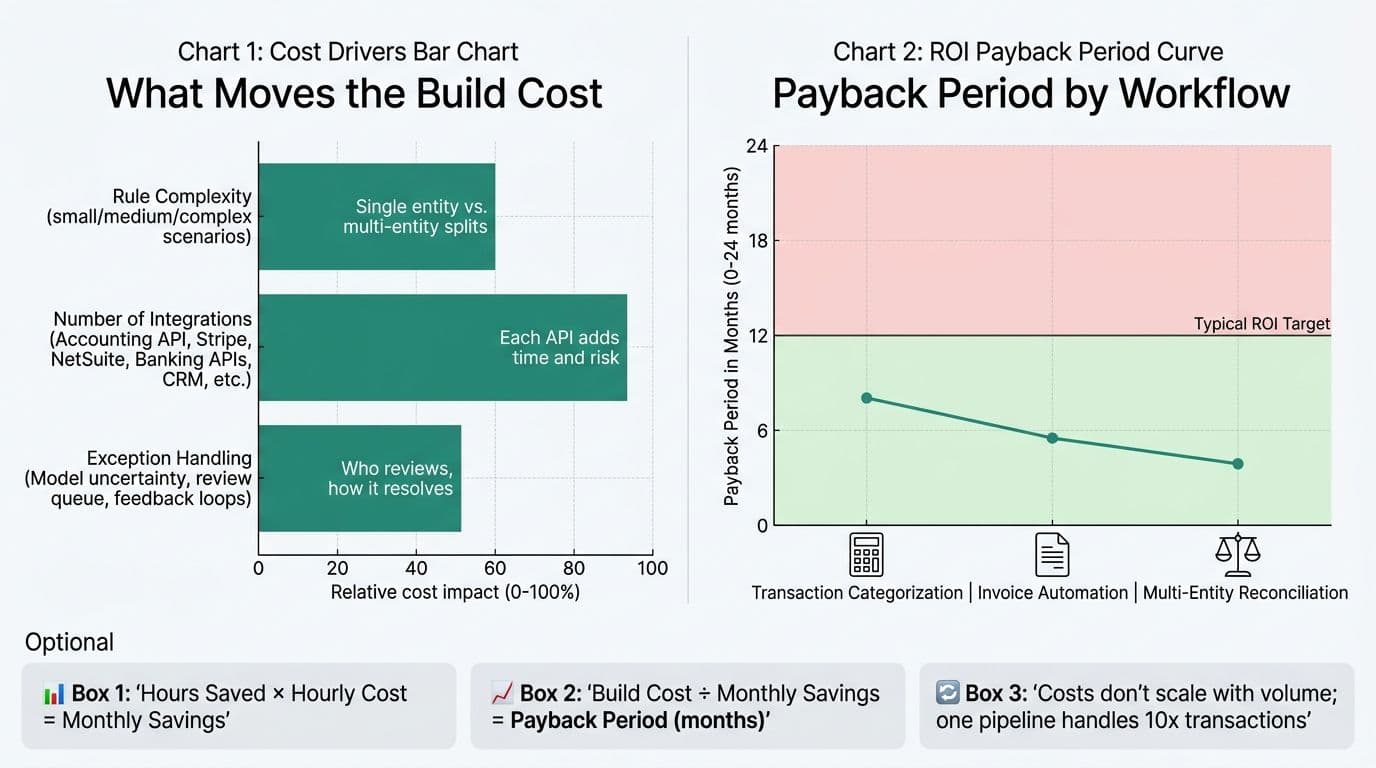
The arithmetic is unexciting and that's the point. Hours saved per month multiplied by loaded hourly cost gives you a monthly figure. Divide the build cost by it. If the payback period is longer than about a year, the workflow probably isn't the right first one.
The structural argument matters more than the first-year number. Hire a person to handle 10,000 transactions a month and 100,000 transactions needs more people. One automated pipeline handles both, with the same review queue and the same rules, and the marginal cost is API calls. Model spend does rise with volume, but it rises as fractions of a cent per document, not as headcount.
Build or Buy: A Decision Tree for Finance Teams
We'd rather you make this call properly than buy from us by default. Here's the honest version.
Buy packaged financial automation software when:
- You need broad coverage across AR, AP, general ledger and reporting, and you don't have a system you're committed to keeping.
- Your processes already match how the software thinks. If you look at the default workflow and nothing jars, that's a real signal.
- You want vendor support and a product roadmap, and you accept the lock-in that comes with it.
Build a custom AI accounting automation system when:
- Your finance processes are genuinely unusual: shared balances, multi-entity splits, revenue recognition that doesn't match any template.
- You need automation to sit beside the ledger you already run rather than replace it.
- You want to own the code, the accounts and the keys, with no renewal conversation.
- Your transaction volume is growing faster than a per-transaction pricing model can stay reasonable.
- Your records can't leave your infrastructure, which means private deployment or private LLM fine-tuning on hardware you control.
For most finance teams with any real complexity, custom wins on one quality: it stays explainable. A packaged tool bent into shape stops being explainable at the first unusual case, and that case always arrives during an audit. Our financial and data automation work is built so the person running the close can read the rule that produced an entry. Sometimes the answer is neither. If your team loses four hours a month to this, fix the process and keep your money.
Questions to Ask Before You Sign Anything
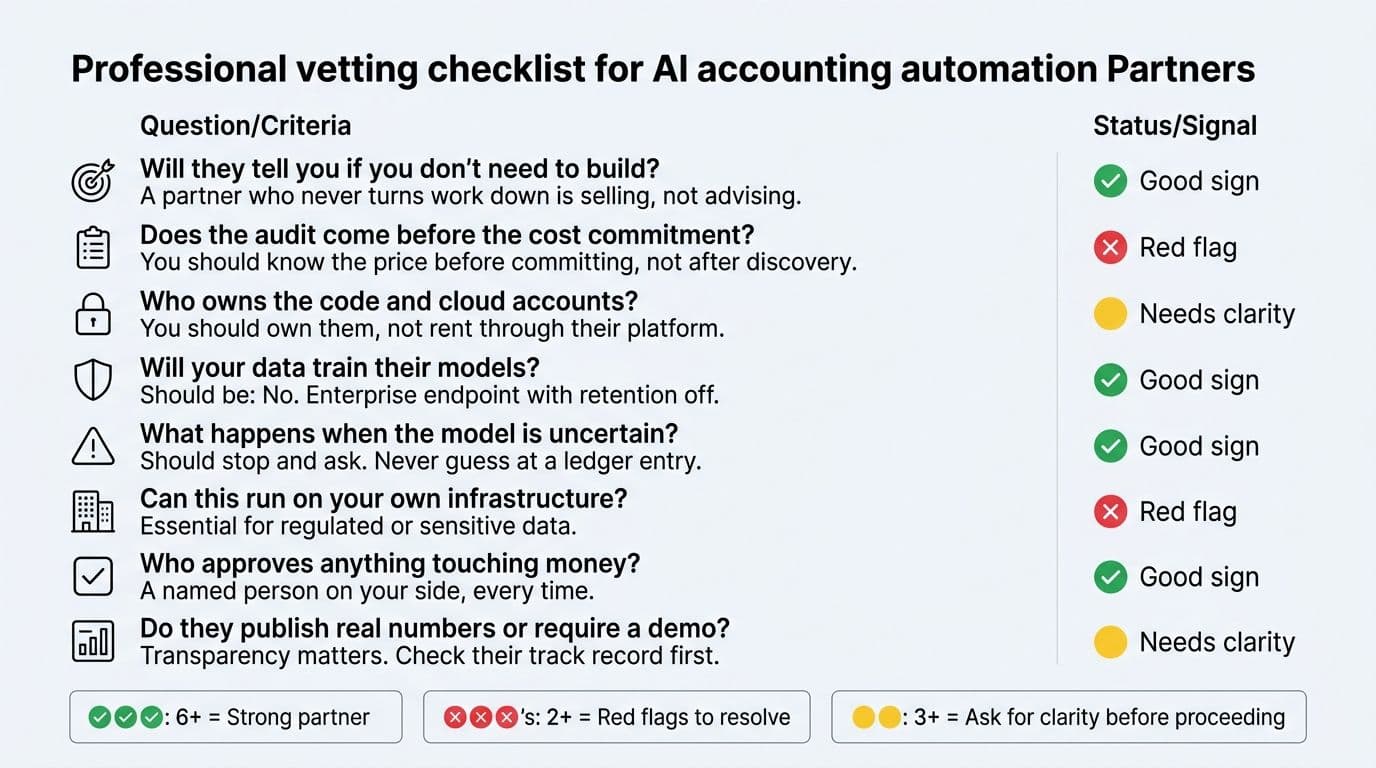
Whoever you talk to, including us, these answers tell you more than a demo will.
- Will you tell me if I don't need to build? A partner who has never turned work down is selling, not advising.
- Does the audit come before the cost commitment? You should know the price before you commit, not after a discovery phase bills out.
- Who owns the code and the cloud accounts? You should. If the answer involves their platform, you've bought a subscription with extra steps.
- Will our data train anyone's model? On enterprise endpoints with retention off, no. Ask them to put it in writing.
- What happens when the model is uncertain? It should stop and ask. Any system that guesses at a category to keep its automation rate looking good is a liability in a ledger.
- Can this run on our own infrastructure? For regulated data, that needs to be a yes, not a maybe.
- Who approves anything that touches money? A named person on your side, every time.
- Do they publish real numbers or require a demo first? We've been building software for eighteen years with a team of 150, across 1000+ clients in 50+ countries, and our product division Appkodes sits at 4.4 out of 5 on Trustpilot across 29 reviews. You can check that before anyone calls you.
One more. Ask who will actually be in the room, since our builders travel to clients. You won't be handed to an account manager who relays your questions to someone you never meet.
Where to Start
You now have the three things that decide this. The architecture that works: the model reads, the code calculates, a person approves. The cost shape: audit first, fixed price named before the build, no platform license. The timeline: roughly three weeks per workflow, one at a time.
The real question was never whether to use AI. It's whether an AI accounting automation system built around your actual process beats a packaged tool built around someone else's. For teams running multiple entities, shared balances or anything a template doesn't cover, custom usually wins, and it wins on explainability more than on price.
Start by counting. Pick your heaviest workflow, whether that's invoice automation, expense automation AI or the reconciliation that eats your month-end, and write down the hours it took last month. That number decides whether any of this is worth doing.
Then book a free automation audit and we'll cost your specific workflows against it. If the numbers don't support a build, we'll say so. If you want context on the finance and payments work we've done first, our fintech and finance practice page has the detail.
Wondering what this would take against your own systems?
The audit costs nothing, and you keep the costed plan and the risks whether you go ahead or not.
Book a free automation audit
Arun Andiselvam
LinkedInI am a startup veteran who has built five brands. I sold the first, an SEO tool, for a six figure exit, and now build AI automation products for businesses. I bootstrapped every one of them from day one.