
It's the twenty-eighth of the month. Your accounts payable folder has 400 PDFs in it. Three of them are the same bill sent twice by a vendor who changed their trading name last quarter, and two people on your team are typing invoice numbers into an ERP that already has the purchase order sitting in it. Nobody on that team is doing anything difficult. They're just doing a lot of it, under a deadline, and the errors they make will surface two weeks later as a payment that doesn't match a statement.
That's the job invoice OCR automation is meant to take off your desk. Optical character recognition reads the text off a scanned or digital invoice. A model pulls out the fields you care about, and the result lands in your finance system without anyone retyping it.
Here's the part most vendor pages skip. Extraction is the easy half. The hard half is everything that happens after the fields come out: matching, validating, deduplicating and posting. A tool that reads invoices perfectly and hands you a pile of unmatched records has moved your team from typing to checking. This guide covers both halves, including the specific checks and routing rules that decide whether your team gets its week back or just gets a new screen to stare at.
What invoice OCR automation actually does in one pass
A working pipeline has five stages. It helps to know which stage is failing when something goes wrong.
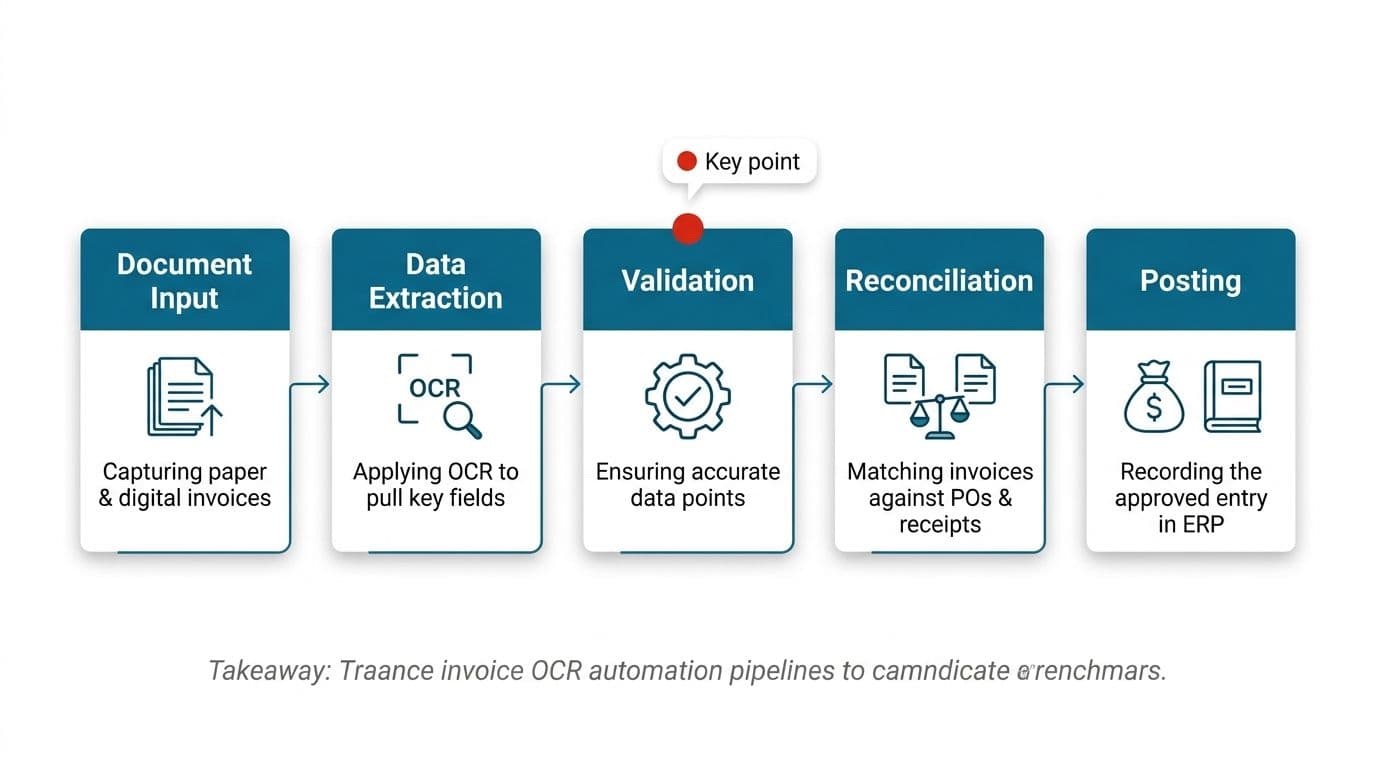
Ingestion. Invoices arrive by email, supplier portal, shared drive or post. The system picks them up, logs where each one came from, and keeps the original file for audit.
Classification. Before anything is extracted, the document is identified: invoice, credit note, statement, or remittance advice. Getting this wrong is expensive, because a statement processed as an invoice becomes a duplicate payment risk.
Text recovery. Digital PDFs already carry a text layer, so OCR isn't needed there. Scans and photos do need it, and this is where image quality decides everything downstream. A skewed phone photo of a crumpled receipt is a different problem from a clean supplier PDF.
Field extraction. Header fields come out first: vendor, invoice number, date, due date, currency, totals. Line items, tax breakdowns and anything in a table are harder, and most tools are noticeably weaker there.
Output and posting. Structured data goes into your ERP or accounting system, usually with a confidence flag attached.
What the pipeline does not do is understand your ledger. It reads what's printed.
Why extraction alone fails without downstream reconciliation logic
The usual approach is to buy an extraction tool, point it at the AP inbox, and expect posted invoices on the other side. What comes out instead is a stream of accurate strings that nothing has agreed with.
An extracted invoice number is a string. It becomes useful when it's matched against a purchase order, a goods receipt, a contract line or a bank statement entry. An extracted total is a number until it's reconciled against what was ordered and what was received.
This is why extraction on its own rarely moves the needle on processing time. The keystrokes went away. The judgment calls didn't.
Downstream reconciliation logic is the set of rules that turns extracted fields into a decision. Does this invoice match an open PO within tolerance? Has this vendor been paid for this period already? Does the currency match the vendor's default, and if not, was there a contract change? Each rule either resolves automatically or raises an exception for a person.
Build those rules and the extraction output has somewhere to go. Skip them and you've bought a very good typist who hands everything back to you for a second opinion.
Validate extracted totals with arithmetic, not model confidence
Confidence scores tell you how sure a model is about the characters it read. They say nothing about whether the document adds up. A model can be very confident it read 8,340.00 when the printed figure was 3,340.00, especially on a faxed or heavily compressed scan.
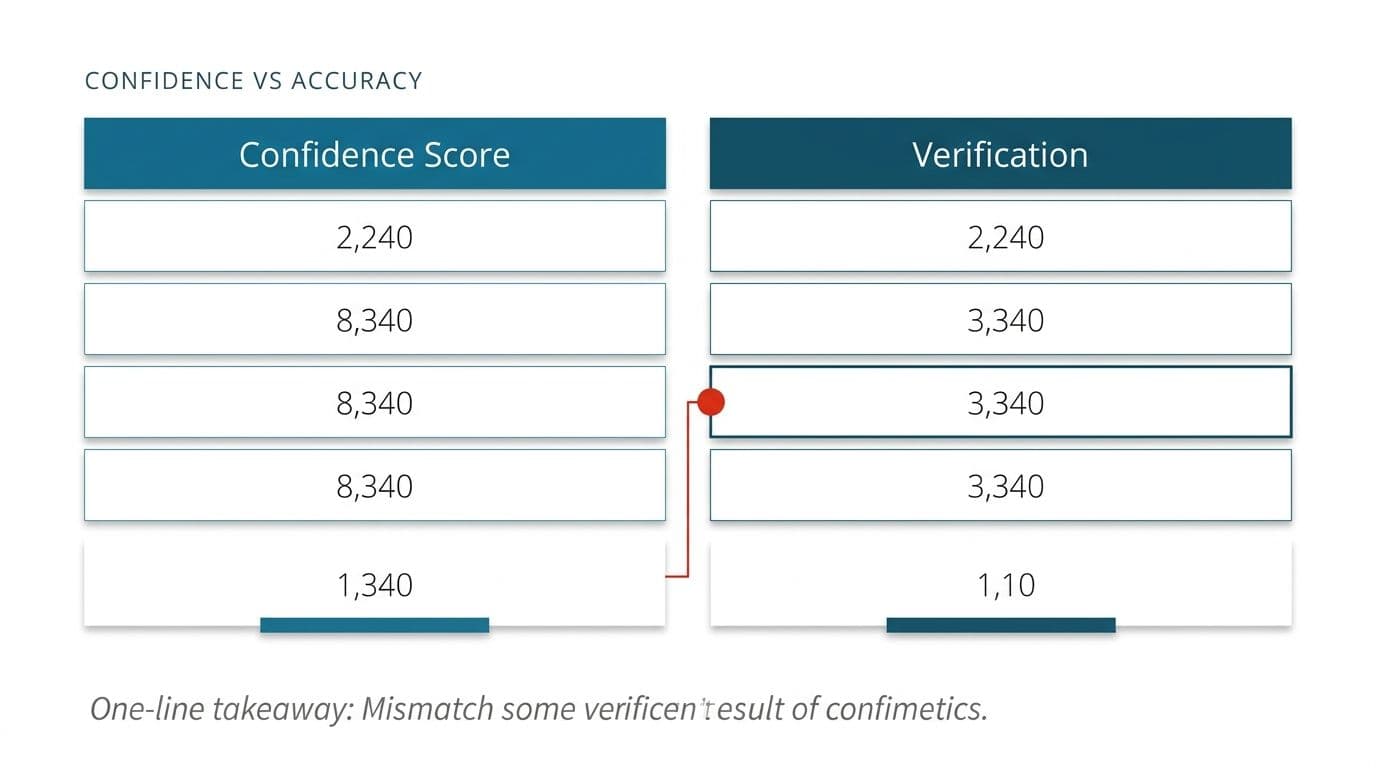
Deterministic math catches what confidence misses. Three checks cover most of it:
- Line items sum to subtotal. Add every extracted line total and compare it to the extracted subtotal.
- Subtotal plus tax equals total. Simple, and it catches both tax extraction errors and total misreads.
- Quantity times unit price equals line total. Run this per line. A line that fails tells you exactly which row was misread.
These checks are cheap to run and they're not probabilistic. Either the arithmetic holds or it doesn't.
There's a second benefit. When a document passes all three checks, you have a defensible reason to post it with less human review. Not because a model was confident, but because the numbers agree with each other. That's the foundation of any sensible routing policy, and it's what lets you reduce review volume without flying blind.
Build a vendor alias table before month-end close
OCR reads printed text faithfully. Vendors are not faithful about what they print. Acquisitions make it worse, because the old brand keeps appearing on invoices long after the registration changed.
The fix is boring and it works. Before your next close, build a vendor alias table. That's a mapping of every name variant you've actually seen to one canonical vendor record. Pull the variants from the last year of invoices rather than guessing. Include punctuation differences, suffixes like Ltd and Limited, and the names your team has been mentally translating without telling anyone.
Then anchor matching on something more stable than the name. A tax registration number, a bank account, or a supplier portal ID changes far less often than a brand does. Use the name as a secondary signal, not the primary key. Give the table an owner and a queue.
This single step removes a surprising share of the exceptions that teams blame on extraction quality. The reading was correct. The matching had nowhere to land.
Telling a legitimate correction apart from a duplicate
Duplicate detection is where automated AP systems most often embarrass themselves, in both directions. Too loose and you pay the same bill twice. Too tight and you block a corrected invoice that the supplier reissued because the first one had the wrong PO reference on it.
The two cases look almost identical on the surface, with the same vendor, the same amount, and close dates. The difference is intent, and intent isn't printed on the page in a field you can extract.
What separates them in practice:
- Invoice number lineage. A reissue usually carries a new number with a suffix, or references the original in a note field. A true duplicate carries the exact same number.
- Arrival channel. The same file arriving twice from the same mailbox within minutes is almost always a resend, not a new liability.
Write these as explicit rules and keep both documents linked in your records, so the audit trail shows what was superseded and why. Then put a person on the approval.
Dates, currencies and cross-border invoice sets
Date extraction is the field that quietly breaks multi-country AP. On domestic invoice sets with consistent templates, it's reliable.
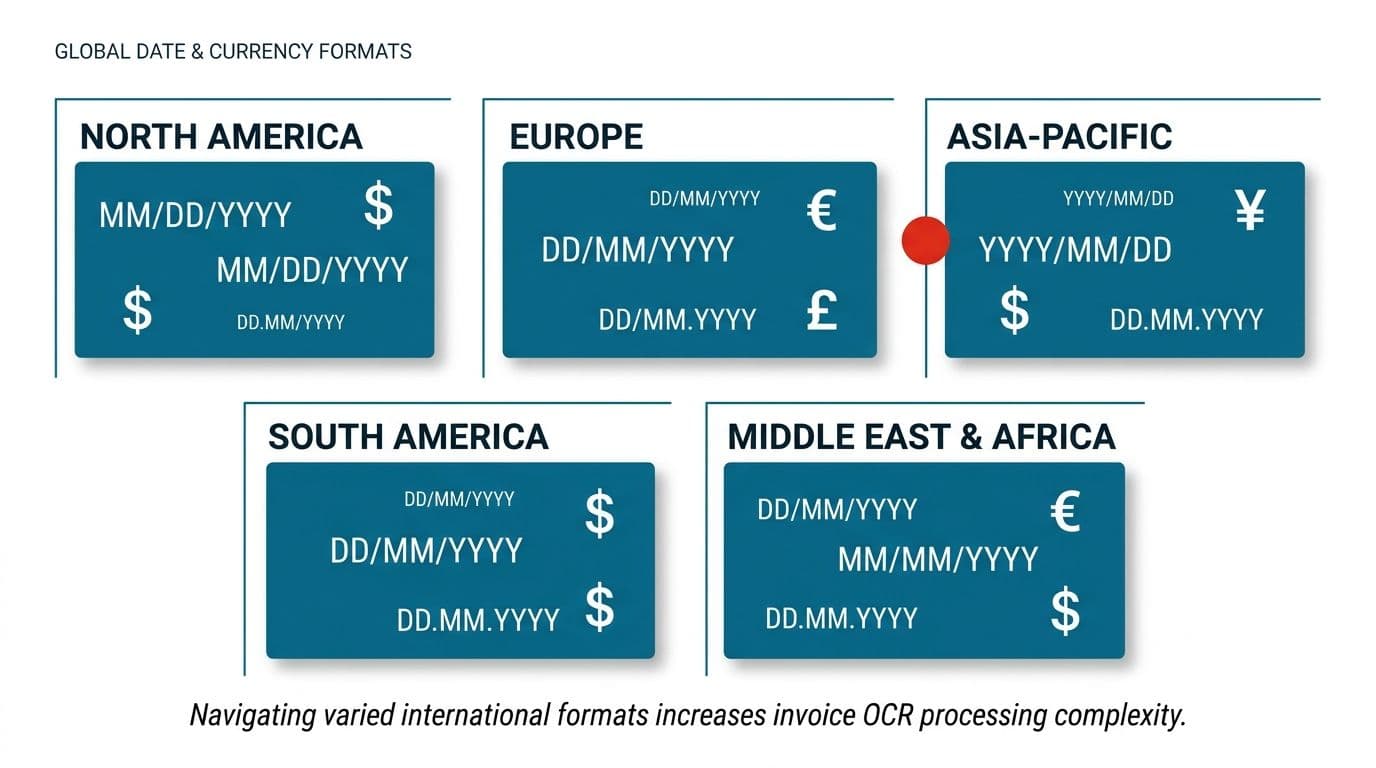
The consequence isn't a cosmetic error. A misread date moves an invoice into the wrong period, shifts a due date, and costs an early payment discount or creates an accrual nobody can explain later.
Spanish-speaking finance teams searching for reconocimiento automatico de facturas run into the same wall, often harder, because invoices from Spain and Latin America commonly combine day-first formats, written month names, and regional tax breakdowns in one document. The underlying technology is the same. The locale assumptions baked into a default configuration are not.
Three practical defenses:
- Set a locale per vendor, not per system. You already know where each supplier invoices from.
- Cross-check the invoice date against the email received date. An invoice dated after it arrived is a parsing error, not a time machine.
- Derive and verify. If terms say net 30 and the extracted due date is 45 days out, one of the two fields was read wrong.
Currency deserves the same treatment. A symbol that could be dollars from four countries needs the vendor record to resolve it, not the glyph on the page.
What manual invoice processing really costs per invoice
Cost conversations about AP usually stall because nobody agrees on the number. The figure worth arguing over isn't the average, but the spread.
Processing a straightforward invoice by hand carries a real cost once you count the time to open it, key it, route it for approval and file it. That's a number most finance leads find believable. The one that changes decisions is the exception cost. When a field extraction error or a mismatch forces someone to chase the supplier, re-open the PO and re-approve, the cost of that single invoice climbs sharply.
That gap is the whole business case. Cutting the base cost of a clean invoice saves a few dollars. Cutting the number of invoices that become exceptions saves several times that, per document, and it saves it on the invoices that were ruining your team's week anyway.
A concrete shape for this: consider a team managing around $180,000 of monthly ad spend across several platforms. That generates roughly 23 invoices per billing cycle, and reconciling them by hand against platform reports and card statements takes something like 14 hours a month. That's not a huge invoice count, but it's a meaningful chunk of a person's month, spent entirely on matching numbers that two systems already hold.
So when you model the return on invoice OCR automation, model it on exception rate rather than volume. Ask any vendor what share of documents currently land in a human queue for their existing customers, and what the queue costs to clear.
How document reconciliation automation closes the loop
Extraction gives you fields. Document reconciliation automation decides what those fields mean against everything else you hold.
In accounts payable that usually means a three-way match: invoice against purchase order against goods receipt, within tolerances you set for quantity and price. Beyond AP, the same logic handles bank statement lines against ledger entries, intercompany balances across entities, and subscription charges against contracted rates.
The design decisions that matter are the tolerances and the fallbacks. What price variance passes without review? What quantity shortfall is acceptable against a partial delivery? When a match fails, does the system try a looser second pass, or raise the exception immediately? Teams who set these once and never revisit them end up either paying variances they shouldn't or drowning in false exceptions.
For finance leads running multiple entities, document reconciliation automation also has to handle the case where one transaction appears in three places with three different reference formats. That's a mapping problem, not a reading problem, and it's solved with the same discipline as the vendor alias table: pre-map the variants you know about, and queue the ones you don't.
We build this layer as part of how we approach document processing and OCR work, because a pipeline that stops at extraction hands the client a half-finished system. The reconciliation rules are where the hours actually come back, and they're specific enough to your chart of accounts that no off-the-shelf default will get them right on day one.
Getting to a 10% to 15% human review rate with smart routing
Full automation of AP is a bad goal. A review rate low enough that your team can clear the queue in a morning is a good one, and in practice that means routing something like 10% to 15% of invoices to a person while the rest post on rules.
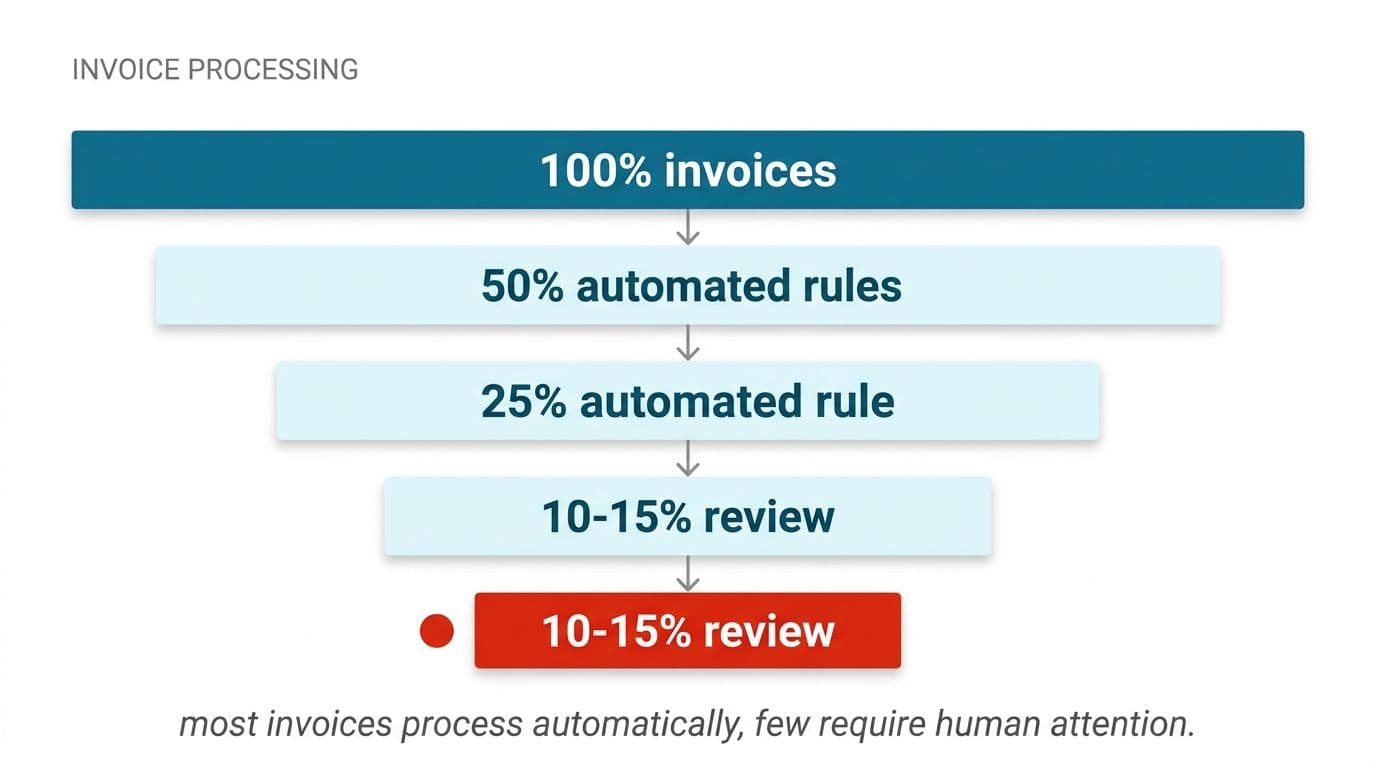
Routing works on risk, not on confidence alone. The conditions worth routing on:
- Failed arithmetic. Any invoice where the line items, tax and total don't agree.
- New or recently changed vendors. First invoice from a supplier, or any invoice following a bank detail change. This is where payment fraud lives.
- Amount thresholds. Set them by cost centre, not globally. A large figure in one department is routine in another.
- One-of-a-kind references. No PO found, or a PO matched outside tolerance.
- Duplicate suspicion. Near-matches against anything paid in the last few cycles.
- Low-confidence critical fields. Specifically the bank account, total and vendor. A low-confidence line description matters far less.
Everything that clears all of these posts automatically with a full audit trail: original file, extracted fields, which rules fired, what matched.
Two things keep the rate honest. Review the auto-posted population periodically, sampling a slice to confirm the rules are still right. And review the exception queue for patterns, because a vendor that generates exceptions every month is a template problem you can fix once rather than a cost you pay forever.
Route ad platform and card spend away from PO matching
Standard AP workflows assume a purchase order exists. Advertising platforms, cloud providers, software subscriptions and most card spend have no PO and never will. Push them through PO-matching logic and every single one becomes an exception, which is how a team ends up with a review queue that's mostly noise.
The fix is cheap, and it happens at ingestion, before extraction. Route by sender domain.
This keeps two kinds of logic from contaminating each other. Your PO matching stays strict, because everything in that stream genuinely should have a PO. Your non-PO stream stays quick, because it isn't failing a test that was never relevant.
It also fixes the reconciliation pain in the ad spend example above. When 23 platform invoices per cycle arrive pre-sorted and pre-matched against platform reports, most of those 14 monthly hours stop being necessary. What's left is checking the handful where the platform billed something the report doesn't show, which is the only part that ever needed a human.
Set the domain list up front and review it quarterly. New tools get bought constantly, and an unrecognized sender should land in a queue rather than in PO matching by default.
Tax breakdowns, multi-rate lines and automated rule research
Tax is where extraction quality and reconciliation logic both get tested. Header totals are usually read well. Tax tables are not. Multi-rate invoices, reverse charge notes, withholding lines and tax summaries split across pages are the documents that force manual correction even on otherwise good pipelines.
Treat tax as its own validation step rather than a field. For each line, the applicable rate should be derivable from the vendor's jurisdiction, your entity's registration and the item category. If the printed rate doesn't match the derived one, that's an exception worth raising, because the error could be yours or the supplier's and both matter.
Rule research is a genuinely good use of a language model, with a hard boundary. A model can read current guidance for a jurisdiction, summarize what changed and draft a rule update for your table, but it should not apply that rule silently. A person with tax responsibility confirms the change, and the rule table carries a date and an owner for each entry. We won't promise an automated pipeline produces correct tax treatment, and no honest vendor will. What it does is stop treatment from going stale quietly and flag the invoices that don't fit the rules you've approved.
Keep the rule table versioned. When a filing is questioned months later, being able to show which rule applied on which date, and who approved it, is worth more than the processing time you saved.
Is OCR a solved problem now, or still advancing?
Both, depending on which part you mean.
Character recognition on clean, printed, high-resolution documents is mature. The accuracy gains left there are small, and no tool is going to win your business on that basis alone. If your invoices are digital PDFs from established suppliers, treat raw character accuracy as table stakes.
Document understanding is where the work still is, and it has moved noticeably in the last couple of years. Layout-aware models and vision language models handle structure far better than the rule-and-template systems that preceded them, which means less per-vendor template configuration and better handling of invoices the system has never seen. That's a real shift for teams with long tails of small suppliers.
What still fails: tables that continue across page breaks, nested tax summaries, handwriting, stamps and signatures overlapping printed fields, and photographs taken at an angle in bad light. Most tools extract header fields reliably and struggle with everything structural, which is exactly why teams who expected hands-off processing end up verifying line items by hand.
The practical read for a buyer is that tool choice matters less than pipeline design, but it still matters. If you're comparing engines, our breakdown of how the leading OCR engines compare on real document sets covers where each one holds up and where it doesn't.
Five steps to automate invoice data entry
A methodical rollout beats a big-bang switch, and this sequence is reproducible across entities.
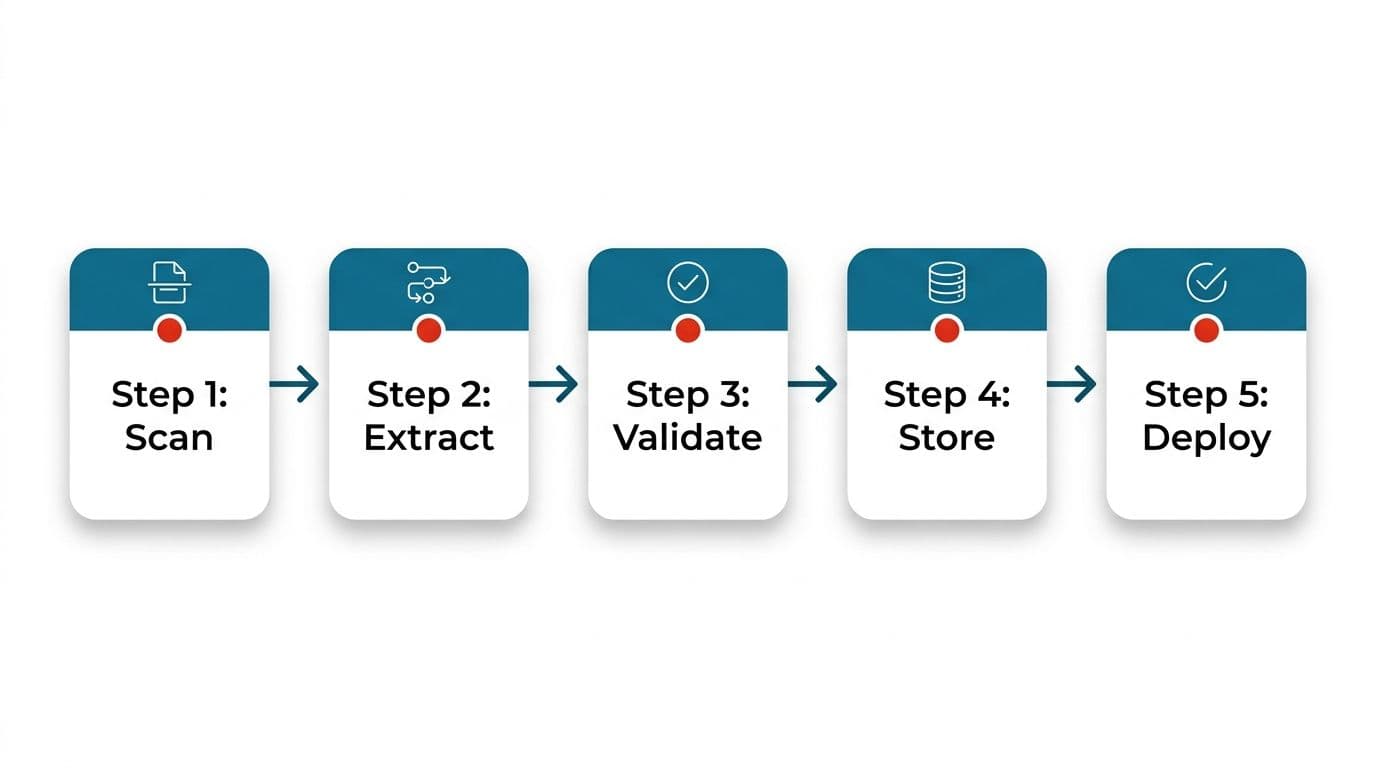
One: collect a real sample set. Pull several hundred invoices from the last few months, weighted to reflect your actual mix including the ugly scans. Any accuracy figure measured on clean samples will not survive contact with your inbox.
Two: define the field schema and the validation rules. Decide exactly which fields you need, which are mandatory, and what each one is checked against. Write the arithmetic checks and the tolerances now, not after go-live.
Three: run in shadow mode. Process live invoices through the pipeline while your team continues manually, and compare outputs daily. This surfaces vendor-specific failures and lets you build the alias table against reality rather than assumptions.
Four: wire into the finance system with an exception queue. Posting is the point where mistakes become expensive, so start with a conservative routing policy that sends more to review than you eventually want. Tighten it as the data supports it.
Five: measure exception rate and tune monthly. Track what percentage lands in review, grouped by cause. Each regular cause is a fixable rule, a template issue, or a supplier conversation.
Across years of work with clients in a wide range of countries, the projects that go badly are almost always the ones that skipped step three. Shadow mode is unglamorous, and it's the cheapest insurance in the sequence.
Free tools, off-the-shelf software, or a custom build
There are several capable free OCR tools available for converting documents, and for some teams that's genuinely the right answer. If you process a small number of invoices a month, or you need occasional one-off conversions, a free tool plus a spreadsheet costs nothing and works fine. We'd rather say that than sell you a project you don't need.
Off-the-shelf AP automation fits when your process looks like the process the product was built for: one entity, one currency, standard PO matching, an ERP the vendor already integrates with. You'll configure rather than build, and you'll be live quickly.
The case for a custom build shows up when the nearly-fitting product starts dictating your process.
For teams who need more than a contractual assurance, private deployment is the answer. You own the code, the accounts and the keys either way.
What to check before you commit, and the limits worth knowing
Invoice OCR automation is not a system you turn on and stop thinking about. Before you sign anything, get straight answers on a short list.
Ask what happens to your documents and where they're processed. Ask whether the accuracy figures quoted were measured on clean samples or on invoice sets like yours. Ask what the current human review rate looks like for comparable customers, and what happens when a match fails at two in the morning on the last day of the month. Ask who owns the integration code afterwards.
Then accept the limits honestly. No pipeline reads every invoice correctly. Arithmetic validation catches internal inconsistencies, not an invoice that's wrong but internally consistent. Reconciliation rules reduce judgment calls, they don't remove them. We don't promise error-free ledgers and we don't automate the approval of anything that moves money without a person signing off. That constraint is deliberate, and it's the one clients thank us for later.
If you want a straight read on your own situation, start by counting two things: how many invoices you process monthly, and what share currently need someone to chase something. That ratio tells you more about the return available than any vendor demo will.
You can also read how we run projects from first call to handover if you'd rather see the process first.
Wondering what this would take against your own systems?
The audit costs nothing, and you keep the costed plan and the risks whether you go ahead or not.
Book a free automation auditHitasoft
LinkedInHitasoft has built software since 2008, for companies that mostly do not have an IT department. These pieces are written by the people who do the integrations rather than by anybody in marketing.