A controller we spoke with last month had a process that looked fine on paper. Supplier invoices arrive by email. Someone runs them through a scanner tool, and the extracted text goes into the ledger. In practice, every third invoice came out with the line items merged into one blob, the tax split missing, and the vendor name picked off the wrong part of the header. So two people spent their mornings fixing what the software had already "read."
That is the gap most OCR buyers run into. Marketing pages quote character-level accuracy on clean printed pages, but your documents are scanned at an angle, stamped, faxed at some point in their life, and full of tables. The most accurate OCR software for a neat typed contract is often a poor choice for a crumpled delivery note, and the reverse is also true.
So this is a ranked list with the tradeoffs left in. Nine options, each with who it suits, what it genuinely does well, what it costs, and one drawback worth knowing before you commit. We build document pipelines for a living, which means we have opinions, and it also means we have reasons to be careful about what we promise. Where a free tool will do the job, we say so.
Quick picks before the detail
Best overall for business documents: ABBYY FineReader PDF. It handles mixed layouts and multi-column pages better than most, and the price sits where a small finance team can justify it.
Best for high-volume invoice and purchase order flows with no engineering team: Rossum, if the annual spend fits your budget.
Best free option for developers: PaddleOCR, specifically the non-VL version when your documents are printed rather than handwritten.
Best for turning documents into structured output for an LLM pipeline: Docling.
Best for occasional scanning on a phone: Genius Scan or Adobe Scan, depending on whether you already pay Adobe.
Best when your documents are messy, your fields are specific, or the data cannot leave your infrastructure: a custom pipeline, which is where our own work sits.
What accuracy actually means in an OCR accuracy comparison
Before the list, one distinction changes how you read every vendor page. Character accuracy is how many letters the engine got right, while field accuracy is how often the invoice total ended up in the field marked "total." They are not the same number, and the second one is the only one your finance team feels.
A tool can read every character on a page correctly and still produce useless output. That happens when it flattens a three-column table into a single run of text, and we see this constantly. Most OCR tools struggle with documents containing tables or mixed layouts, and the extraction leaves someone doing manual cleanup afterwards. That defeats the point of automating the step at all.
So a useful OCR accuracy comparison tests three things on your own documents: did it read the characters, did it keep the row and column structure, and did it put the right value in the right field. Run the same twenty pages through every candidate and look at the output side by side. Hands-on testing on your trickiest documents tells you more in an afternoon than any benchmark table, because benchmark sets are clean and your archive is not.
One more thing worth knowing: a tool's weakest point is usually a specific document type, not the tool overall. Handwriting, rotated scans, dot matrix print, and multi-page tables each break different engines in different ways.
1. ABBYY FineReader PDF
Who it suits: Finance, legal, and operations teams who process a steady flow of printed business documents and want a desktop tool that works without a developer.
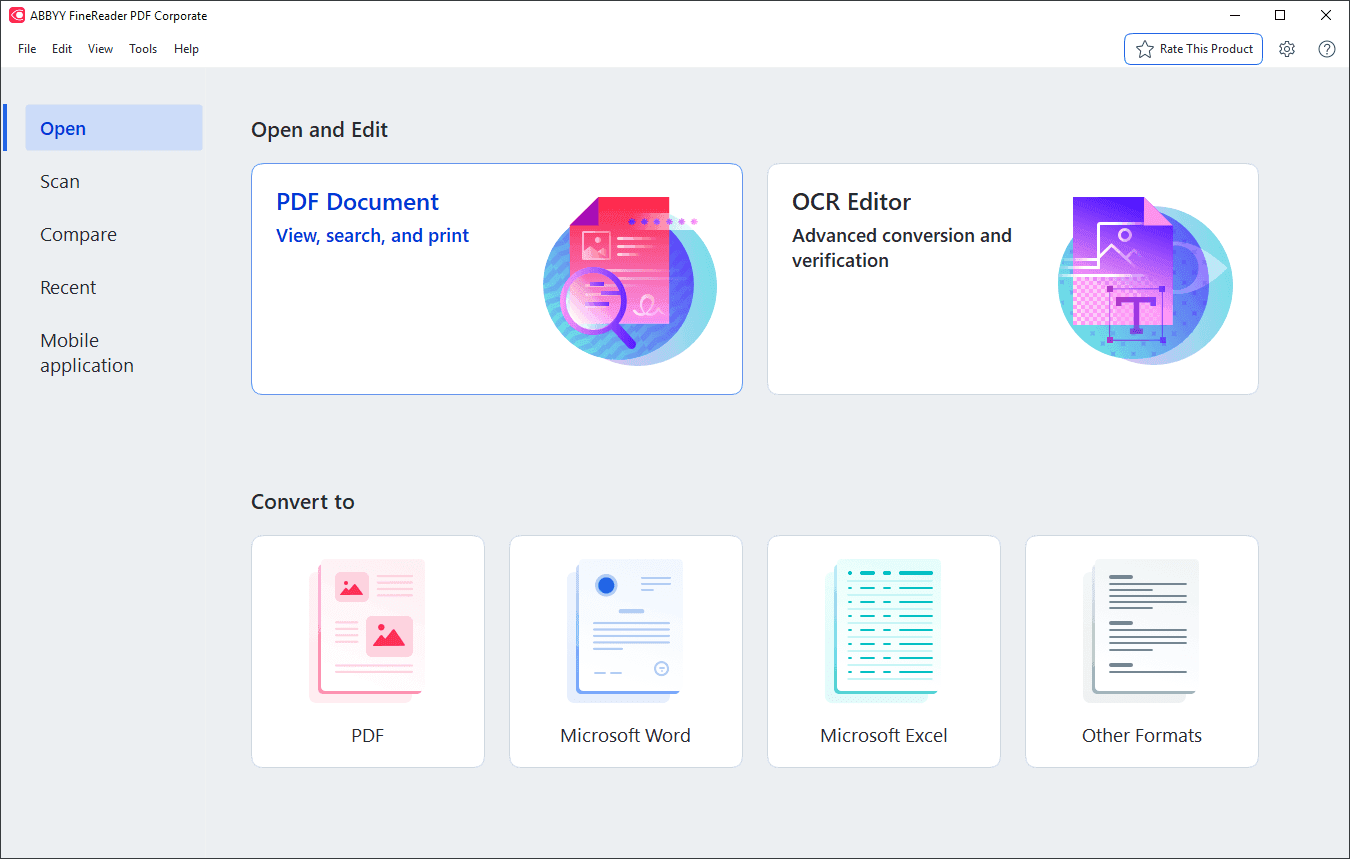
What it does well: Layout retention is its strongest feature. Multi-column pages, headers, footnotes, and tables come out resembling the original rather than a jumble, which matters more than raw character accuracy when you are converting a PDF into something editable. It handles a wide set of languages, and its PDF editing and comparison tools mean you often do not need a second product alongside it. For straightforward OCR for invoice processing at modest volume, it holds up.
Price: From $69 per year.
One real drawback: It is built around a person sitting at a machine. Once you want thousands of documents processed overnight and pushed into an accounting system automatically, you are into server licensing and integration work, and the simplicity that made it attractive disappears. There is also a ceiling on how well it handles genuinely degraded scans, no matter how you tune the settings.
If you want one product to cover the general case and you are not building an automated pipeline, this is the most sensible starting point in the best OCR software for documents category.
2. Rossum
Who it suits: Mid-size and larger companies running high volumes of invoices, purchase orders, and remittance advice through accounts payable, with budget authority and no in-house ML team.
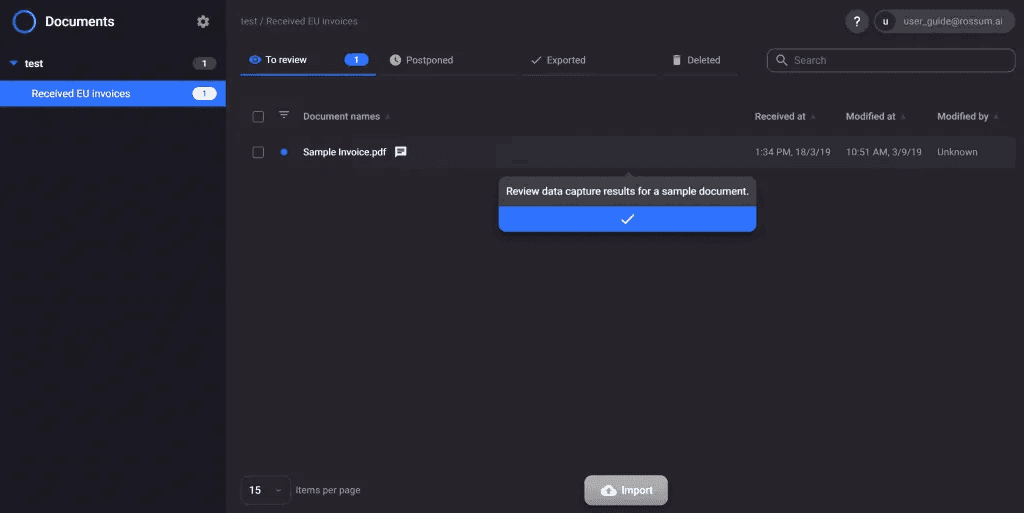
What it does well: It is built for one job rather than being a general reader. The model learns from corrections your team makes, so field accuracy on your specific supplier formats improves over time without anyone writing rules for each vendor.
The validation interface is genuinely good. A human reviews low-confidence fields in a layout that shows the source document next to the extracted values, which keeps the checking fast. For teams whose main question is OCR for invoice processing rather than general document reading, it answers that question directly.
Price: From $18,000 per year.
One real drawback: The price is the drawback, and so is the shape of it. Below a certain document volume the per-document cost is hard to defend. The platform is also opinionated about the document types it handles well. Push it toward contracts, medical forms, or engineering drawings and you are using a specialist tool outside its specialism.
3. Hitasoft Document Processing and OCR
Who it suits: Teams whose documents break the off-the-shelf tools, whose fields are specific to their business, or whose records cannot leave their own infrastructure. Typically fintech, healthcare, and multi-entity finance operations.
What it does well: We build the pipeline around your documents instead of asking your documents to behave. That usually means combining engines rather than picking one: a fast reader handles the clean pages, a vision model takes the handwritten and degraded ones, and validation logic checks extracted totals against line items before anything reaches your ledger. Output goes straight into the systems you already run, as structured records rather than text files. For regulated work we deploy privately, so documents and model calls stay inside your boundary. Our document processing and OCR work covers the extraction, the validation, and the handoff into your accounting or case management system. A person approves anything touching money or a customer, which is a design decision rather than a limitation, because we will not claim an extraction pipeline is accurate without review.
Price: A fixed price named before work starts, quoted after we look at your documents. No hourly creep.
One real drawback: It is a project, not a download. If your documents are ordinary printed invoices in one format, a product off this list will do the job for less money, and we will tell you that rather than take the work. Custom only pays when the off-the-shelf tools have already failed on your real files.
4. PaddleOCR
Who it suits: Developers who want strong extraction quality without a license fee and are comfortable running Python and managing models.
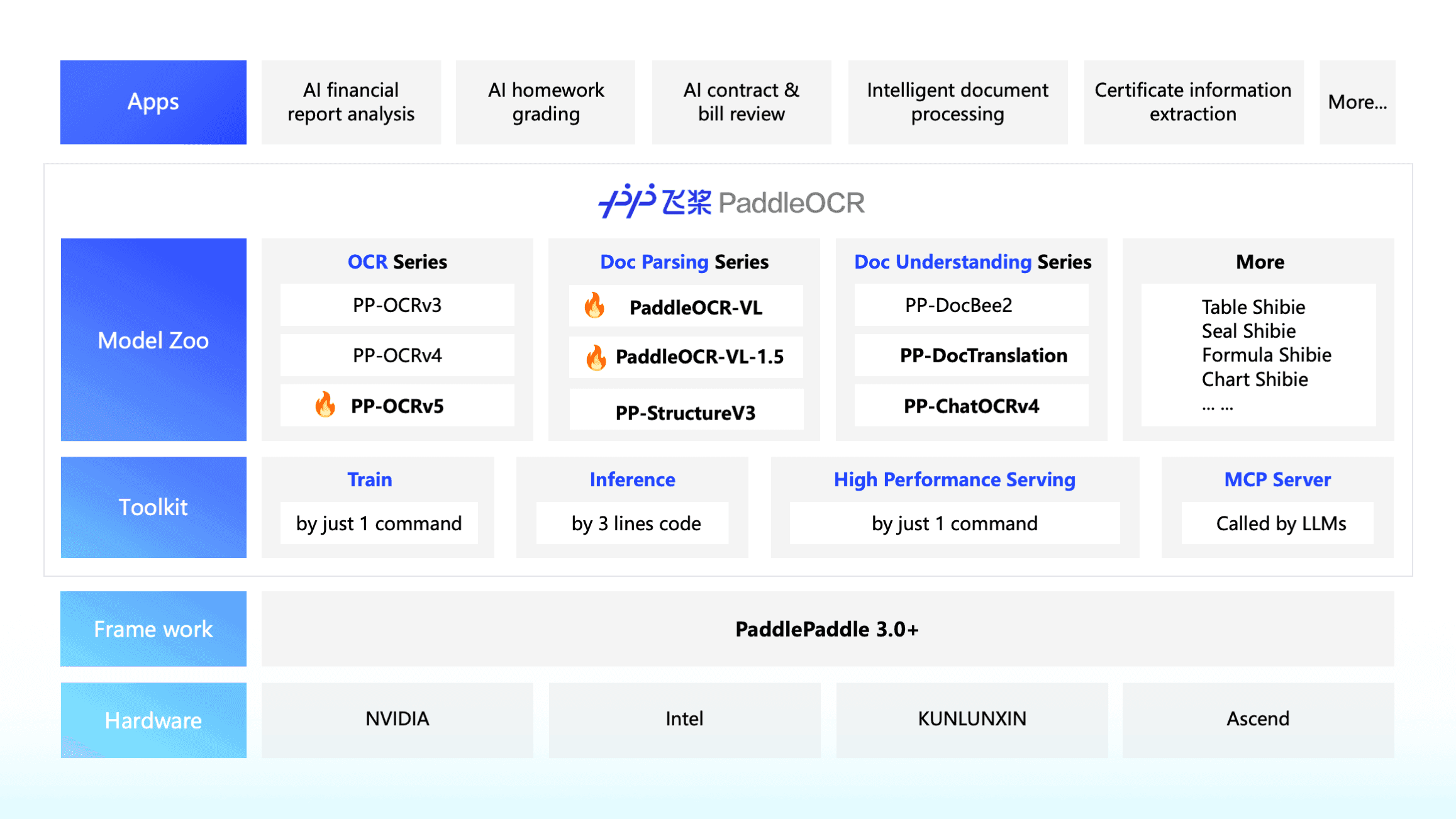
What it does well: The standard, non-VL version is the quiet winner of the free tier. On printed documents without handwriting it delivers excellent results at a fraction of the compute the vision language variant needs, which matters enormously when you are processing batches rather than single pages. Language coverage is broad, detection of rotated and curved text is solid, and the table recognition module is better than the free alternatives.
Price: Free and open source.
One real drawback: The VL pipeline, which is the version people reach for when they want the highest quality, is painfully slow. Accuracy is reasonable, but throughput becomes the bottleneck on bulk document processing, and you will feel it the first time you queue a few thousand pages. The practical approach is to route handwriting-heavy documents to the heavier model and everything else to the standard one, which means you are now maintaining two paths.
Setup is also not trivial. Dependency management and model downloads take a working session before you see your first result.
5. DeepSeek OCR
Who it suits: Teams already running AI-powered OCR tools in a Python stack who want a current-generation model without a per-page bill.
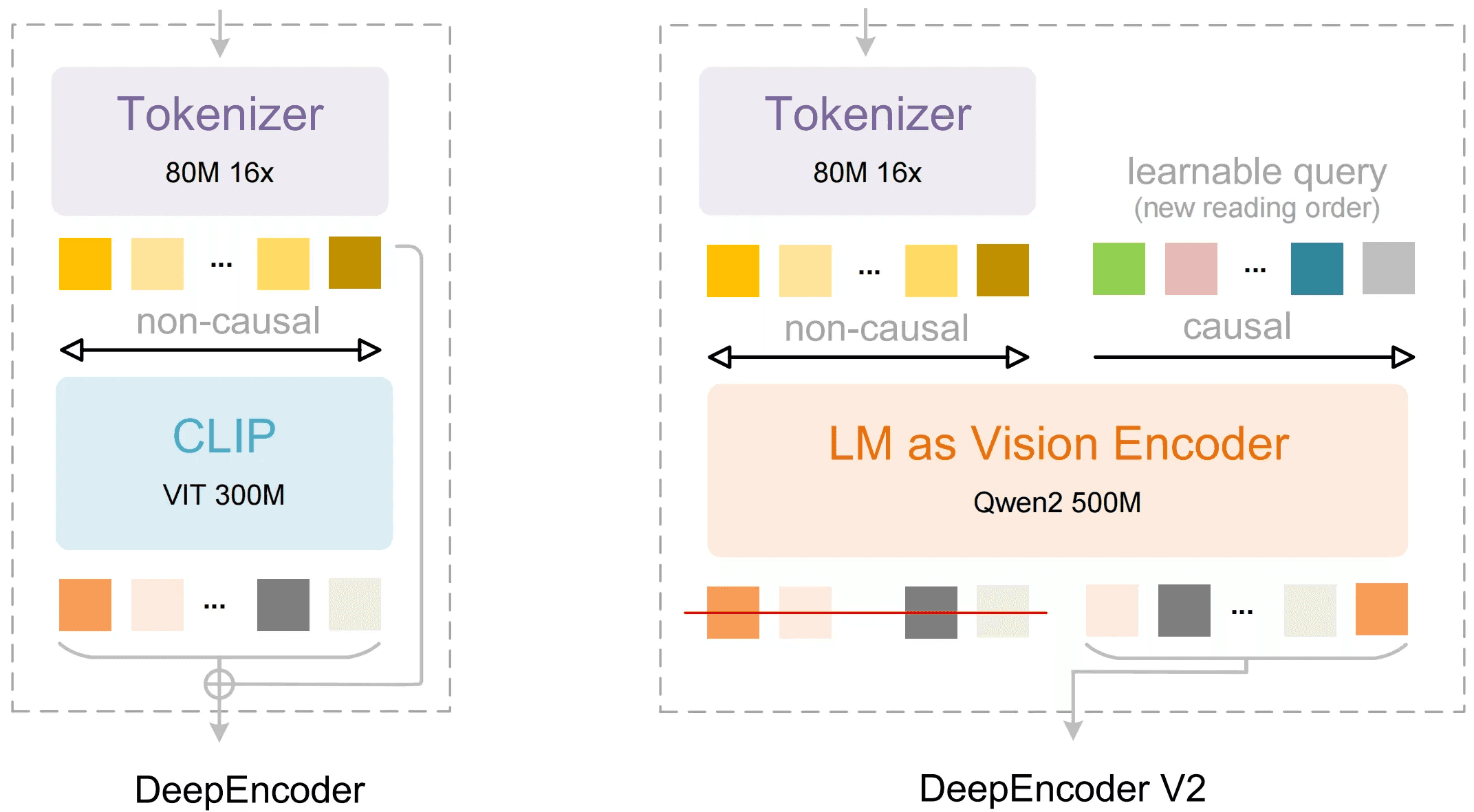
What it does well: It belongs to the newer family of models that read a document the way a person does, taking in the whole page rather than hunting for text boxes. That approach copes better with unusual layouts, inline diagrams, and documents where text and structure are entangled. It can produce markdown-style output directly, which saves a conversion step if your destination is an LLM pipeline or a structured database.
Price: Free to use, with the usual caveat that free means you pay in GPU time.
One real drawback: Models in this category move quickly, and what is current now will be superseded. If you build tightly around one model's output format, expect rework when you upgrade. There is also the general caution with any AI-powered OCR tool: these models produce fluent output that is subtly wrong, inventing a plausible value instead of flagging an unreadable one. That failure mode is more dangerous than a garbled character, because it looks correct, and validation in code is not optional here.
6. Docling
Who it suits: Engineering teams building retrieval augmented generation (RAG) systems or document analysis pipelines who need clean, structured representations of PDFs rather than raw text.
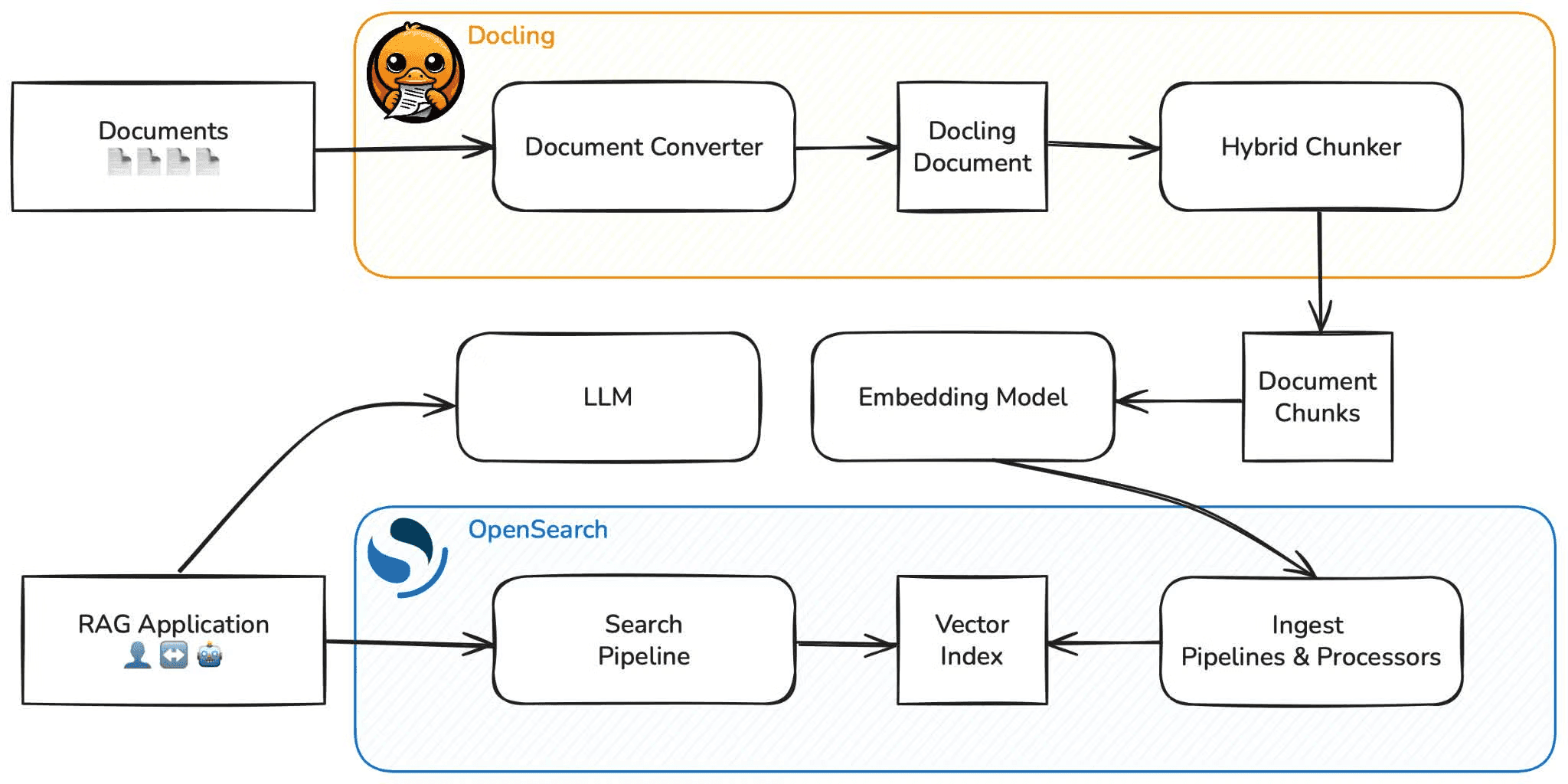
What it does well: It treats document structure as the product. Headings, reading order, tables, and figures come out as a structured document object you can serialize to JSON or markdown, which is exactly what you need when the next step is chunking for a vector database or feeding an LLM. It handles a range of input formats, not just PDF, and the output is consistent enough to build on.
Price: Free and open source.
One real drawback: It is a document conversion library, not a field extraction product. It will tell you there is a table and give you its cells, but it will not tell you which cell holds the invoice total, and you still write that layer. For teams expecting a finished accounts payable tool, that gap is larger than it first appears.
Paired with a model for the field-level reasoning, it is one of the better foundations for AI-powered OCR tools in a custom build.
7. Adobe Scan
Who it suits: Individuals and small teams who need to capture paper on a phone and get a searchable PDF out, especially if the company already pays for Acrobat.
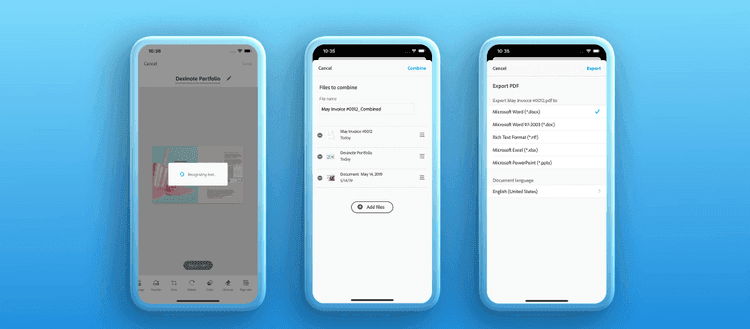
What it does well: Capture quality is the point. Edge detection, deskewing, and glare handling are good enough that a phone photo of a receipt comes out looking scanned, and the OCR layer makes it searchable. The handoff into Acrobat and the rest of the Adobe stack is tidy, which is a real advantage if your documents end up there anyway.
Price: $12.99 per month.
One real drawback: It is a capture tool with OCR attached, not an extraction platform. You get a searchable PDF, not structured fields, and the path from there to your accounting system still runs through a person. For occasional text extraction from screenshots or single pages, a lightweight utility is usually the better fit than a subscription package with this much around it.
8. Genius Scan
Who it suits: Field teams, contractors, and anyone capturing receipts and forms on a phone who prefers a one-off annual cost to another monthly subscription.
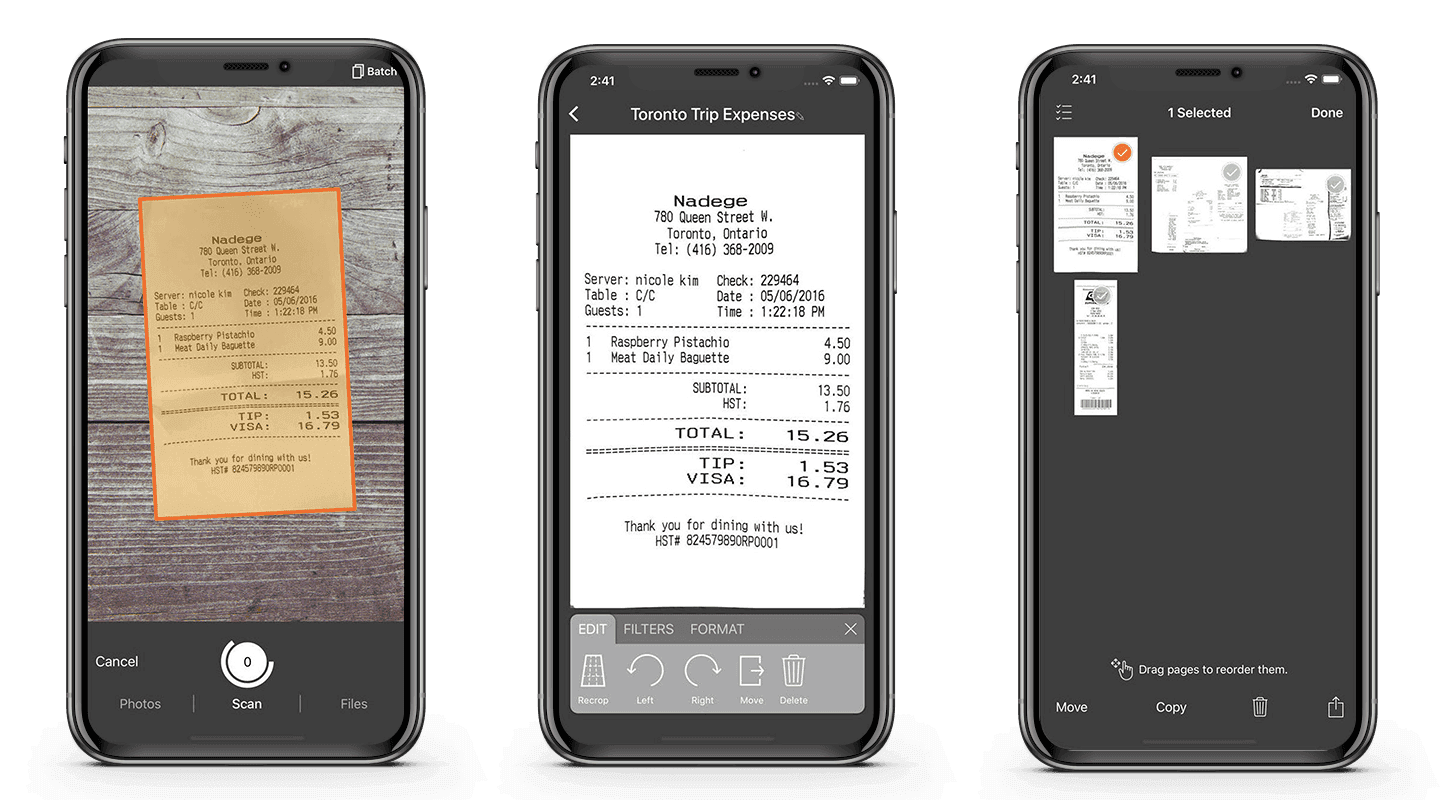
What it does well: It is fast and unfussy. Batch capture, automatic page detection, and export to the usual cloud destinations work without ceremony, and the text recognition is sufficient for making documents searchable later. The annual pricing is friendlier than per-seat monthly billing for a team of five people in vans.
Price: $39.99 per year.
One real drawback: Document data extraction accuracy on anything structured is limited. It is built to produce clear images of pages, and the OCR exists to make those images findable. If your goal is pulling totals, dates, and line items into a system, this is the wrong layer of the stack, and no amount of configuration changes that.
9. Tesseract
Who it suits: Honestly, fewer teams than its reputation suggests. It still has a place in constrained environments where you need a small, dependency-light engine on clean printed text.
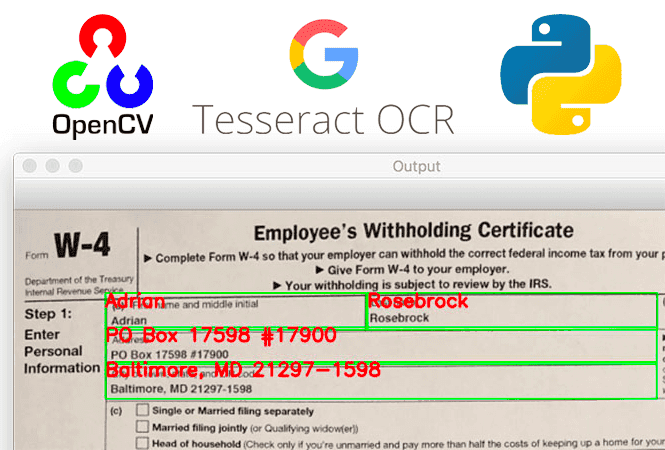
What it does well: It is free, it is everywhere, and it runs offline. It has been embedded in many products over the years, so the documentation and community answers for it are extensive. On high-quality printed pages in a well-supported language, it reads characters acceptably.
Price: Free and open source.
One real drawback: It is not reliable for accurate production work, and the time spent coaxing it into shape is time you will not get back. Teams routinely spend weeks on preprocessing, thresholding, and page segmentation settings to reach a quality level that a current model gives them out of the box. Layouts confuse it, degraded scans defeat it, and tables come out scrambled.
If you inherited a Tesseract pipeline, the most valuable thing you can do is run your documents through a modern alternative and compare the output. The gap in any serious OCR accuracy comparison is wide enough that the migration usually pays for itself.
Speed, throughput and cost per page on large batches
Accuracy gets the headlines, but throughput decides whether the project ships. A model that reads a page beautifully in thirty seconds is unusable when your nightly batch is tens of thousands of pages. This is the single most common surprise in moving an OCR proof of concept into production.
The pattern we see repeatedly: the heaviest vision language pipelines deliver reasonable quality and then collapse under volume, while a leaner conventional engine processes the same documents at a small fraction of the compute cost with results that are just as usable on printed text. The expensive model earns its place on the subset of pages that actually need it, which in most archives is handwriting, poor scans, and unusual layouts.
So build your cost model per page, not per month. Take a representative sample, measure pages per minute and the compute or API cost for each candidate, and plot accuracy against cost. A simple scatter of quality versus cost per page makes the decision obvious in a way that a feature matrix never does, and it exposes the tools that are only affordable at demo scale.
Routing is the lever that matters most. Send the clean pages to the cheap fast path, and send the difficult ones to the expensive model. Your blended cost drops without a measurable loss in document data extraction accuracy, yet most teams never build the router and pay the premium model price on every page.
Offline and private OCR when documents can't leave your network
Plenty of buyers cannot use a cloud API at all. Patient records, loan files, HR documents, and anything under a data residency requirement have to stay inside your own network, and no amount of vendor assurance changes the contract you signed with your own customers.
The good news is that the offline option is no longer the weak option. PaddleOCR, Tesseract, Docling, and the open vision models all run on your own hardware, and the current generation of self-hosted models reads documents well enough that choosing privacy no longer means choosing poor quality. That was not true a couple of years ago.
On the question we get asked most, whether AI vendors train on your documents: on enterprise endpoints with retention switched off, no. But that is a configuration you have to verify rather than assume, and sometimes the answer "we trust the setting" is not sufficient. When it is not, running the model yourself removes the question entirely.
We handle this through private LLM fine-tuning and secure hosting and compliance-focused AI architecture for clients whose records cannot leave their control. What we will not do is promise an environment is breach-proof, because nobody can. What we can do is keep the documents inside your boundary so that the list of people who could see them is one you control.
Tables, charts and structured JSON output
The reason OCR projects stall is rarely the text. It is the tables. A supplier invoice with fifteen line items, a sub-total, a freight charge, and two tax rates is a structured object pretending to be a picture, and most tools hand you back the words in roughly the right order with the structure thrown away.
What teams actually need is row and column organization preserved from the source, so that a PDF becomes rows in a system rather than a paragraph someone retypes. That requirement sits underneath almost every automation project we are asked to quote. It is also the clearest dividing line in any OCR accuracy comparison, because the tools split cleanly into those that model table structure and those that do not.
Docling and ABBYY handle structure deliberately. PaddleOCR has a dedicated table module that works well on ruled tables and less well on borderless ones. The vision language models reason about layout rather than detecting lines, which helps on unruled tables and hurts on very dense ones.
For JSON output, assume you will write the schema yourself. A tool can give you cells, but deciding that column three is the unit price and that it must multiply out to the line total is business logic, and that logic is also where you catch errors. Checks like that belong in code, and they are what makes financial and data automation trustworthy enough to leave running.
Languages, special characters and LLM post-processing
Language support is quoted as a count, and the count is close to meaningless. What matters is whether the engine handles your specific scripts, your accented characters, and your currency symbols, plus the mixed-language documents that turn up in international operations. A tool advertising a hundred languages may still mangle a Tamil address block or a German invoice where the decimal comma reads as a period and changes the number by a factor of a hundred.
Test with your own documents in your own languages, and pay close attention to numerals, dates, and separators, because those are the errors that reach your ledger silently.
The second half of the job is post-processing, and this is where AI-powered OCR tools have changed the economics. Raw OCR output goes to a language model that corrects obvious misreads, normalizes dates and currencies, maps supplier names to your master data, and returns clean JSON. The model is doing editing, not reading, which is a task it is reliable at.
Two cautions apply here. The model confidently fixes something that was not broken, so compare its output against the raw extraction and flag disagreements rather than trusting the rewrite. And token costs add up across large batches, which is why we set spend limits per document and route only the ambiguous fields through the model. We build these layers as part of AI workflow automation work, and the review step stays in regardless of how good the model gets.
How to choose: custom OCR vs off-the-shelf
Start by buying. Take fifty of your hardest documents, run them through two or three products from this list, and count the fields that came out right. If a product gets you close enough that review takes a few seconds per document, buy it and move on. That is the honest answer for most teams asking which is the most accurate OCR software for their situation, and it is cheaper than anything we would quote you.
The custom OCR vs off-the-shelf decision tips when one of four things is true: your documents are genuinely messy and the products fail on them, your fields are specific to your business and no product models them, your data cannot go to a cloud API, or your volume is high enough that per-document pricing has become your largest software line.
OCR software for messy documents is a real category and a real need, but it is a smaller category than vendors imply. Most archives are more consistent than the people who work with them believe.
If you are at the point where off-the-shelf nearly fits and the gap is costing you people, that is worth an hour of conversation. We will look at your documents, tell you which path we would take, and say so plainly if the answer is a product you can buy this afternoon. You can book a free automation audit or read how we run projects before deciding whether to talk to us at all.
Wondering what this would take against your own systems?
The audit costs nothing, and you keep the costed plan and the risks whether you go ahead or not.
Book a free automation auditHitasoft
LinkedInHitasoft has built software since 2008, for companies that mostly do not have an IT department. These pieces are written by the people who do the integrations rather than by anybody in marketing.