
The error you do not see
The failures you can see are not the ones that hurt you. When automatic document recognition fails loudly, returning garbled characters or blank fields, you catch it and fix it fast. The dangerous output looks correct and is not. A number sitting in the wrong column. A missing header row shifting every value up by one. A grand total that was read cleanly but pulled from the wrong field.
Pulse AI make this point directly. A number that lands in the wrong cell breaks the analytics and financial models that sit downstream of it. A silent extraction error such as a column swap sits in a different category from a plain text misread. One is a typo you can spot. The other is a clean-looking figure that is quietly wrong.
Here is the stake. If your accounting entries are generated straight from this output, nobody finds the error at the point it happens. It surfaces weeks later when a reconciliation refuses to balance, and by then the wrong number has been copied into three other places. That is the problem worth solving. It is not the one the accuracy scores on a vendor datasheet measure.
Why "how accurate is it" has no useful answer
Vendors publish accuracy scores. Those scores do not measure the thing you actually care about.
An academic benchmark of 21 PDF parsers, run across 100 documents holding 451 tables, found the standard structural metrics correlate poorly with human judgment. TEDS landed at r=0.68 and GriTS at r=0.70. IIn plain terms, a parser can score well on the metric while corrupting the contents of cells. Or it can score badly while producing a table laid out differently that means exactly the same thing. The number on the datasheet and the number you care about are not the same number.
Pulse AI add the practical version of the same problem. A benchmark's spatial tolerance setting lets a prediction that has lost its whole header row still register as high content accuracy, because every data cell matched the neighbour one position over. The figures all look fine. The headers are gone. In a financial table that makes the figures meaningless, because you no longer know which column is tax and which is total. Table extraction accuracy on paper and table extraction accuracy in practice point in opposite directions.
They also report that Arabic scripts typically cost more than ten points of extraction quality on average. That is the first genuine hint of the argument running through this article. The document decides the outcome far more than the tool does. Two parsers with near-identical headline scores diverge wildly the moment you hand them your actual paperwork. So the valuable question is not how accurate the tool is. It is which of your documents are the hard ones.
The five places automatic document recognition actually breaks
This is where OCR accuracy stops being a single number and becomes five separate problems. Each one fails in its own way.
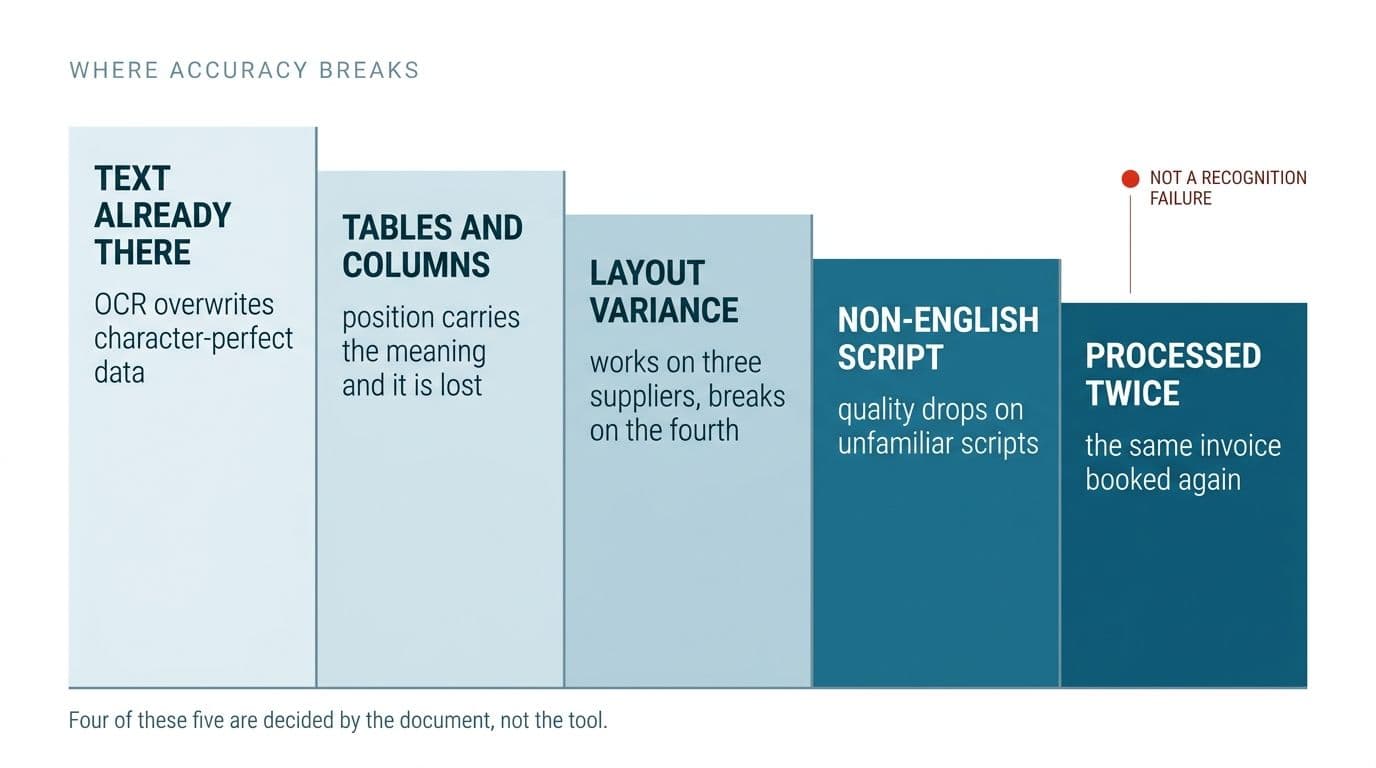
- Running OCR on pages that never needed it. A PDF exported from an accounting system already holds real, character-perfect text. When OCR runs over it, that text is thrown away and replaced with a guess. One client spec we reviewed listed "detect whether a PDF already contains text" as the first step of the pipeline, before any recognition runs at all.
- Tables and multi-column layouts. Flat OCR reads characters and loses position. In a table the position is the meaning. Merged cells and borderless tables are exactly where table extraction accuracy collapses, because the tool reads every digit correctly and still drops them into the wrong grid.
- Layout variance across sources. The parser works on the three invoices you tested it on and breaks on supplier number four. One spec in our set stated the requirement in plain words, that the solution must not be hard-coded to a single supplier's format. Real document data extraction has to survive the fourth layout it has never seen.
- Non-English text. Arabic scripts cost more than ten points of extraction quality on average, and this is not a niche edge case. Several specs in our set required Russian and Kazakh. That is a reminder that automated document recognition in the real world routinely spans scripts the tool was never tuned for.
- Documents processed twice. A file that was updated rather than added, arriving again as a near-duplicate. Two specs listed duplicate detection as an explicit requirement. This accuracy failure has nothing to do with recognition at all. The characters were read perfectly. The system just booked the same invoice twice.
What a pipeline that handles this looks like
Three distinct client specs in our source set described the same five-stage shape without any knowledge of each other. That convergence is the real story, so it is worth stating plainly. Detect whether the page already holds text. Run OCR only where it is actually needed. Extract the fields and tables. Validate the result. Route by confidence.
The first three stages are the ones every vendor demo shows. They are where document data extraction either holds together or quietly falls apart. The last two decide whether you trust the output, and they are the ones nobody writes about.
Validation is where accuracy is actually enforced. Not through better recognition, through arithmetic. Do the line items sum to the grand total? Is the tax number in a valid format? One spec listed GSTIN format validation, date validation and invoice total validation as separate requirements. A total that does not add up tells you something was misread, and you do not need a confidence score to know it. The maths either closes or it does not.
The second check is quieter and just as important. Match every extracted value back to where it appeared in the source document, verbatim or by fuzzy match. One spec required exactly this, alongside a stated requirement of zero silent misses. If a figure cannot be traced back to a spot on the page, it does not get trusted.
Confidence routing is the safety net that catches what validation cannot. Low-confidence pages go to a person, not into the ledger. This appeared in six of our nine sources independently, under different names. A Review Required status. A manual-review flag. A discrete folder for uncertain predictions. When six buyers specify the same mechanism without coordinating, it has stopped being a nice-to-have. This is the heart of a document processing pipeline that routes by confidence, and it is the part most tool comparisons never reach.
Why the cheap path and the expensive path matter
The two-level design, cheap treatment for easy pages and costly treatment for hard ones, usually gets presented as an engineering preference. It is a budget decision, and the numbers are stark.
Cross-checked across four independent comparisons, as published in 2026, basic OCR runs at about $1.50 per 1,000 pages. AWS, Google and Azure have all converged on that same figure. Switch table extraction on with Textract and it rises to roughly $15 per 1,000. Turn on forms and it reaches around $50. Combine the features and it climbs to as much as $65 per 1,000 pages.
Azure's prebuilt invoice tier sits at about $10 per 1,000 against Textract's $50 for equivalent work. Textract bills OCR and tables as separate line items, so the cost stacks up with every feature you enable. That is a 10x to 43x spread between the cheap path and the pricey one.
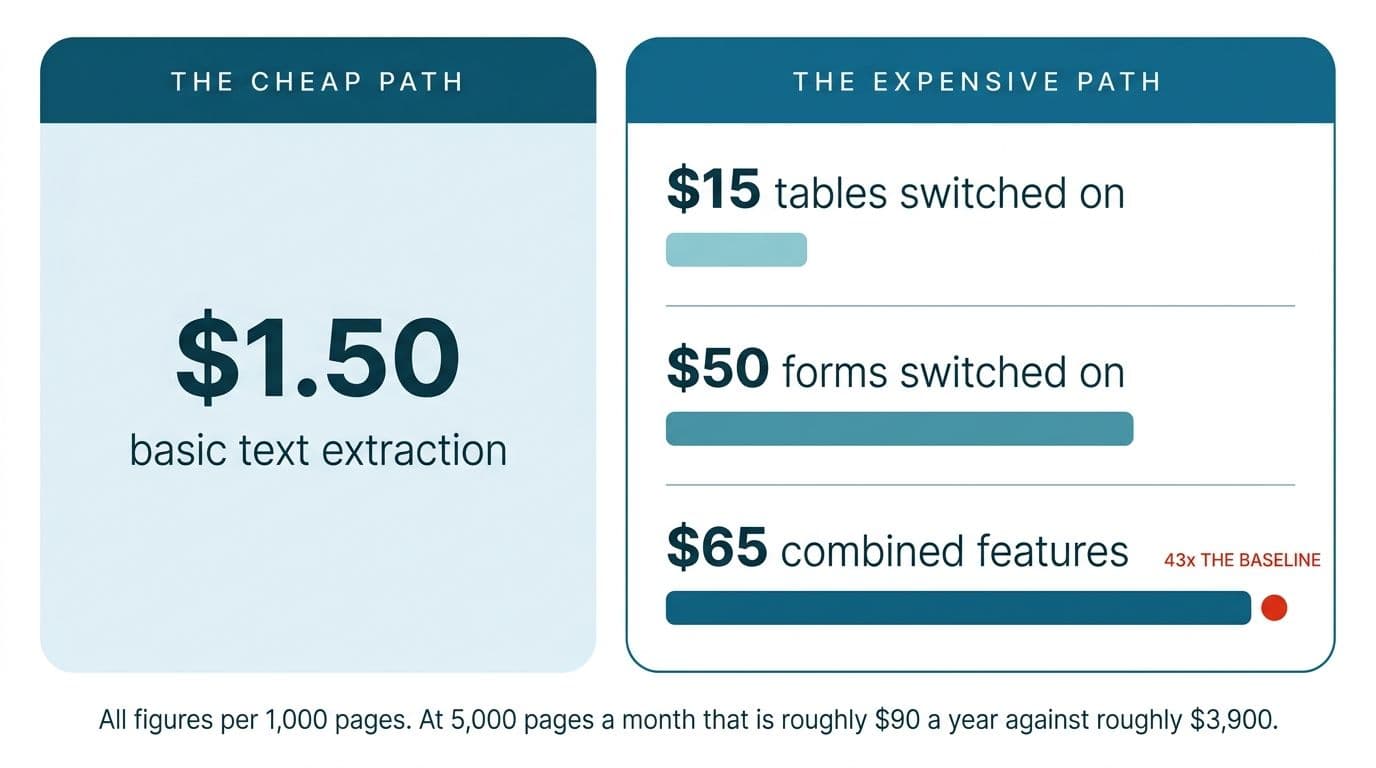
Put it at your scale. At 5,000 pages a month, routing everything through the costly path costs roughly $325. Routing the same volume through basic text costs about $7.50. Over a year that is the difference between roughly $3,900 and roughly $90. The point makes itself. The two-level pipeline is not sophistication for its own sake. It is the difference between a document processing automation setup you can afford every month and one you quietly switch off. Knowing which pages need the expensive path is exactly the routing decision from the previous section. Integrating this into the system you already run turns the arithmetic into something operational.
How you would know it works before you trust it
The buyers who know what they are doing specify this step. The ones who do not skip it.
One spec asked for a test set, a golden set scored with precision and recall, and explicitly rejected "it works on my examples" as evidence. Another said they would supply completed real-world projects where the correct answer was already known. Same idea, different words, two independent buyers arriving at the same requirement.
Here is what that means for a small company with no data science team. Take fifty documents that represent your real mix, including the awkward suppliers and the scanned-then-faxed ones nobody likes. Have someone key in the correct answer by hand, once. That set becomes the thing you measure every change against. The score it produces is the only OCR accuracy figure that means anything for your paperwork. The vendor's benchmark was run on someone else's documents. This one is run on yours.
Then the honest part. This is unglamorous work and it is the step most projects skip. It is why so much document processing automation gets trusted before anyone has established whether it should be. If your documents carry anything sensitive, this is also the point to settle how the data is stored and handled. Retrofitting a secure and compliant architecture after go-live is far harder than designing for it up front.
Start with your documents, not the vendors
Most teams evaluating automated document recognition open by comparing OCR tools against each other. The comparison that actually matters is between your documents, not between the vendors. What proportion of your pages already contain real text. How many of them carry tables. How many suppliers or formats you handle in a normal month. What happens downstream when a single value comes out wrong.
Answer those four and the architecture chooses itself, including which tool belongs at each stage. Answer none of them and the tool choice is a coin flip, whatever the benchmark leaderboard says. Accuracy was never the recognition problem it looked like. It is a routing problem and a checking problem wearing a recognition problem's clothes.
If you want help working out which of those four questions applies hardest to your documents, that is a conversation worth having before you pick anything. Talk to us and we will start there.
Wondering what this would take against your own systems?
The audit costs nothing, and you keep the costed plan and the risks whether you go ahead or not.
Book a free automation audit
Arun Andiselvam
LinkedInI am a startup veteran who has built five brands. I sold the first, an SEO tool, for a six figure exit, and now build AI automation products for businesses. I bootstrapped every one of them from day one.