
Everyone is bolting automations and triggers onto their ticketing setup right now. Plenty of those setups, built to make the queue calmer, quietly made it messier. Before you add another layer, it helps to know what the layer is actually for. When you automate ticket categorization with AI agents, you are solving a classification problem rather than an agent problem. The teams reporting real wins mostly automated deterministic things instead of AI. AI classification earns its place at exactly one point in the workflow. The preparation done before any model is chosen decides whether it works at all.
The scope here is narrow on purpose. This is about customer support tickets, the free-text kind that arrive from paying customers by email and chat. It is not about internal IT service desks, which have options support teams do not. It is not about automated replies sent to customers, which carry a different risk entirely. Categorization is the invisible layer, and that is where we stay.
What is automated ticket categorization?
Ticket categorization, prioritization, routing and resolution are four separate problems that support vendors bundle and sell as one feature. Pulling them apart is the single most useful thing a support operations lead can do before buying anything. Each of the four has a different accuracy requirement and a different failure cost.
Ticket categorization is assigning a ticket a type, such as billing or account access. Ticket categorization reads the ticket content and outputs a label, nothing more.
Ticket prioritization is deciding how urgent a ticket is. It uses inputs that categorization does not, including account attributes that never appear anywhere in the ticket text.
Ticket routing is deciding which agent receives the ticket. Routing depends on skill match and on current capacity. A classifier has no representation of capacity.
Ticket resolution is acting to fix the customer's problem. It is the only one of the four that requires an AI agent, because it involves lookups, actions and handoff decisions.
| Stage | What it decides | What it needs | Cost when wrong |
|---|---|---|---|
| Categorization | Ticket type | A classifier and a defined taxonomy | Internal correction, seconds |
| Prioritization | Urgency | Type-specific rules plus account data | Delayed response, SLA risk |
| Routing | Which agent | A scheduler aware of capacity | Overloaded agents, uneven queue |
| Resolution | What action to take | An agent with tool access | Customer-visible error |
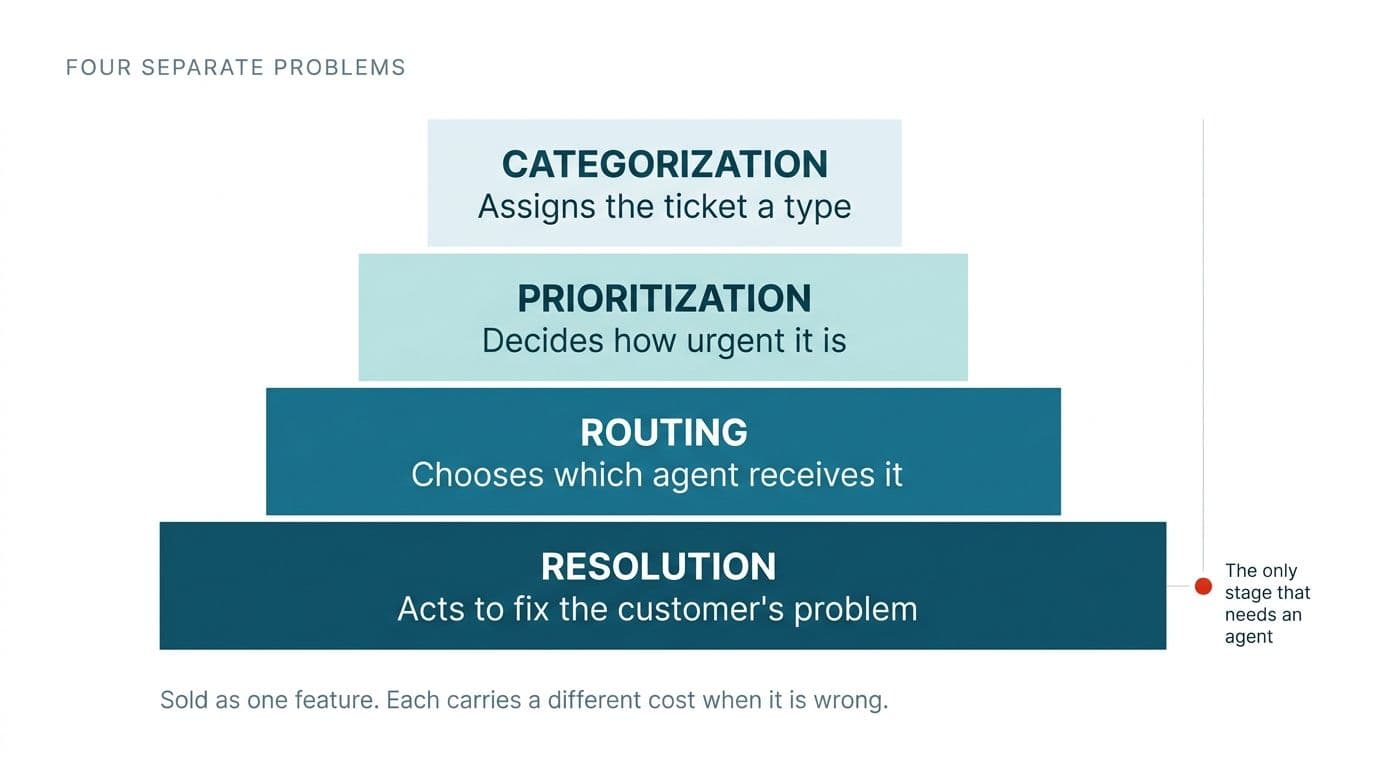
These four are bought as one feature. That is why rollouts fail. A single product priced as one thing hides the fact that categorization tolerates a cheap correction while resolution produces a customer-visible error. Buy them separately, and to different standards. That is what a working system looks like.
Do you need AI agents to categorize tickets?
Ticket categorization needs a classifier, not an agent. The two are marketed as one product and priced as one product. That is why support teams overbuy and then wonder why the running cost never matched the value.
The technical difference is plain. Classification is a single decision with a fixed output space, handled in one pass by a well-prompted model call or a fine-tuned classifier, at low cost and low latency. An agentic loop adds tool use and non-determinism. On a task that needs neither, an agentic loop adds cost and new failure modes without adding a single point of accuracy.
The rule for when an agent is warranted is worth memorizing. An agent is warranted when the system must look something up before deciding, take an action in another system, or choose whether to hand off. Ticket categorization does none of the three. It reads text and returns a label.
The industry incentive here is real without being sinister. "AI agent" is what the category markets on, so a support operations lead shopping for tooling will find the term attached to features that are plain classifiers underneath. Knowing the difference keeps the invoice honest. If you want a transparent read on where AI agents genuinely earn their cost inside support workflows, the distinction between a labelling task and an acting task is the whole story.
A classifier is simpler than an agent but it is not trivial. A working classifier needs a designed taxonomy, a confidence threshold policy and a labelled evaluation set. The rest of this post covers those in order.
What should you automate before ticket categorization?
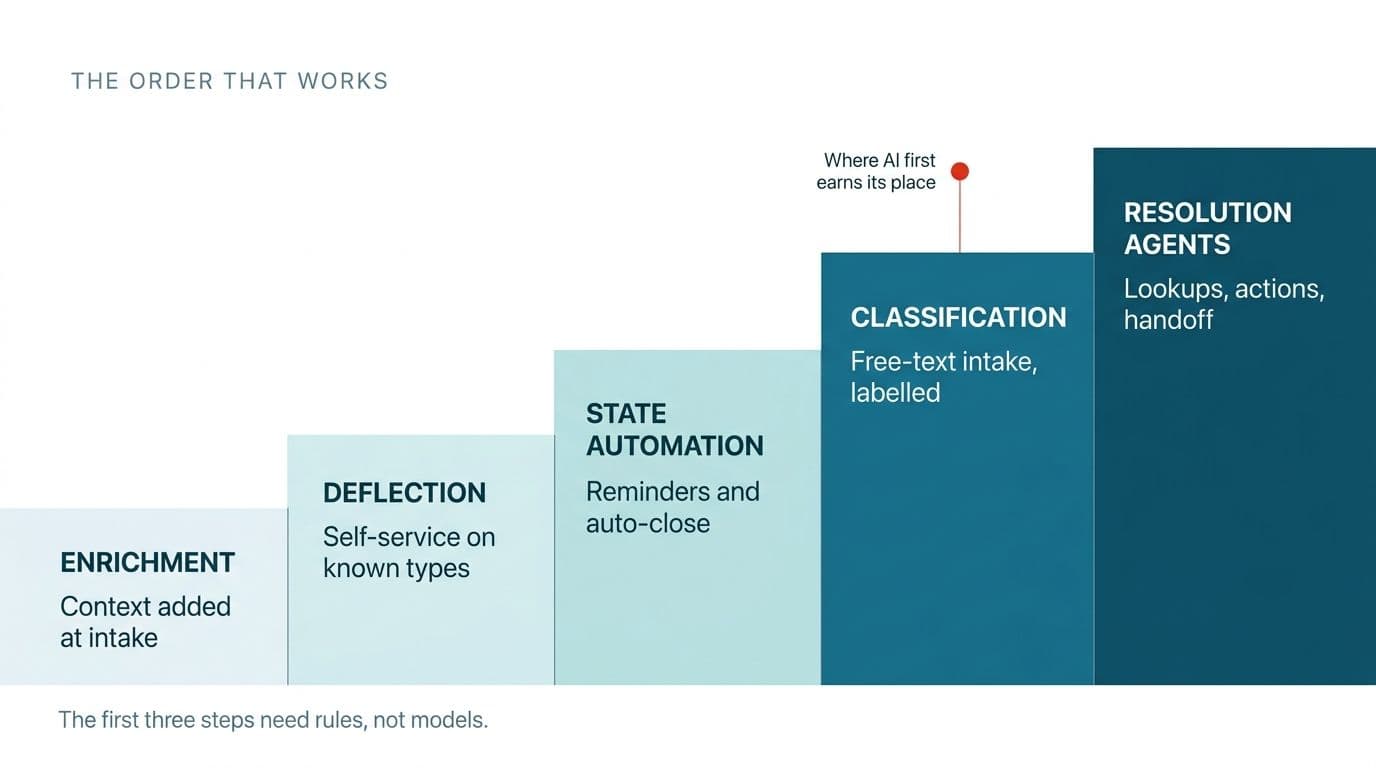
Enrichment, deflection and state automation deliver more measurable value than classification for most support queues, and none of the three requires AI. When support and operations managers are asked what automation actually helped, the answers are overwhelmingly deterministic rules, not models.
Enrichment. Enrichment is attaching context to the ticket automatically at creation so the agent never has to ask for it. In a support context that means plan tier and account age, present the moment the ticket opens. Enrichment consistently ranks as the most valuable single change practitioners report, and it involves no AI at all.
Deflection. Deflection is an automatic reply on known ticket types offering the customer a self-service path before a human touches the ticket. The honest way to prove deflection works is to measure self-service usage directly against ticket volume reduction. That is what the teams who trust their deflection numbers actually did.
State automation. State automation is escalating reminders on tickets waiting on the customer, with automatic closure after a defined window. The outcome reported again and again is the same. Tickets stop sitting open indefinitely. The standing count of the queue drops without anyone resolving a single new issue.
Rules handle the structured, predictable majority of a support queue. What rules cannot handle is free-text intake where the customer's phrasing matches no keyword anyone thought to write, and that residue is exactly what classification is for. Teams that skip the three rungs and jump straight to classification get a faster classifier applied to the same underlying mess, which is why so much rules-based support workflow automation for repetitive queue tasks should be finished first.
Why can't customer support constrain ticket intake the way IT does?
Internal IT teams reduce classification work by constraining intake, using structured forms and restricted category fields. Customer support cannot copy that approach because it has no authority over the requester.
Three IT approaches recur, and they are genuinely good inside their context.
- The first removes the user's ability to set priority, so nobody marks their own request urgent.
- The second hides secondary category fields so users pick only a broad type and specialists refine it later.
- The third replaces free-text requests with structured forms that collect the right details up front.
The forms example deserves weight, translated into support terms. A vague request produces hours of back-and-forth clarification, then one detail turns out to be wrong and the work already done has to be unwound. Structured intake moves those decisions to the front, where they are cheap.
Every one of those strategies depends on authority over the requester. An employer can require an employee to use a form. A company cannot require a paying customer to. Support intake arrives by email and chat, phrased however the customer chose in the moment, and no amount of form design changes that fact.
The conclusion is worth stating flat. For internal IT service desks, classification is optional because intake is constrained. For customer support, classification is not optional, because customer intake cannot be constrained.
What does automated ticket categorization actually save?
Automated ticket categorization removes work that most support teams have already moved onto their agents without ever counting it. The saving is not a new efficiency. It is the recovery of a cost that was quietly relocated.
Current practice explains it. When user-selected categories cannot be trusted, teams let the customer pick a broad type at submission and have the agent set the correct category at close. That categorization work was never eliminated. It was moved to the end of every single ticket, where it hides.
The cost is invisible by design. Setting a category at close takes a few seconds, short enough per ticket that no one counts it, and it appears in no queue metric anyone watches. Multiply a few seconds across annual ticket volume, though, and it becomes a real number, one worth a line in a business case.
The second benefit is larger than the time saved. Categories set at close are set by a tired agent optimizing for one thing, closing the ticket in front of them. That is precisely why category data in most helpdesks is unreliable, and why nobody trusts the reports built on top of it. Classification at intake produces category data clean enough to plan staffing against. The saving you can measure is the seconds. The saving that changes decisions is the trustworthy data.
How do you design a ticket taxonomy for AI classification?
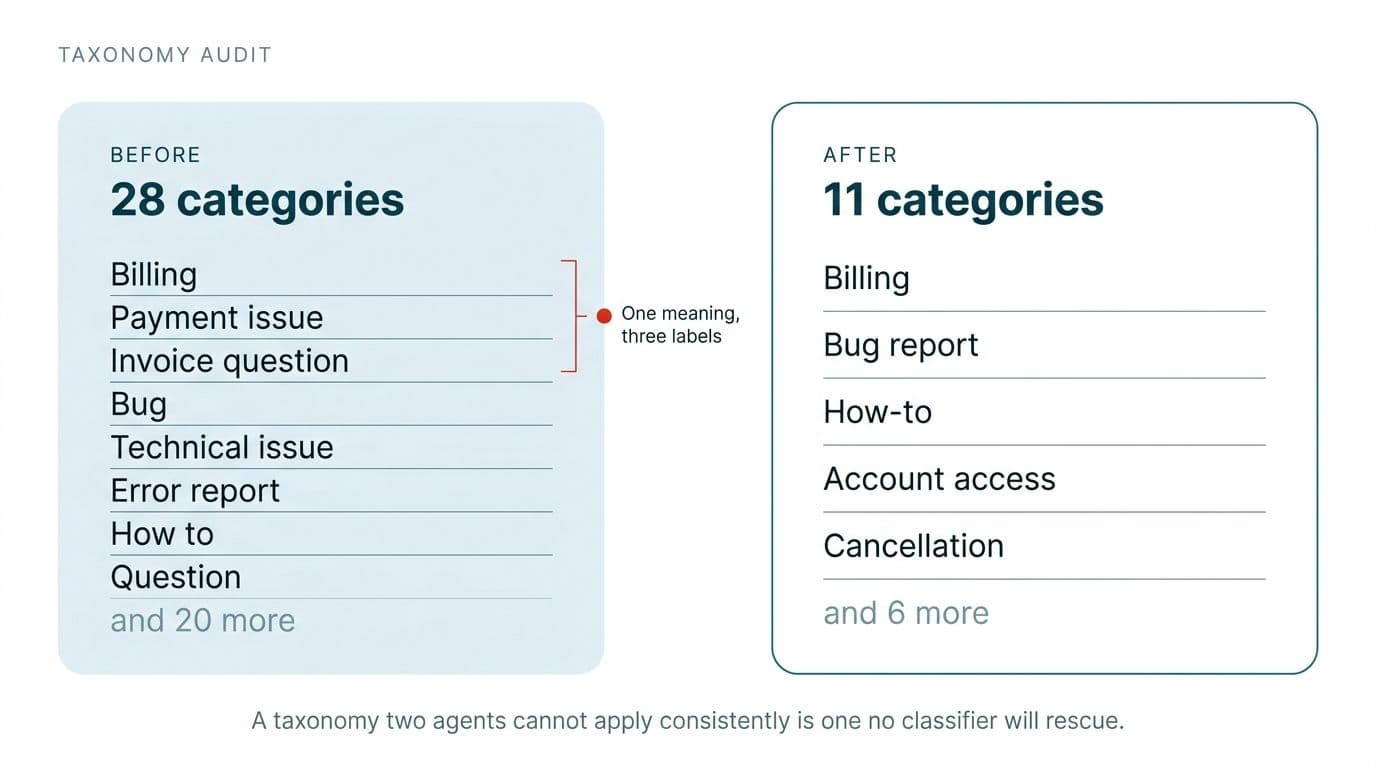
A ticket taxonomy for AI classification should contain eight to fifteen categories, each with a one-line definition and two example tickets, and it should exist as a written document before any model is selected. This is the step every competing guide skips, and it is the step that decides accuracy.
One worthwhile principle from teams who got this right is that the entire triage configuration was driven by a rules document written before any tool was involved. The tool was mapped to the business rules, never the reverse.
The actual starting state is rarely clean. The category list was configured by whoever set up the helpdesk years ago, has since grown to twenty or thirty entries, and is now half unused and half overlapping. Two categories that mean the same thing to different agents will produce a model that looks inaccurate when the labels were the real problem.
- Export twelve months of tickets with their assigned categories and count actual usage per category.
- Cut anything below a small usage threshold and merge anything where two agents would reasonably disagree about which category applies.
- Target eight to fifteen working categories. Fewer than eight categories and the labels are not actionable. More than fifteen categories and the boundaries blur, which degrades both human and model accuracy.
- Write a one-line definition per category with two real example tickets. This document is the labelling guide, and it is also the classifier's prompt.
- Test on humans first. Give two agents fifty tickets each and measure agreement. If human agreement falls below roughly nine in ten, the taxonomy is the problem and no model will fix it.
The human agreement test is the highest-value hour in the entire project, and it costs an afternoon. A taxonomy two humans cannot apply consistently is a taxonomy no classifier rescues. Finding that out before you buy anything is the cheapest insurance available.
Should you classify ticket type or priority first?
Classify ticket type first, then apply priority logic specific to that type. A single priority model applied across all ticket types produces confident but unreliable results.
The reason is that a support queue is not one population. A billing dispute, a how-to question, a bug report and a cancellation threat have incompatible urgency logic, and the signals that predict urgency for a bug report are irrelevant to a billing dispute. A classifier trained to output one priority scale across all of them is averaging over populations that share no features, and the average describes none of them.
The design that works is two-stage. Stage one assigns the type. Stage two applies the priority rules that belong to that type. Stage two should probably stay rules-based, because a cancellation from an enterprise account is high priority due to an account attribute the classifier never sees, not due to anything in the ticket text.
There must also be a documented path for a human to override an assigned priority, because there will always be context the system does not have. Documentation matters for a specific reason. Overrides are training signal, and an override nobody recorded is a lesson thrown away.
How do confidence thresholds and human review work in practice?
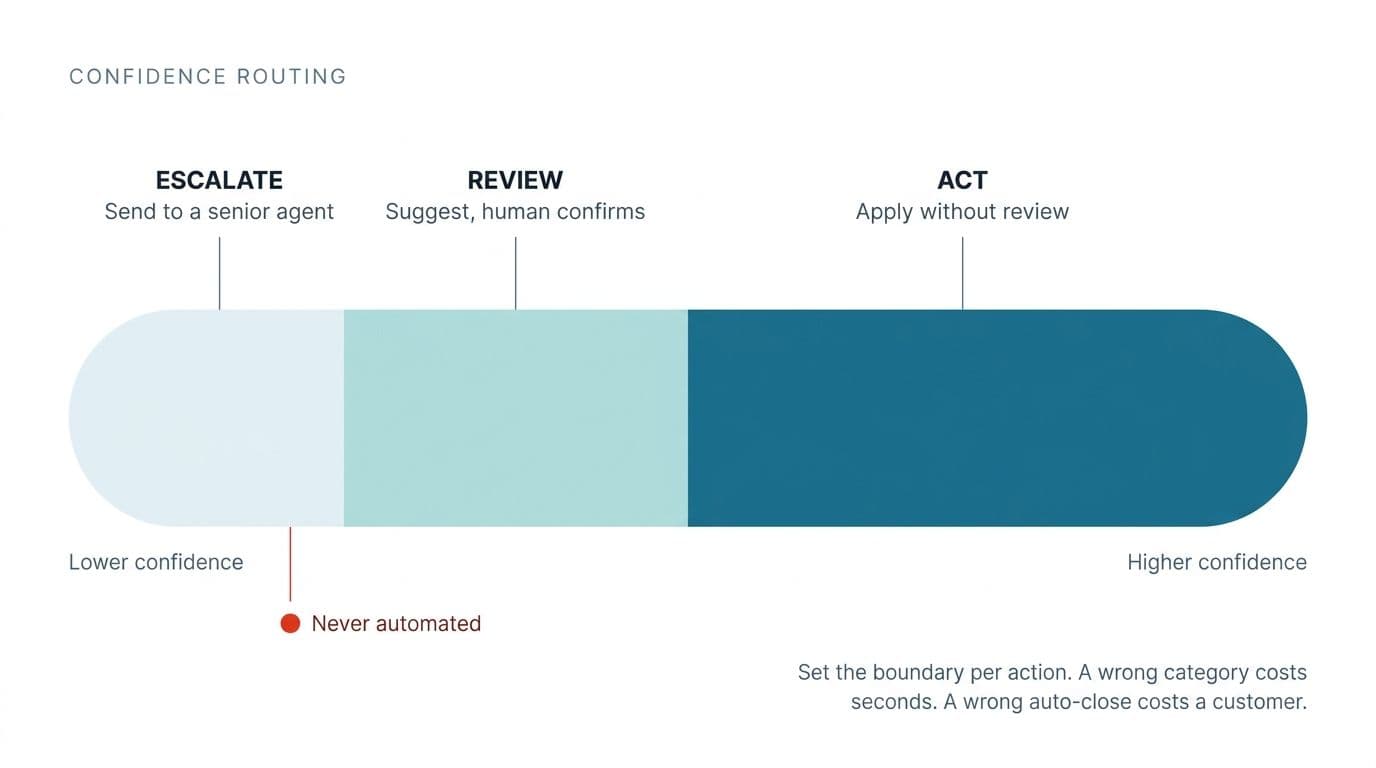
A classifier returns both a category and a confidence score. Systems that ignore the confidence score assign a category to every ticket whether the classifier was certain or guessing. The confidence score is the difference between automation you trust and automation that quietly corrupts your data.
A confidence threshold is the score above which a classification is applied automatically and below which the ticket goes to a human. Confidence thresholds are set per action, not globally, because different actions carry different costs.
The suggest-only phase is how you find the right threshold without gambling. Before the system acts on anything, it proposes a category and a human confirms or corrects it, and the agreement rate is logged for every proposal. Run the suggest-only phase for two weeks on live traffic. Two weeks of live agreement data gives you a number to gate the go-live decision on, rather than a feeling.
The threshold logic follows from the data. Above a high agreement bar, allow unattended action on that specific action only. Below it, route the ticket to human review. The threshold is per action because a wrong category costs an internal correction while a wrong auto-close costs a customer, and those two mistakes should never share a setting.
Two things must be built from day one, because retrofitting them is slow and expensive:
- An audit log recording every automated decision and the reasoning behind it.
- Batch reversal. When the system applies a wrong rule overnight, you need to undo hours of it in one step rather than ticket by ticket.
Sequence an AI rollout by who sees the mistake, not by which feature is most appealing. A misclassified ticket is an internal correction nobody outside the team notices. A wrongly closed ticket is something the customer experiences directly, and that difference should drive the entire order of the rollout.
Why is ticket routing different from ticket categorization?
Ticket routing is a capacity problem, not a classification output. A classifier knows which agent is best matched to a ticket but has no representation of which agent has room to take it.
A real example makes the failure concrete. A team configured skill-based routing to send every ticket to the best-matched technician. One technician accumulated more than forty tickets at once, purely because the system judged him the most qualified for each of them. He responded by removing all of his skills from the system so it would stop finding him.
The diagnosis is the interesting part, because the model was probably correct every single time. It was answering the question of which agent is the best match when the operational question was which agent is the best match with capacity right now. Those are different questions, and only one of them keeps the queue balanced.
The design implication is that routing needs a scheduler layered on top of the classifier, aware of current queue depth and concurrency limits. Routing is a constrained assignment problem, not a lookup.
The second-order effect is the one to remember. When routing punishes competence by piling work on the most capable person, people opt out of being competent in the system, and the routing data degrades as a direct result of the routing logic.
What breaks when a ticket classification prototype goes to production?
A prototype ticket classifier built in a workflow tool will classify test tickets correctly and will still fail in production for five specific reasons, none of which are model accuracy.
The concession is real and worth making without hedging. A workflow tool wired to a model and a helpdesk API genuinely works. It gets built in an afternoon, and it is a legitimate way to prove the idea is worth pursuing. The prototype is not the problem. Mistaking the prototype for the finished system is.
| Capability | Prototype | Production requirement |
|---|---|---|
| Accuracy measurement | None | Held-out labelled evaluation set |
| Confidence handling | Every ticket gets a category | Per-action thresholds with human review queue |
| Drift detection | None | Monitoring for new ticket types after product releases |
| Auditability | None | Log of every decision with reasoning |
| Ownership | One person's workflow file | Documented, version-controlled, owned by a team |
Drift is the least obvious of the five. A product release creates ticket types the taxonomy does not contain, and the classifier keeps confidently assigning those new tickets to the nearest wrong category, so the data looks fine while quietly going wrong.
There is a ceiling that turns buyers into build prospects, and practitioners tend to hit it in real time. Off-the-shelf triage features often cannot be managed programmatically. When you cannot create your own categories or skills through an API, and can only edit what the vendor shipped, the system cannot be adapted to a taxonomy you designed yourself. That is the point where configuring stops being enough. If you have reached that ceiling, building ticket classification that fits an existing taxonomy is the work that follows.
How do you reduce a support ticket backlog with automation?
The fastest way to reduce a support ticket backlog is to close tickets waiting on customer response, not to classify tickets better. The backlog and the classifier are different problems, and the highest-impact lever needs no AI at all.
| Lever | Time to impact | Requires AI |
|---|---|---|
| Auto-close tickets awaiting customer response | Days | No |
| Deflect high-frequency ticket types to self-service | Weeks | No |
| Enrich tickets at intake | Weeks | No |
| Classify at intake | Weeks to months | Yes |
Auto-close clears a substantial standing backlog on its own and costs nothing to switch on. Deflection depends on knowing which categories are highest frequency, which is where good category data pays for itself. Enrichment shortens handling time across every ticket in the queue, not just the ones it targets. Classification does not reduce the backlog directly, but it routes the backlog correctly and makes every other lever more precise, which is why classification works best as the last lever rather than the first.
Sequencing matters here more than tooling. A team chasing ai automation for support ticket backlog reduction with a classifier, before the auto-close rule is even live, is spending the expensive budget on the slowest lever. An MSP put the calibration better than any vendor. These tools do not replace tier-one support, they mean you need fewer tier-one staff.
When do AI agents actually earn their place in support?
AI agents earn their cost at ticket resolution, where the system must look something up, decide whether to act, take an action, verify it worked and decide whether to hand off. Every one of those steps is what a classifier does not do, and together they are the definition of an agent.
Support-specific examples make the boundary straightforward. An agent checks order status against a fulfilment system and issues a refund within policy. An agent resets an entitlement. An agent reissues a licence key. Each of these involves multiple steps and real branching, which is exactly what distinguishes an agent from a classifier.
One line practitioners draw hard is worth respecting rather than arguing with. Automating what you say to customers is a different risk category from automating what you know about their ticket.
The distinction stated flat. Ticket categorization is invisible to the customer, and a wrong category costs an internal correction. Customer-facing automation is visible, and a wrong reply costs the relationship. Those are not two settings on one dial. They are two projects.
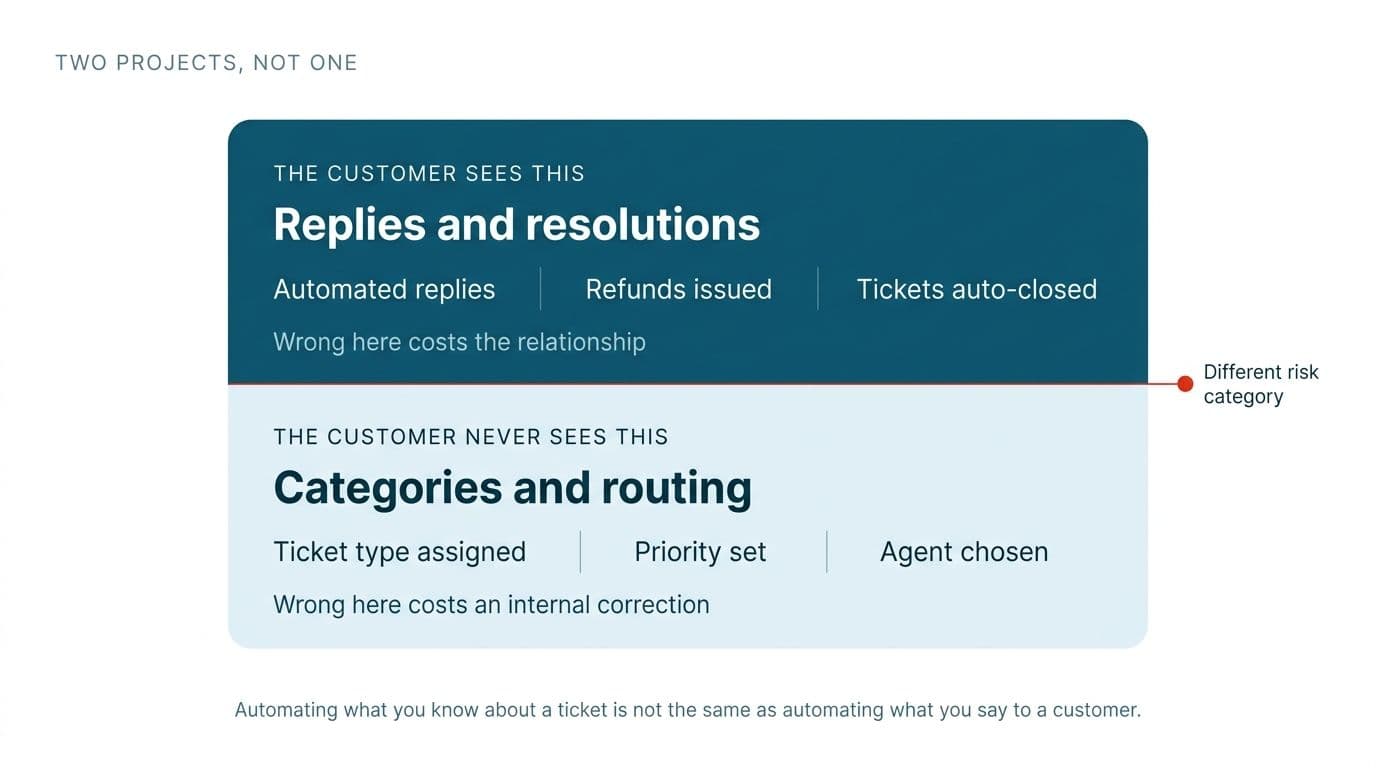
This post lives entirely on the invisible side of that line. Treating categorization and customer-facing replies as one project is a common and expensive mistake. Keeping them separate is the cheapest risk control available.
Wondering what this would take against your own systems?
The audit costs nothing, and you keep the costed plan and the risks whether you go ahead or not.
Book a free automation audit
Arun Andiselvam
LinkedInI am a startup veteran who has built five brands. I sold the first, an SEO tool, for a six figure exit, and now build AI automation products for businesses. I bootstrapped every one of them from day one.