
An operations manager at a ten-person logistics firm recently described her setup. A handful of Zaps, a Google Sheet acting as a database, and a bill that had crept higher than she expected made up the whole system. Half those Zaps fired on every new row and then filtered out most of what they processed. She was paying for tasks that did nothing.
That's the honest shape of the problem. Zapier AI workflow automation is genuinely good at moving records between apps, drafting text, and classifying things that arrive in a predictable format. It gets expensive and brittle when the logic branches, when volume climbs, or when the work touches money. This guide covers where it fits, how to cut the bill, and the point where a custom build costs less than another year of patched Zaps.
What Zapier's AI features actually do, and where they stop
Zapier's AI sits in three places. There are AI steps inside a Zap, which call a model to summarize, classify, or extract from text. There are AI agents, which run with a bit more latitude and decide what to do next. And there's the builder itself, where you describe an automation in plain language and it assembles a draft.
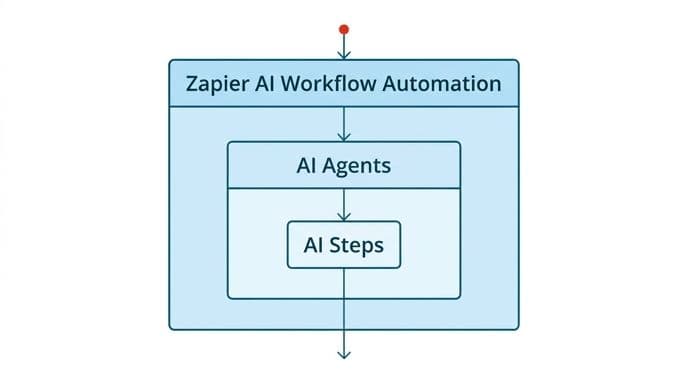
The AI steps are the dependable part. Give a model an inbound email and ask it to pull out a company name, a requested quantity, and an urgency label, and it will do that well enough to act on, provided someone checks the output or the next step validates it in code. Classification, summarization, and drafting are the jobs where a language model earns its keep.
Where it stops is logic. Zapier has never been comfortable with loops and aggregators. If you need to process a list of twelve line items, roll them into one record, and branch differently based on the total, you'll end up with storage steps, lookup tables, and a child Zap called in sequence. It works, but it's also the thing that breaks at 2am and takes an hour to trace, because the state lives in three places.
The other limit is latency and stacking. If a voice agent or chatbot already reasons about what the customer said, adding a second model inside the workflow to reason about it again just adds a slower response and one more thing that can fail. Backend workflows should stay short and deterministic. Put the thinking at the edge, where a person or a specialized tool handles it, and keep the plumbing dumb.
Filters, paths, and webhooks: the three features that decide your bill
Most people building Zaps never read closely about these three. They're where the money goes.
Filters stop a Zap from continuing when a condition isn't met. The critical detail is placement. A filter in step four means steps one through three already consumed tasks. Move the filter to step two and the ninety percent of records that don't qualify cost you almost nothing. That single change, applied across a handful of busy Zaps, is where a lot of the savings come from.
Paths are conditional branches. They let one trigger lead to different outcomes based on a field value, which sounds like the answer to complex logic. In practice, paths stay shallow. Nest them a few levels deep and the editor becomes hard to read, and the version you fix at 2am is not the version you built. When a workflow needs more than two or three genuine branches, that's a signal the logic belongs in code, not in a canvas.
Webhooks are the escape hatch. A webhook trigger fires only when something real happens, rather than polling an app every few minutes and billing you for checks that find nothing. If an app you use can post a webhook, switch to it. Polling triggers are the quiet tax on high-volume accounts.
Learning these three properly is also the fastest route to doing this work for other people. Plenty of freelancers make a living on automation with no formal training and no computer science background. They picked one industry, learned the five processes every firm in it repeats, and built the same workflow again and again with small changes. Niche first, tooling second.
Cutting a Zapier bill without losing the automation
If you're spending over a thousand a month on a small team, you're almost certainly overpaying.
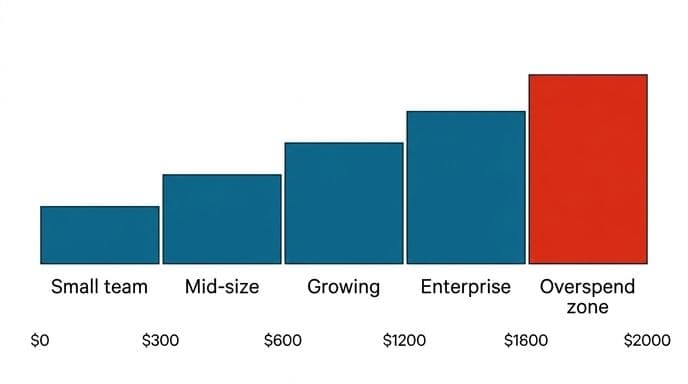
The reductions available are substantial, often most of the bill, and they come from four moves. Move filters to the front, as above. Split one large Zap into several small ones with narrower triggers, so a record only enters a workflow it's actually relevant to. Take high-volume loops, the ones that iterate over long lists, out of Zapier entirely and run them somewhere that charges by compute rather than by task. Then audit what's still switched on, since dead Zaps from a project that ended last year keep billing.
The fourth move is the one people resist: not everything needs to live on a single platform. A $15 server running a scheduled script can absorb the brute-force work while Zapier keeps the parts where its connectors genuinely save you time. That's not a failure of the tool. It's using it for what it's priced well for.
Self-hosted versus cloud: when open source ai workflow automation tools make sense
Cloud platforms handle hosting, updates, and connector maintenance. You pay per task and you accept that your data passes through someone else's infrastructure. For most SMB work, that trade is fine.
The case for ai workflow automation tools open source is narrower but real. Self-hosting changes the pricing model from per-task to per-server, which matters enormously at volume. It also keeps records inside your own infrastructure, which is the deciding factor for anyone handling health data or financial records that a regulator will ask about later. We build private deployments for exactly this reason, and we'll say plainly when a client doesn't need one.
What you take on is operations. Someone has to patch the server, watch the queue, and fix the connector that broke when a vendor changed their API. If no one on your team owns that, a self-hosted stack becomes a liability the month after the person who set it up leaves.
There are free ai workflow automation tools at the low end too, including generous free tiers and community editions. They're a sound way to test whether a process is worth automating before you commit budget. Just don't design your production architecture around a free tier, because the moment it matters, you'll be migrating under pressure.
Deterministic rules, AI agents, or both: choosing per workflow
The useful question isn't whether to use AI. It's which parts of a given workflow should be rules and which should be judgment.
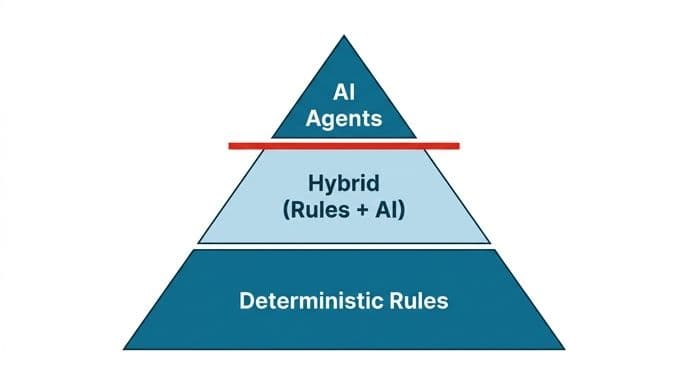
Use deterministic rules when the input is structured and the outcome is defined. Invoice arrives, fields map to the ledger, record posts. No model is needed here. Rules are cheaper, faster, auditable, and they fail in ways you can read in a log.
Use an AI agent when the input is messy and a human would otherwise read it. Free-text support tickets, scanned documents of varying quality, and inbound emails that could be anything. Lead management is commonly cited as one of the most frequent AI use cases in automation, and that fits the pattern, since lead data arrives unstructured and someone has to interpret it.
Use a hybrid for almost everything else, which is to say most of the work. The model reads and proposes. Code validates. A person approves anything that touches money or reaches a customer. That approval step is not a limitation to engineer away. It's what makes the system safe to run.
This matters most in payment workflow automation. Matching remittances to invoices and flagging mismatched amounts means routing exceptions to a controller. AI handles the reading and the matching suggestion, and a person confirms before anything posts. We don't build payment workflow automation that moves money without a human in the loop, and we won't promise error-free ledgers, because no honest builder can.
Zapier AI workflow automation versus a custom build: the switching point
Low-tech companies benefit most from these platforms, precisely because no-code tools let a team modernize without hiring engineers. A small startup automating HR onboarding with a handful of Zaps gets an authentic week back. That's a good outcome and it doesn't need us.
The switching point arrives when three things happen together. Your task bill rivals what a developer costs, your workflows have grown branches that no one fully understands, and the process now touches something you can't afford to get wrong, like a ledger or a regulated submission.
If you're there, a custom AI workflow automation build gives you logic in code, costs that scale with compute rather than per action, and systems you own outright. If you're not, stay where you are and optimize. You don't need prompt engineering skills to run a good Slack integration, and no-code ai workflow automation platforms stay the right answer for a large share of back-office work. The deeper comparison of what different categories of tools handle well is covered in our guide on choosing between automation platforms for ticket routing.
For teams whose records can't leave their own infrastructure, private model hosting and fine-tuning is the path. For invoice-heavy work, document processing and OCR usually pays for itself faster than anything else on the list.
Start by exporting your task history and finding the three Zaps burning the most tasks for the least result. Fix those first. If the numbers still don't work after that, book a free automation audit and we'll tell you honestly whether building is worth it.
Wondering what this would take against your own systems?
The audit costs nothing, and you keep the costed plan and the risks whether you go ahead or not.
Book a free automation auditHitasoft
LinkedInHitasoft has built software since 2008, for companies that mostly do not have an IT department. These pieces are written by the people who do the integrations rather than by anybody in marketing.